I understand that "exposure fusion" is a method for combining different exposures into a single image. How exactly does it work, and how is it related to HDR?
Asked
Active
Viewed 7,231 times
31


-
There's interesting discussions in the comments at http://photo.stackexchange.com/questions/20873/how-can-i-make-hdr-images-without-the-cartoon-look but it seems like Photo.SE is missing a good reference on this topic. – coneslayer Mar 05 '12 at 15:42
2 Answers
30
Exposure fusion is a process that takes multiple images and combines them to create a single image while only keeping the properly exposed elements. In contrast to HDR images, exposure fusion is more basic, gives a more realistic effect, and requires fewer steps.
The exposure fusion(fusion, or EF) process takes each individual pixel and assigns a weight to it for the contrast, saturation, and luminosity of that pixel. It is the software that then determines the balance of pixels in the final image. Some applications refer to this decision as the selection of the "good" or "best" pixels. You can tweak the settings that determine the balance in some software implementations of exposure fusion software.
A great example of when exposure fusion might make sense is when you don't have a neutral density(ND) graduated filter available to you, or the scene that you are shooting does not have well defined areas that usually work well with these filters. You can use exposure fusion to combine bracketed exposures to balance elements such as sky, foreground, and subject. HDR can also achieve this, but many times the results after tone mapping become unnatural and undesired.
Here is a three image example of exposure fusion with a comparison to the output of an HDR process with tone mapping.
I started with these three source images:

This is the output after the initial exposure fusion was done:
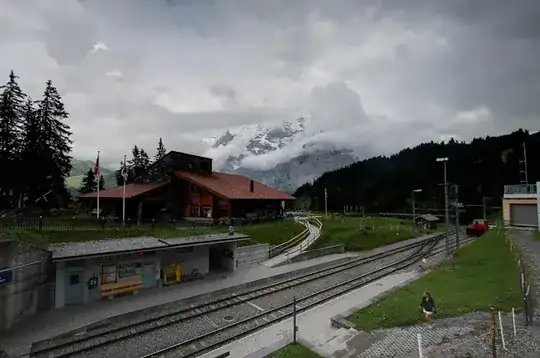
This is the output after the exposure fusion was done, and Lightroom adjustments made:
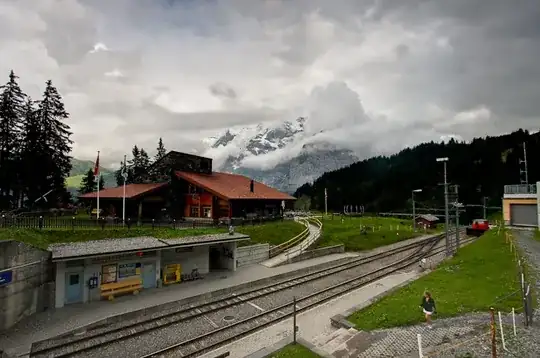
This is the output from the same three source images that used HDR tone mapping and Lightroom adjustments:

Exposure fusion is significantly different than high dynamic range(HDR) images that most of us are familiar with, in that it creates a low dynamic range image without any intermediate step of tone mapping. The two can be confused because they both take multiple input images and turn them into a single output image. The enfused output of exposure fusion is much truer to a scene than HDR photos. HDR photos have very uneven transitions and many times look unrealistic. Exposure fusion images on the other hand only capture exactly what tonalities the scene had, without any tone mapping.
The term exposure fusion is now typically given to the automated process of combining multiple images into one using software. Prior to software automating this, photographers have been doing this for years, in both film terms and digital. In the digital sense, we could take two or more images, and splice in elements from each to combine them into one final image. The result many times would prevent areas from being overly blown out highlights or lost detail.
The real magic of exposure fusion is that the software is very quick at determining what are the best pieces from each image. You could do this yourself in Photoshop with a huge amount of time, but the entire process is automated using algorithms in the software and really speeds the process up. To a degree this is the same as exposure fusion, but at a much more basic scale. An example of this is given below in the further reading for the Luminous Landscape.
Exposure fusion can also be used to stack focus and achieve images that otherwise would not be possible due to a narrow depth of field. This can be handy in many instances and the real trick is that exposure fusion can usually calculate the optimal image on its own.
Some examples of exposure fusion software include:
- Photomatix Pro
- LR/Enfuse
- Enfuse
- More examples in this related question "What Software Exists to Perform Exposure-Fusion?"
Overall, exposure fusion is a technique that overcomes the obstacles put forth by limited dynamic range digital cameras. By capturing a set of bracketed images we can take the full dynamic range of a scene and turn it into a single image. HDR photography does this as well, but since modern displays are low dynamic range, we must tone map to display the image. Exposure fusion works around this step and combines multiple exposures into a single low dynamic range image in a typically automated and efficient fashion. The output is very true to the original scene, and can help overcome over or under exposure cases.
Further reading
In the past the process has also been referred to as "Exposure Blending", so research on that topic may benefit those interested.
- Blended Exposures at Luminous Landscape
- The New Complete Guide to Night and Low-Light Digital Photography
- Exposure Fusion – Best Way To Blend Images
- Exposure Fusion - Tom Mertens, Jan Kautz and Frank Van Reeth, Pacific Graphics 2007

-
Doing it by hand being harder is an understatement! Most algorithms choose a different weight per pixel. – Itai Mar 05 '12 at 19:30
-
@Itai - That is true, I will add in more detail about what the fusion process is actually doing. – dpollitt Mar 05 '12 at 20:19
-
2It should be noted that an HDR image is only the 32-bit source image. The final output from HDR processing and tone mapping is also a low dynamic range image! In that respect, HDR and EF are not that much different...however its the algorithmic approach, and to a degree the amount of photographer fiddling, that differentiate the two. – jrista Mar 05 '12 at 21:01
-
@jrista - You do have to fiddle with enfused images too. Try out Photomatix Pro to enfuse and you will still see lots of sliders to toggle and play with. I agree with the point highlighted, both methods do produce low dynamic range images. – dpollitt Mar 05 '12 at 22:00
-
@dpollitt: I think you can fiddle with enfuse, however in my experience so far, the amount of fiddling that is necessary is far lower than what is necessary with HDR. With HDR, you rarely end up with an acceptable image right out the gate...some degree of tone mapping is necessary. With Enfuse, you can usually just run a set of images through it, and it will produce something very acceptable right off the bat. If you need to tweak for perfection, the tweaking tends to require less effort by a long shot than is required with HDR. – jrista Mar 05 '12 at 22:17
-
@jrista - Yes, I agree with you. I wrote one thing in the comments but said another in my post update :) "You can tweak some of these settings in some software implementations of exposure fusion software.". I agree right out of the gate, fusion images usually look just fine without tweaks, and without tone mapping, HDR usually looks horrible :) – dpollitt Mar 05 '12 at 23:49
-
-
1In my experience exposure fusion generally makes for a far more realistic/pleasing image but I understand that this is down to personal preference. The exposure fusion functionality in Photomatix Pro is very good. – Mark J P Mar 06 '12 at 23:35
-
Thanks for your tips - they are very helpful. From the the photos you have provided that you have taken exposures covering the highlights and darker sections of the image. Is it important to do that or can I bracket my shots? What should the exposures be at? A question relating to the combine photos within the LR/enfuse program no 3 "Enfuse" what should the exposure, saturation, contrast Weights what would your recommendation for these to be set at. – Sue Jul 23 '12 at 00:00
-
Tone Fusion is a form of High Dynamic Range imaging. So was the dodging and burning that Ansel Adams raised to a high art. So was the first known image produced from two separate exposures of a seascape by Gustave Le Gray in the 1850s. The largest difference in my mind between TF and what many refer to as HDR is the point at which tone mapping is done. With TF you tone map (if desired) each image prior to merging them. With "HDR" you tone map after merging them. – Michael C Feb 26 '13 at 00:59
7
To supplement dpollitt's answer, with exposure fusion, you retain the relationship between tones in the original scene. If point A is lighter than point B in the original image, then it will still be lighter after you've fused the images.
With HDR, because the merged file exceeds the dynamic range of the output device, you have to tonemap it, and in that process you can end up with local areas where the relative tones are not the same as in the original images. A bright, almost washed out sky and dark foreground, can end up with a bright foreground and a dark, menacing sky!
For example, in dpollitt's 3 exposures, the clouds are brighter than any other part of the scene. In the exposure fusion result, the clouds are still brighter, but the shadowy foreground has been lifted. In the HDR version, some of the dark cloud area is darker than the foreground pavement, which is not how the original images were.

-
-
6If point A is lighter than point B in the original image, then it will still be lighter after you've fused the images.: It's not obvious to me, mathematically, why that would be true. If it were true, it sounds like EF would give results comparable to an HDR image with no tone mapping (but possibly a global tone curve applied). Since EF does have locally varying masks that give different weights to the input images, I'm not sure how the statement I quoted would be guaranteed. – coneslayer Mar 05 '12 at 20:19
-
1Well, exposure fusion uses weightings for contrast, saturation and exposure. I guess you are correct that, depending on the weightings, it's not an absolute. In fact you could probably create surrealistic, overdone tone map-looking results with extreme weightings. – MikeW Mar 05 '12 at 21:36