22

I just want to add direction (Bearing: i.e N 25 35 E) and Distance (Length: 125 meters) as my new field in polyline/line data.

Is there a Plugin to generate these fields?

I tried to used Export/Add geometry columns in my line data, but only "Length" value was added.

Taras
  • 32,823
  • 4
  • 66
  • 137
arzandia
  • 306
  • 1
  • 3
  • 5
  • 1
    What does your polyline data look like? Distance is relatively easy to calculate - however, 'bearing' may change over the length of a polyline. Are you looking for bearing from start point to endpoint? – Simbamangu Apr 28 '12 at 14:07
  • Yes, im looking for bearing from start point to end point... thanks – arzandia Apr 29 '12 at 08:52
  • 1
    Do you want straight-line distance from startpoint to endpoint, or length of line following the path of the line? These could vary widely if the line segment has intermediate curves or other changes of direction. – RyanKDalton Apr 30 '12 at 15:09
  • So far I can use the mmqgis plugin to give me distance. Am exploring the direction problem. – Willy Apr 28 '12 at 10:03

3 Answers3

44

You can calculate bearing in the Field Calculator in QGIS. This works in UTM (metric) coordinates over small distances (hundreds of km), but something more sophisticated would be needed for large distances or for decimal degrees.

Open the attribute table for your line layer, toggle editing, and click the Field Calculator button to open the dialog:

enter image description here

Create a new field as decimal with 1 or 2 precision.

Paste this code into the "Expression" box, and click "OK": (atan((xat(-1)-xat(0))/(yat(-1)-yat(0)))) * 180/3.14159 + (180 *(((yat(-1)-yat(0)) < 0) + (((xat(-1)-xat(0)) < 0 AND (yat(-1) - yat(0)) >0)*2)))

The first part calculates the inverse tangent of the x and y differences and converts it to degrees (180/pi). The second part adds either 180 or 360 to the resulting figure to give a bearing from 0-360°.

Edit - updated formula as per suggestion

CASE
   WHEN ((yat(-1)-yat(0)) = 0 and (xat(-1) - xat(0)) >0) THEN 90
   WHEN ((yat(-1)-yat(0)) = 0 and (xat(-1) - xat(0)) <0) THEN 270
   ELSE (atan((xat(-1)-xat(0))/(yat(-1)-yat(0)))) * 180/pi() + 
       (180 * (((yat(-1)-yat(0)) < 0) + (((xat(-1)-xat(0)) < 0 AND (yat(-1) - yat(0)) > 0)*2)))
END
Simbamangu
  • 14,773
  • 6
  • 59
  • 93
  • 2
    A most elegant solution, thanks. I'd mention that if you need to determine the bearing for each segment of a polyline you can do this by splitting the line shapefile with the 'Split Feature' plug-in. Then load the new (split) shapefile and follow the above procedure. – nhopton Apr 29 '12 at 11:17
  • 1
    @arzandia - note that you MUST be using QGIS 1.9 (see the home page for beta downloads) as the xat() and yat() functions don't work in 1.7, which you are using! – Simbamangu Apr 29 '12 at 11:31
  • i already used the plug in you have mentioned. as you can see the image, the layer's name is "splitted"... – arzandia Apr 29 '12 at 12:10
  • @nhopton - i appreciate the comment re split feature, I needed that! – Willy Apr 30 '12 at 09:13
  • I think the questioner(?) should mark this as the answer. – Willy Apr 30 '12 at 09:14
  • Is there anyway to substitute different x/y values in this equation? I assume these x/y values are based off of how the line was drawn (i.e. left to right). However if I have lines that were drawn between two points and a bearing calculated this way, it would not show correct direction of flow of water if in fact the line should have been drawn in the opposite manner. Can I substitute the correct x/y values based off of known direction of flow? – cbunn Oct 07 '15 at 23:49
  • @cbunn - the yat(0) and yat(-1) values are the y values of beginning and end of line, respectively (any negative index gives the end point) - to calculate reverse bearing, just swap the index values. – Simbamangu Oct 08 '15 at 09:41
  • So if I had a field for the actual start/end points could I insert it in place of yat(0) and yat(-1) and xat(0) and xat(-1)? – cbunn Oct 08 '15 at 13:48
  • 1
    To answer my own question, "Yes you can insert field values for yat(0)/yat(-1) and xat(0)/xat(-1)." – cbunn Oct 08 '15 at 20:54
  • 1
    For me I had to do some changes to the script to get it to work: (atan((xat(0)-xat(1))/(yat(0)-yat(1)))) * 180/3.14159 + (180 (((yat(0)-yat(1)) < 0) + (((xat(0)-xat(1)) < 0 AND (yat(0) - yat(1)) >0)2))) – oskarlin Feb 08 '16 at 10:43
  • @Oskar, your modification will give the bearing from the second (1) to the first (0) node in the line, NOT from the first to the last (-1)! – Simbamangu Feb 09 '16 at 06:02
  • Aha, sorry! For some reason the method from the last didn't work, therefore I used first and second for my project. – oskarlin Feb 09 '16 at 15:19
  • Hi, did you try this in newer QGIS - 2.18 or 3.x? Because I am still getting NULL output for all these expressions from here despite separate parts like "yat(0)" etc. give me correct output. Layer is in UTM. – Juhele Aug 07 '19 at 09:11
  • @Juhele works in QGIS 3.10-3.16 – Simbamangu Nov 04 '20 at 03:50
24

You do not need a plugin. Everything is in the class QgsPoint of PyQGIS

If you examine the contents of a QGIS point class with the Python built-in function dir() in the Python Console.

dir(point])
['__class__', '__delattr__', '__dict__', '__doc__', '__eq__', '__format__', '__ge__', '__getattribute__'
, '__getitem__', '__gt__', '__hash__', '__init__', '__le__', '__len__', '__lt__', '__module__', 
'__ne__', '__new__', '__reduce__', '__reduce_ex__', '__repr__', '__setattr__', '__sizeof__', 
'__str__', '__subclasshook__', '__weakref__', 'azimuth', 
'multiply', 'set', 'setX', 'setY', 'sqrDist', 'sqrDistToSegment', 'toDegreesMinutesSeconds', 'toString', 'wellKnownText', 'x', 'y']

You can see there are azimuth and sqrDist functions and after a few tries:

- xy[0].azimuth(xy[1]) or xy[1].azimuth(xy[0]) gives the azimuth direction between two points(in degrees, +/- 180°)
- xy[0].sqrDist(xy[1]) give the square distance between two points (in the unit of the project)

The problem enter image description here
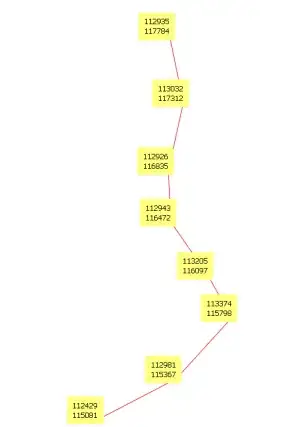
So in the Python console

def select_all(layer):
     layer.select([])
     layer.setSelectedFeatures([obj.id() for obj in layer])

myline = qgis.utils.iface.activeLayer()
select_all(myline)
for elem in myline.selectedFeatures():
      xy = elem.geometry().asPolyline()

now xy contains all the nodes (points) of the line

# first point
print "x=%2d y=%2d" % (xy[0].x(),xy[0].y())
x=112935 y=117784
# and others...

Using all node points of the line:

1) azimuth point i to point i + 1 (+/- 180°) (nodes of a line)

for i in range(len(xy)-1):
     print "x=%2d y=%2d azim=%6.1f azim2=%6.1f" % (xy[i].x(), xy[i].y(), xy[i].azimuth(xy[i+1]), xy[i+1].azimuth(xy[i]))

x=112935 y=117784 azim= 168.4 azim2= -11.6
x=113032 y=117312 azim=-167.5 azim2=  12.5
x=112926 y=116835 azim= 177.3 azim2=  -2.7
x=112943 y=116472 azim= 145.1 azim2= -34.9
[...]

2) euclidean distance between point i and point i + 1

for i in range(len(xy)-1):
     print "x=%2d y=%2d dist=%6.1f" % (xy[i].x(), xy[i].y(), xy[i].sqrDist(xy[i+1]))

x=112935 y=117784 dist=232533.9
x=113032 y=117311 dist=238243.6
x=112926 y=116835 dist=131839.8
x=112943 y=116472 dist=209268.1
[...]

After, it is not very difficult to add these values to the attribute table.

I use this technique to analyze the lineaments (geology) with matplotlib and the Script Runner plugin

enter image description here

gene
  • 54,868
  • 3
  • 110
  • 187
13

The solution provided by @Simbamangu is pretty effective but not cover all cases. For example,applying the formula with an horizontal displacament will NULL the result, so you must use this formulate in Field Calculator of QGIS

case
   when yat(-1)-yat(0) < 0 or yat(-1)-yat(0) > 0
       then (atan((xat(-1)-xat(0))/(yat(-1)-yat(0)))) * 180/3.14159 + 
       (180 * (((yat(-1)-yat(0)) < 0) + (((xat(-1)-xat(0)) < 0 AND (yat(-1) - yat(0)) > 0)*2)))
   when ((yat(-1)-yat(0)) = 0 and (xat(-1) - xat(0)) >0) then 90
   when ((yat(-1)-yat(0)) = 0 and (xat(-1) - xat(0)) <0) then 270
end
Taras
  • 32,823
  • 4
  • 66
  • 137
Sergio
  • 948
  • 9
  • 15
  • is it possible to do this in postgis? The postGIS command called ST_Azimuth only works on points, and I have not been able to find any examples of this same process in postgresql, postgis. – nerdsconsider Apr 04 '22 at 15:35