Fairly new to QGIS and searching a method to graphically align my point symbols in the direction of the vector. The symbol represents a water valve in an irregular shape in close proximity to a vector water network--is there a way to align each symbol adjacent/ horizontal to a water network vector layer?
Asked
Active
Viewed 1,068 times


1 Answers
6
Yes, but it's a manual method I read about.
In QGIS 2.0.1 you can set the point symbol to be rotated based on an angle(integer/double) in a field.
Have a look at What is the best way to represent bridges using a point vector layer in QGIS?
In that example, "bridges" which are represented as point features and with a custom symbol on the map are rotated based on a value in a field.
Getting Your Bearings (automatic method)
This is basically a spatial join from a line attribute (the bearing) to the nearest point feature.

1.) Split line feature into segments based on nodes/vertices with v.split.vert in the processing toolbox (GRASS required):

2.) Use QGIS field calculator on split_lines to get the bearing for each segment (start editing layer before field calculator can be used):
For convenience: (atan((xat(-1)-xat(0))/(yat(-1)-yat(0)))) * 180/3.14159 + (180 *(((yat(-1)-yat(0)) < 0) + (((xat(-1)-xat(0)) < 0 AND (yat(-1) - yat(0)) >0)*2)))
 Stop editing and save changes to retain your newly created
 [bearing] field.
3.) Use Distance to nearest hub in the Processing toolbox and set the split_lines as the Destination Hubs Layer with [bearing] in the Hub Layer Name Attribute. Measurement Unit can safely be ignored in this example.

4.) Create a new Decimal Number type field in the points_with_bearings file called [bearing] to convert the [HubName] field from a string. [HubName] and [HubDist] can be deleted if they're not needed.
Stop editing points_with_bearings and save changes.

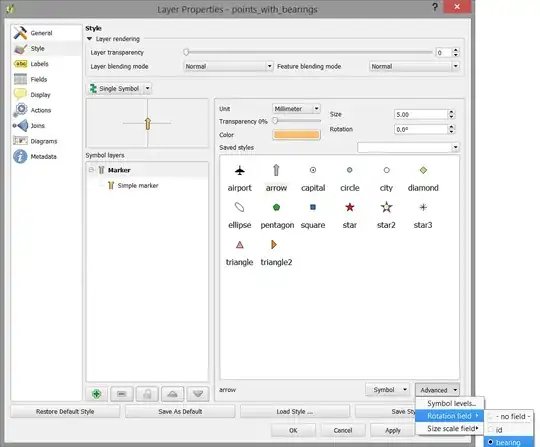
5.) Go to the Style tab in the Layer Properties window for the points_with_bearings layer and set [bearing] as the Rotation Field.

References:

