Without going into specifics of why I might like to do this, or whether this is a good idea or not, I would like to know how I can disable use of wireless networking on my MacBook Air, either via removal of software or drivers or similar, such that the machine is unable to connect to a WIFI network in any way without I undo those changes. The intention is for the machine to be unable to communicate wirelessly when out of the house, and for those changes to not be easily reverted until I return (for example requiring some piece of external storage that does not travel with me and which contains copies of whatever I have removed).
How can I easily remove and then re-allow WIFI access (without losing my stored profiles/passwords or disturbing anything else)? Is it possible to simply copy a certain app or plugin to an external drive, delete it from my laptop, and later copy it back, again having everything as it was before?
One year later
I have been happily using Daniel Lawson's solution below for quite some time now. I have created two applications with automator, one that deletes the .kext, one that restores it from an USB stick.
First, copy /System/Library/Extensions/IO80211Family.kext to a USB stick and leave that stick at home.
Open Automator, select to create an "Application", then choose "Utilities" from the "Library", then "Execute Shell Script". (I'm translating this from my German menus, so the exact names may differ.)
For the "Disconnector" app, enter the following into the text area of the "Execute Shell Script" event:
echo YOUR_ADMIN_PASSWORD | sudo -S rm -rf /System/Library/Extensions/IO80211Family.kext
Replace "YOUR_ADMIN_PASSWORD" by your admin password. Then save the app and drag its icon to the Dock.
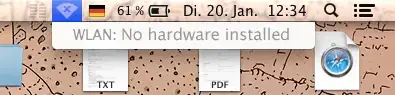
Now, when you are sure you want to be free of all online distractions, click the app icon, and the IO80211Family.kext is gone. Just restart your laptop and you can no longer connect to WLAN:
For the "Reconnector" app, enter the following into the text area in Automator:
echo YOUR_ADMIN_PASSWORD | sudo -S cp -r /Volumes/NAME_OF_YOUR_USB_STICK/IO80211Family.kext /System/Library/Extensions/
Replace "YOUR_ADMIN_PASSWORD" by your admin password and "NAME_OF_YOUR_USB_STICK" by the name of your USB stick. Save the app etc.
Now when you return home, insert the USB stick that carries the IO80211Family.kext into your laptop, click the Reconnector app icon and then restart your laptop. Now you can connect to WLAN again.
Note.
There are some security issues invovled when you echo your admin password, because by that it is written to the shell history and can be found there. I don't care, but you might, depending on your circumstances.


