4

I wonder if there is any way, how to turn off / disable the wireless network interface or driver, so I cannot connect to WiFi from running OS. I have MacBook Pro with OS X Mavericks.

The reason for this is I have some exams at the University and if I want to use my own notebook, I have to turn off the WiFi in some more permanent way (for example from BIOS, if I had PC).

I have installed rEFIt so I can enter to some kind of EFI Shell, but I honestly don't know, what I can do here to not destroy my computer.

Higgcz
  • 43

1 Answers1

4

You can move the IO80211Family.kext from /System/Library/Extensions. The Wi-Fi won't function without this file, so moving it will prevent the Wi-Fi from working. If you leave the file on an external drive, you won't be able to re-enable it without the file.

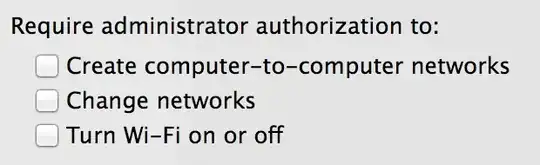
Alternatively, if you're able to disable the admin account, it's a bit easier. Go to System Preferences → Network → Wi-Fi → Advanced and require administrator authorisation to turn the Wi-Fi on.

grg
  • 201,078
  • Oh, really great idea, but I am afraid, our teacher will say something like: "You can make a copy of it and save it somewhere else."

    Maybe if I would be able to disable admin account somehow. Then I couldn't copy this folder back...

    – Higgcz Jan 12 '14 at 16:56
  • @Higgcz If you're able to disable the admin account, then it's a bit easier — see edit. – grg Jan 12 '14 at 17:21
  • 1
    @Higgcz - that is being inconsistent - if it is OK to turn it off in the BIOS as you can just turn it on again – mmmmmm Jan 12 '14 at 17:23
  • @grgarside Well, but how can I disable the admin account? – Higgcz Jan 12 '14 at 17:37
  • @Mark It's really silly rule, I know, but that's the rule for using own notebooks for the exams. – Higgcz Jan 12 '14 at 17:40
  • 1
    Let them change the password and not tell you until after the exam? – grg Jan 12 '14 at 17:47
  • This seems to be heading more in the direction of what specific teachers will allow and not about how the system works. Schools have policies against cheating and plagiarism in part so that they don't have to police each student 100% of the time. Even if you had the WiFi off, there are bluetooth options, USB tether options, and the list goes on. – bmike Jan 12 '14 at 19:04
  • @grgarside You're right, it's sounds like perfect solution. Hopefully it'll be enough. It may solve problem with bluetooth or USB tethering either. Thanks – Higgcz Jan 12 '14 at 19:35