2

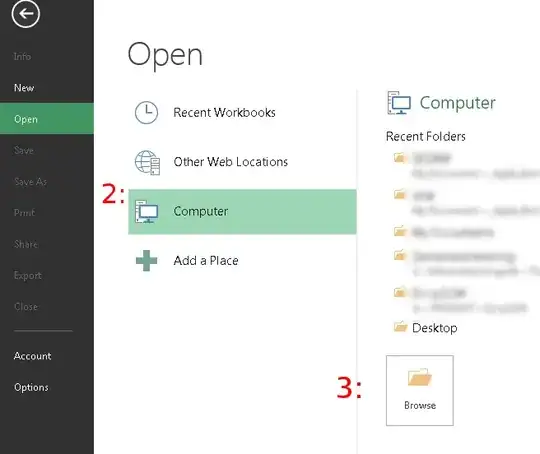
Nowadays (Excel 2013, with an impossible-to-find About dialog, by the way), the File Open dialog/page in Excel is cloud-enabled and Windows 8-ified. This means that it defaults to show the recent workbooks, and to browse for a file on my computer I then need to first click/tap Computer (2:), which shows a list of recent folders, and finally tap/click the "Browse" button (3:) to open the file chooser.

Can I somehow make a "quick access toolbar" item that instead of calling "Open" (same as Ctrl+o), directly brings up the file chooser like when I click the big Browse button? (3:)
enter image description here

MattBianco
  • 2,253
  • I was surprised there is not a better command to add the quick access toolbar, but I couldn't find one. The quickest work around I could find was dragging a file from an explorer window and just dropping it on an open excel window. – Tyson Sep 02 '14 at 12:51

2 Answers2

1

You can use a keyboard chord of shortcuts:

Alt+F (File menu), followed by O, C, B (Open, Computer, Browse).

1

First add a Quick Access Tool bar link for file open, if you haven't already.

Then choose File > Options > Save and check the box for Don't show the backstage when opening or saving a file, also Check Save to Computer by default, and check the default location is your my documents folder (or where ever).

The Quick Access Toolbar button will now pop you directly into an open file browser.

Tyson
  • 1,490
  • Marvellous! Incredible that I had to look under "Save" to find it :-) – MattBianco Sep 02 '14 at 14:22
  • yea... I went looking for file open options (it seemed reasonable that you should be able to change the default location) and decided to look at the save options and got the clue quick with the wording that these were going to effect file opening too. – Tyson Sep 02 '14 at 14:31