Possible Duplicate:
How do I get the Modern UI of Firefox in Windows 8?
The latest Nightly build of Firefox claims to have support for the Metro (Modern) UI. How can I change my default Metro browser from Internet Explorer to Nightly?
Possible Duplicate:
How do I get the Modern UI of Firefox in Windows 8?
The latest Nightly build of Firefox claims to have support for the Metro (Modern) UI. How can I change my default Metro browser from Internet Explorer to Nightly?
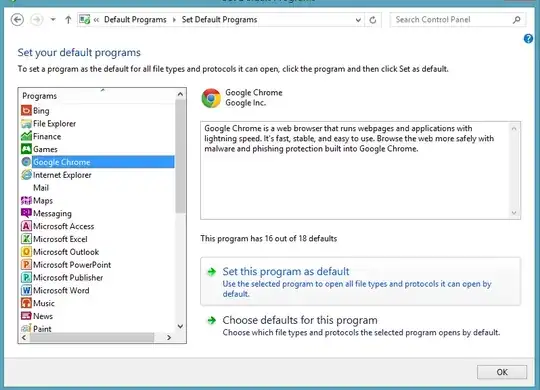
Just go to control panel and select the option "Default Program" now a dialog box will appear select the first option "Set you default programs". Now the list will be load then search out Firefox and select it now you will see the "Set this program as default". See the screen shot as I've set the Chrome to default you can do it for Firefox. That's it.

-metrodesktop and apply it. Beware don't delete the whole value.
– avirk
Oct 24 '12 at 17:47

