0

I need some help cleaning up a winsxs folder that is about 15GB in widows7. I went to this page, hoping that i could use the dsim command to reduce the size of winsxs. instead I get error 87, "remove option not recognized in this context" I went to MS technet, to look for support, but the support was something like, make sure you typed the command properly. I have typed the commands properly, and spacing is not the issue.

I have these disabled features, I would like to remove completely: How do I do it? enter image description here

j0h
  • 1,460
  • Please provide the precise syntax you used. You have all available updates for Windows 7 installed. The article in question only applies to Windows 7 if the required update is installed. If you want our help, this information will help us, understand what is going on precisely with your system. The lack of this information makes it unanswerable – Ramhound Feb 11 '16 at 13:56
  • A 15 GiB WinSxS folder is quite normal. If you want Windows to use less space, you should upgrade to newer versions. – Daniel B Feb 13 '16 at 07:38
  • because windows is taking op 15+GB in Winsxs, I cant upgrade. I dont have room. – j0h Feb 13 '16 at 12:46

1 Answers1

1

Features on Demand is a Windows 8 only feature (parameter is still there in Windows 10, but the feature only works for Server 2016). So the /Remove parameter in the command DISM.exe /Online /Disable-Feature /featurename:NAME /Remove is detect as unknown in Windows 7.

So update to Windows 8.1 to get this feature.

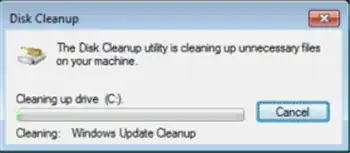
The only way to reduce the size of the WinSxS in Windows 7 is to install this update and run Disk Cleanup and select "Windows Update Cleanup":

enter image description here

enter image description here

After a reboot the old updates are removed and WinSxS will be cleaned up.

enter image description here

This can reduce the WinSxS a lot.

magicandre1981
  • 98,168
  • 30
  • 181
  • 248
  • I’m trying it, it didn't really say there would be substantial space saving. i'm kinda wondering if i delete the Winsxs folder entirely, if my PC will still function. Thanks for the explanation, I might have read something similar, but I think I got it when you explained it. Thanks for that. it turns out I also had old restore points that were still hanging around, despite having turned off system restore. – j0h Feb 13 '16 at 02:19
  • when I used this on family PCs it cleaned several GBs because of a lot of old IE updates – magicandre1981 Feb 13 '16 at 07:27