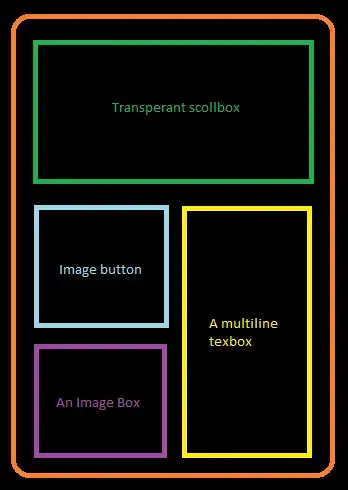
<?xml version="1.0" encoding="utf-8"?>
<LinearLayout
  xmlns:android="http://schemas.android.com/apk/res/android"
  android:orientation="vertical"
  android:layout_width="match_parent"
  android:layout_height="match_parent">
    <ScrollView android:layout_height="wrap_content" android:id="@+id/scrollView1" android:layout_width="match_parent">
        <LinearLayout android:id="@+id/linearLayout1" android:layout_width="match_parent" android:layout_height="match_parent">
            <TextView android:layout_width="wrap_content" android:layout_height="wrap_content" android:text="My Text View" android:id="@+id/textView1" android:textAppearance="?android:attr/textAppearanceLarge"></TextView>


        </LinearLayout>
    </ScrollView>
    <LinearLayout android:layout_height="wrap_content" android:id="@+id/linearLayout2" android:layout_width="match_parent" android:orientation="horizontal">
    <LinearLayout android:layout_height="wrap_content" android:id="@+id/linearLayout3" android:layout_weight="1" android:layout_width="fill_parent" android:orientation="vertical">
        <ImageButton android:layout_height="wrap_content" android:id="@+id/imageButton1" android:src="@drawable/icon" android:layout_width="fill_parent"></ImageButton>
        <ImageView android:id="@+id/imageView1" android:layout_height="wrap_content" android:src="@drawable/icon" android:layout_width="fill_parent"></ImageView>
    </LinearLayout>
    <EditText android:layout_width="fill_parent" android:layout_weight="1" android:text="abcdef" android:layout_height="wrap_content" android:id="@+id/editText1" android:inputType="textMultiLine">
        <requestFocus></requestFocus>
    </EditText>
    </LinearLayout>

</LinearLayout>
Adjust parameters according your need