0

Microsoft docs pretty much explicitly say "no" (bold added by me):

ROPC doesn’t work when there's any interruption to the authentication flow that needs user interaction. For example, when a password has expired or needs to be changed, multifactor authentication is required, or when more information needs to be collected during sign-in (for example, user consent).

So, before I spend countless hours digging around, I was hoping someone here might be able to quickly settle this for me. Is there any way at all to implement MFA using Azure AD B2C ROPC? Or is it, as Microsoft indicates, flat-out "no"?

The main reason I ask is because that same paragraph suggests that ROPC cannot be used when the password needs to be reset - however, we've been able to implement a workaround for that, by using the Graph API to handle resetting of the password.

Presently, the way we are handling authentication is to call CreatePublicClientApplication().AcquireTokenByUsernamePassword(), and the way we are handling password reset is to call the Graph API with a PATCH request, setting the passwordProfile using the new password.

So - is there a way to basically "tell" Azure AD B2C that the MFA has been handled? My theory is perhaps we could do the following:

  1. User accesses login page
  2. User enters username and password
  3. System uses Graph API (or something else) to invoke an MFA request, causing the text message to be sent to user, and stores identifying handshake information for MFA request
  4. System temporarily stores the info, and then presents the user with a follow-up prompt saying something along the lines of "enter the code you received on your phone"
  5. User enters code within acceptable time limit
  6. System sends code to Graph API to validate
  7. System passes username, password, and handshake information from Step 3 to log user in
Kiran Ramaswamy
  • 605
  • 1
  • 8
  • 19

1 Answers1

0

You are right, as mentioned in the MsDoc, ROPC will not work for the users who have enabled with MFA. They will be blocked by the application when they try to login.

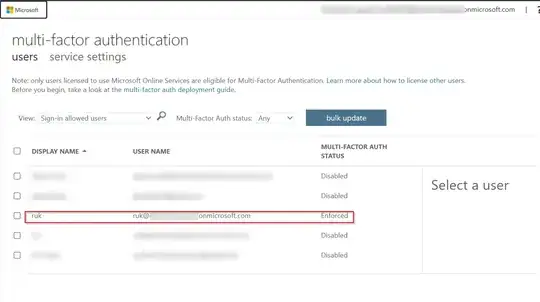
I enabled MFA for the user like below:

enter image description here

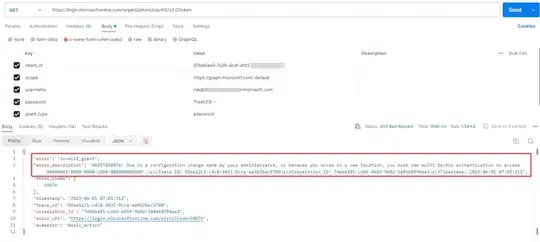
I generated access token using ROPC flow by using below parameters:

https://login.microsoftonline.com/organizations/oauth2/v2.0/token

client_id:ClientID
scope:https://graph.microsoft.com/.default
username:ruk@xxxx.onmicrosoft.com
password:Trash33!
grant_type:password
client_secrer:***

And I got the error like below:

enter image description here

To resolve the error, I disabled MFA and access token got generated successfully:

enter image description here

Note that: The workaround you mentioned doesn't satisfy the ROPC flow with MFA enabled users.

Hence as a workaround. make use of any other user interactive flows such as Authorization Code flow, Implicit flow etc to achieve your scenario.

Generated auth-code like below:

https://b2ctenant.b2clogin.com/b2ctenant.onmicrosoft.com/B2C_1_Signinsignup/oauth2/v2.0/authorize?
&client_id=xxxx
&response_type=code
&redirect_uri=https://jwt.ms
&response_mode=query
&scope=https://b2ctenant.onmicrosoft.com/xxxxx/test.read
&state=12345

enter image description here

Now, I generated access token by using below parameters:

https://b2ctenant.b2clogin.com/b2ctenant.onmicrosoft.com/B2C_1_Signinsignup/oauth2/v2.0/token

client_id:xxxx
grant_type:authorization_code
scope:https://b2ctenant.onmicrosoft.com/xxx/test.read
code:code
redirect_uri:https://jwt.ms
client_secret:ClientSecret

enter image description here

Rukmini
  • 6,015
  • 2
  • 4
  • 14
  • Hey Rukmini, thanks for the response! Yeah that is pretty much what I expected I'd have to do. I just wanted to validate that there was no way to use ROPC with MFA, as the current config is using ROPC with a local sign-in page, as opposed to using the MSFT AADB2C auth page. – Kiran Ramaswamy Jun 01 '23 at 13:35