0

My end goal is to authenticate a AD user with his/her username and password credentials only, After research, got to know about ROPC flow, so I created an App Registration, used its tenantID, clientID and such parameters and hit the API with username and password in PostMan. I was successful in getting the tokens. Great.

I need to hit this API from my web application and get tokens.(Getting token is not my objective, but to just authenticate a user). When I try to hit this URL from my React Client, I get CORS error.

What should I do to solve this issue?

I created an App Service, but helpless, couldn't get understanding of what's happening

1 Answers1

1

I tried to reproduce the same in my environment and got the below results:

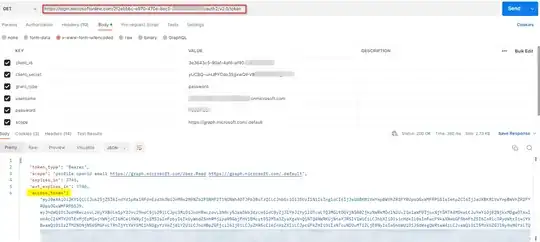
I generated access token via ROPC Flow using below Parameters:

GET https://login.microsoftonline.com/2f2ebbbc-e970-470e-8ec5-XXXXXXX/oauth2/v2.0/token

client_id:3e3643c5-90af-4af6-af90-XXXXX
client_secret:Client_Secret
grant_type:password
username:user@XXX.onmicrosoft.com
password:*****
scope:scope

enter image description here

To resolve the CORS error, try adding <allowed-headers> tag defined in your CORS policy:

    <cors>
        <allowed-origins>
            <origin>*/</origin>
        </allowed-origins>
        <allowed-methods preflight-result-max-age="300">
            <method>GET</method>
            <method>POST</method>
        </allowed-methods>
        <allowed-headers>
            <header>Authorization</header>
        </allowed-headers>
    </cors>
  • Check whether you are passing wrong token and check whether you are authorized to perform the action.

  • If still the issue persists, try not exposing the client_secret and call the Api.

Reference:

Enable Cross-Origin Requests (CORS) | Microsoft Learn

Rukmini
  • 6,015
  • 2
  • 4
  • 14
  • Thanks @Rukmini, for your response, Currently I am using React Client to hit the Auth API, so where do I have to add tag? I just have my App Registration from where I got the clientID and tenantID, apart from that I haven't configured anything in my azure portal. – Johnson Jayaraj Nov 27 '22 at 06:18