Anyone know how I might create a script to assign a group of extensions to the framework aspnet_isapi.dll file? I have to do about 20 to each website (about 40 sites) and it is incredibly tedious to do it through the IIS Manager interface.
Thanx.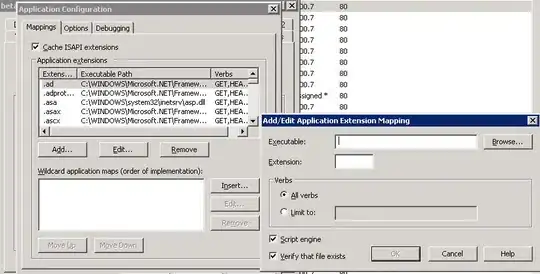
Anyone know how I might create a script to assign a group of extensions to the framework aspnet_isapi.dll file? I have to do about 20 to each website (about 40 sites) and it is incredibly tedious to do it through the IIS Manager interface.
Thanx.


Try this VBScript...I think it will do what you need. Just save it in a .vbs file (change the arrays at the beginning for your websites and extensions) and from a CommandPrompt in the System32 folder run "cscript yourfile.vbs".
Hope it helps (and works :) ) I have IIS7 so couldn't fully test in IIS6. Let me know if you run into problems and I'll try to tweak it.
Oh and Thanks to @Cheeso for some code I "borrowed" from his self-answered question.
Dim arrExtensions(2)
arrExtensions(0) = ".tst1"
arrExtensions(1) = ".tst2"
arrExtensions(2) = ".tst3"

Dim arrSites(1)
arrSites(0) = "Default Web Site"
arrSites(1) = "Test"

Dim iis
iis = GetObject("winmgmts://localhost/root/MicrosoftIISv2")

For s = 0 To ubound(arrSites)
    ' Get the settings for this web site '
    iisSettings = iis.ExecQuery("SELECT * FROM IIsWebServerSetting WHERE ServerComment = '" & arrSites(s) & "'")

    For e = 0 To ubound(arrExtensions)
        ReDim newMaps(0)
        ' two passes '
        For t = 0 To 1
            Dim c
            c = 0
            For Each item In iisSettings
                ' in pass 1, count them. '
                ' in pass 2, copy them. '
                For i = 0 To Ubound(item.ScriptMaps)
                    If UCase(item.ScriptMaps(i).Extensions) <> ucase(arrExtensions(e)) Then
                        If t = 1 Then
                            newMaps(c) = item.ScriptMaps(i)
                        End If
                        c = c + 1
                    End If
                Next

                If t = 0 Then
                    ReDim Preserve newMaps(c)
                Else
                    newMaps(c) = iis.get("ScriptMap").SpawnInstance_()
                    newMaps(c).Extensions = arrExtensions(e)
                    newMaps(c).ScriptProcessor = "%Windir%\Microsoft.NET\Framework\v2.0.50727\aspnet_isapi.dll"
                    newMaps(c).Flags = "1"
                    newMaps(c).IncludedVerbs = "ALL"
                    item.ScriptMaps = newMaps
                    item.Put_()
                End If
            Next

        Next

    Next
Next

iisSettings = Nothing
iis = Nothing

