3

So I'm using Twitter APIs to gather info related to a certain topic, and one of the things I'm visualizing is the popularity of devices.

So far I have this: https://gyazo.com/441a9ab80b943f9e0c3a36131273844a

The above is generated by this code:

device_types_condensed <- (ggplot(manu_tweets3, aes(x= statusSource_clean , fill = isRetweet)) + geom_bar() 
                 + theme(panel.background=element_rect(fill='white'), 
                         axis.ticks.x=element_blank(),
                         axis.text.x=element_blank())
                         + theme(axis.ticks.x=element_blank(), axis.text.x = element_text(angle = 25),
                         axis.text=element_text(size=8)) 
                         + labs(x="", title = "Device Popularity for Tweet or Retweet Usage", y ="No. of Tweets on Device")
                         )
device_types_condensed

What I want to do is to add text above each bar that reflects the % of tweet activity that device is responsible for.

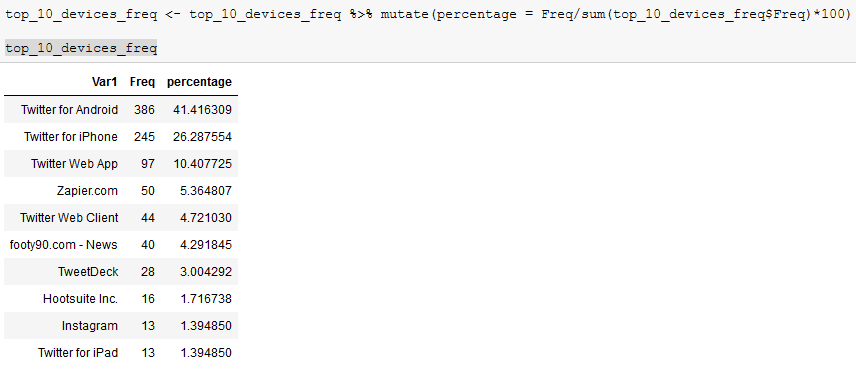
This means I am not changing the y-axis. The y-axis still reflects the count of tweet, and the number on top of the bar will be what reflects the percentage. So far I already have a table made with that value: https://i.gyazo.com/5f14d2c1352e8c9c2c5997678ceea3b4.png

What I can't figure out for the life of me is how to select the % labels in the table just above, and then apply them to the ggplot graph based on device type.

Sorry, don't have the rep to post images but I linked the URLs!

Yeahprettymuch
  • 501
  • 5
  • 16

1 Answers1

2

You're pretty close. I didn't have access to your exact data so I simplified your problem. You said you had some devices, each with a count of tweets associated with those devices, and that each device had a separate proportion associated with it. You also said these were in two different data.frames.

The most ggplot-ish way to handle this would be to join them together into a single data.frame because both data.frames share a common key: The device. This simplifies the ggplot2 code a touch. First, I'll work up a solution without combining, and then I will end by showing you how to combine your two data.frames together.

I generated data that looked similar to your data like this:

mydf <- data.frame(device = c("A", "B", "C"),
                   num_tweets = c(100, 200, 50))

prop_df <- data.frame(device = c("A", "B", "C"),
                      proportion = c(.29, .57, .14))

Without joining them together first, I think you can get what you want with code like this:

ggplot(mydf) +
  geom_col(aes(device,
               num_tweets)) +
  geom_text(data = prop_df,
            aes(device,
                max(mydf$num_tweets * 1.10),
                label = paste0(proportion * 100, "%"))) +
  scale_y_continuous(expand = expand_scale(mult = c(0, .1)))

Notice a few things:

  • I went with a geom_text call to get the percentages to display because I want ggplot2 to handle the x position for me (to match what already gets displayed when we call geom_col right above it) so the bars and percentages match up.
  • The geom_text call has as its first argument data = prop_df which tells geom_text to not use the the plot's default data.frame, mydf, and to use prop_df instead just for that layer.
  • In my aes call, I tell ggplot to map device to the x axis and then I hard-coded the y values to 110% of the maximum device count so they will display all at the same height, just above the bars.
  • ggplot2, by default, tries to shrink the plot area to match the data you've plotted and I wanted some more breathing room so I used expand_scale(mult = c(0, .1) to expand the plot in the y direction by 110%.

Is this similar to what you were looking for?

enter image description here

I then went ahead and simplified the ggplot call by joining the two data.frames together with dplyr::left_join prior:

library(dplyr)

mydf <- left_join(mydf, prop_df)

ggplot(mydf) +
  geom_col(aes(device,
               num_tweets)) +
  geom_text(aes(device,
                max(mydf$num_tweets * 1.10),
                label = paste0(proportion * 100, "%"))) +
  scale_y_continuous(expand = expand_scale(mult = c(0, .1)))

which is just a bit shorter and doesn't require you to override the data argument in geom_text.

What do you think?

amoeba
  • 4,015
  • 3
  • 21
  • 14
  • 1
    Thank you so much, it seems combining the tables is the most elegant solution after all. I was tunnel-visioned away into trying another method to get it like that that had me pulling my hair out! – Yeahprettymuch Jul 20 '19 at 04:40
  • You bet. It can take a few attempts before you can guess the least painful way to make your data work with ggplot. If my answer was sufficient, could you please mark it as a solution? – amoeba Jul 20 '19 at 05:01
  • 1
    Using your suggestion I now got something like this, with the percentage amt just above the bar. Thanks a tonne!!! https://i.gyazo.com/c2162e5e39a2f5b293c5d4da534c8be5.png – Yeahprettymuch Jul 20 '19 at 05:05
  • Great, glad you could apply it to your example. Nice work! – amoeba Jul 20 '19 at 07:51