2

I am creating a game for android. Each user needs to be authenticated.

Currently, when a new user launches the game, it requests an identification code from my server, and stores it to SharedPreferences. Next time user launches the game, it uses this stored identification code to authenticate. The problem is, when user clears data of this app, there's no way he can get his ID back, so he lost his progress forever.

Is there a way how to generate something like Identification code which is unique and always the same for one player using Firebase Play games auth method?

GoogleSignInOptions gso = new GoogleSignInOptions.Builder(GoogleSignInOptions.DEFAULT_GAMES_SIGN_IN)
                .requestServerAuthCode("MyCID")
                .build();

        mAuth = FirebaseAuth.getInstance();
        super.onCreate(savedInstanceState);
        final FirebaseAuth auth = FirebaseAuth.getInstance();
        AuthCredential credential = PlayGamesAuthProvider.getCredential("MyCID");
        auth.signInWithCredential(credential)
                .addOnCompleteListener(this, new OnCompleteListener<AuthResult>() {
                    public void onComplete(@NonNull Task<AuthResult> task) {
                        if (task.isSuccessful()) {
                            currentUser = auth.getCurrentUser();
                        } else {
                            Toast.makeText(MainActivity.this, "Authentication failed.",
                                    Toast.LENGTH_SHORT).show();
                        }
                    }
                });
        if (currentUser == null) {
            cu = "NO UID";
        } else {
            cu = currentUser.getUid();
        }

I tried this code (Where is MyCID: I used the CID from the image below), but no Google Play Games pop-up is shown, I get Authentication Failed toast and cu is set to "NO UID".
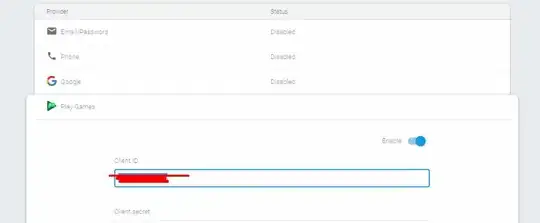
MyCID

Can someone explain how does this work please?


EDIT

Thanks to @crysxd , My app now shows the green google play games popup. But instead of expected "Select an account" popup, as I see in other games which uses google games sign in, I get an error, which says "com.google.android.gms.common.api.ApiException: 4:".

Is there a function which I need to run to show this dialog? Am I missing something or just I have incorrectly configured the game in google play console?

My current code: link

TheGameSpider
  • 137
  • 1
  • 2
  • 9

1 Answers1

3

You are skipping an essential step here. The Firebase docs are usually very good, but the Play sign in is poorly described.

You got the first step right: You need to set up GoogleSignInOptions but you miss to pass them to a GoogleSignInClient.

  • Create a client in onCreate:

    private static final int RC_SIGN_IN = 543;
    private GoogleSignInClient mGoogleSignInClient;
    
    public void onCreate(Bundle savedInstancestate) {
        super.onCreate(savedInstancestate)
    
        // ...
    
        GoogleSignInOptions gso = new GoogleSignInOptions.Builder(GoogleSignInOptions.DEFAULT_GAMES_SIGN_IN)
                .requestServerAuthCode("MyCID")
                .build();
    
        mGoogleSignInClient= GoogleSignIn.getClient(this, gso)
    }
    
  • Call this method when the sign in button is clicked or you want to start sign in. This will cause the sign in dialog to be shown.

    private void signIn() {
        Intent signInIntent = mGoogleSignInClient.getSignInIntent();
        startActivityForResult(signInIntent, RC_SIGN_IN);
    }
    
  • Get the sign in response and handle it

    @Override
    public void onActivityResult(int requestCode, int resultCode, Intent data) {
        super.onActivityResult(requestCode, resultCode, data);
    
        // Result returned from launching the Intent from 
        GoogleSignInApi.getSignInIntent(...);
        if (requestCode == RC_SIGN_IN) {
            Task<GoogleSignInAccount> task = GoogleSignIn.getSignedInAccountFromIntent(data);
            try {
                // Google Sign In was successful, authenticate with Firebase
                GoogleSignInAccount account = task.getResult(ApiException.class);
                firebaseAuthWithGoogle(account);
            } catch (ApiException e) {
                // Google Sign In failed, update UI appropriately
                Log.w(TAG, "Google sign in failed", e);
            }
        }
    }
    
  • Finally, your code comes into play. Now we have the GoogleSignInAccount which is required to call PlayGamesAuthProvider.getCredential(...). You passed your Client ID here, but that's the wrong thing. This is how it works: You give your client ID to Google just to tell them who (or which app) you are. They will let the user sign in and give you a special token ("id token") which Firebase can then use to get information about the user from Google Play Games. And that's the token you need to give to Firebase here:

    private void firebaseAuthWithGoogle(GoogleSignInAccount acct) {
        Log.d(TAG, "firebaseAuthWithGoogle:" + acct.getId());
    
        AuthCredential credential = GoogleAuthProvider.getCredential(acct.getIdToken(), null);
        mAuth.signInWithCredential(credential)
            .addOnCompleteListener(this, new OnCompleteListener<AuthResult>() {
                @Override
                public void onComplete(@NonNull Task<AuthResult> task) {
                    if (task.isSuccessful()) {
                        // Sign in success, update UI with the signed-in user's information
                        Log.d(TAG, "signInWithCredential:success");
                        FirebaseUser user = mAuth.getCurrentUser();
                        updateUI(user);
                    } else {
                        // If sign in fails, display a message to the user.
                        Log.w(TAG, "signInWithCredential:failure", task.getException());
                        Snackbar.make(findViewById(R.id.main_layout), "Authentication Failed.", Snackbar.LENGTH_SHORT).show();
                        updateUI(null);
                    }
    
                    // ...
                }
            });
    }
    

Hope that helps! You can find the entire code referenced in the docs here and here (these are the files they show the snippets from in the docs).

crysxd
  • 3,177
  • 20
  • 32
  • Well, it works, I get the google play games pop-up, but I get an error in the onActivityResult method, right here `GoogleSignInAccount account = task.getResult(ApiException.class);`. `ApiException e` says "com.google.android.gms.common.api.ApiException: 4:" I cannot find what does this errorcode 4 means. – TheGameSpider Jun 16 '19 at 20:47
  • [image](https://www.dropbox.com/s/kogoxzcw3a0kq29/Screenshot_6.jpg?dl=1) – TheGameSpider Jun 16 '19 at 20:57
  • 1
    Google only gives you error codes definded [here](https://developers.google.com/android/reference/com/google/android/gms/common/api/CommonStatusCodes). 4 means sign in required which does not make too much sense. Take a look [here](https://stackoverflow.com/questions/24041462/google-sign-in-for-android-not-working-error-code-4) – crysxd Jun 17 '19 at 04:02
  • Looks like there's something missing. I found an app with Google Games Auth, and there's a popup which says "Select account to continue". I don't have this popup, it shows me just the "Sign in required" error. – TheGameSpider Jun 18 '19 at 18:17
  • Yes, the dialog should pop up when you start the intent. The result of the dialog is passed to onActivityResult. I thought this would already work for you as mentioned in the first comment. What other dialog do you see? Are you singed in with a Google account on the device? Can you make a GitHub gist with the entire class? – crysxd Jun 18 '19 at 18:48
  • I see the green popup which shows my app icon and name, then it says Google Play Games. Then I see a green loading spinner. When it disappears, i get the SIGN_IN_REQUIRED error 4. Here's my code: https://gist.github.com/TheGameSpider/7aeb011782f575ccbe74fffedd9733c3 – TheGameSpider Jun 19 '19 at 13:01