1

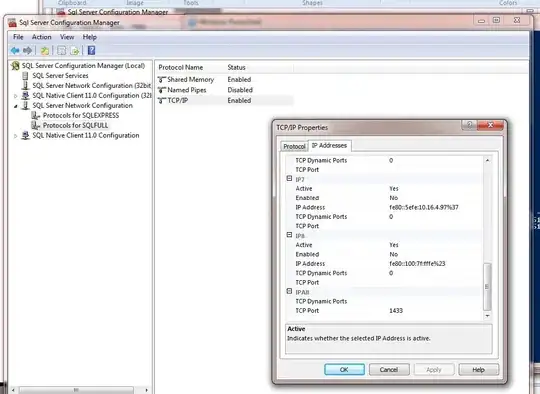
I have installed named instance of the SQL Server, later I wanted to use it as default instance. So I did this:

  • Open SQL Server Configuration Manager
  • Click SQL Server Network Configuration
  • Click Protocols for INSTANCENAME you want to make available (i.e. SQLExpress)
  • Right-click TCP/IP and click Enabled
  • Right-click TCP/IP and go to Properties
    • Go to the IP Addresses tab
    • Scroll down to the IPAll section
    • Clear the field TCP Dynamic Ports (i.e. empty/blank)
    • Set TCP Port to 1433
    • Click Ok
  • Go to SQL Server Services
  • Right-click your SQL Server (INSTANCENAME) and click Restart

SQL Server Configuration Manager

This made my the named instance listen on the default port. Then I did the same for the default server and I changed TCP port to the 1434 so they don't interfere. I restarted the computer but still when I login through SQL Server Management Studio and give localhost as the server name I still access the old default server.

Why is it so, how to fix it?

Yoda
  • 17,363
  • 67
  • 204
  • 344
  • Are you supplying the name of the instance in your connection string? I.e. `localhost\SQLEXPRESS`? If not, regardless of what port it's running on, simply passing `localhost` will connect to an instance with the Default instance name (`MSSQLSERVER`). – Thom A Dec 13 '17 at 12:33
  • @Larnu I thought that this what I did will cause it to be default instance. Can I rename the instances? – Yoda Dec 13 '17 at 12:36
  • No. The Instance name cannot be changed. – Thom A Dec 13 '17 at 12:47
  • @Larnu So what's the point in doing this: https://stackoverflow.com/a/11921896/1123020 if this doesn't change a thing? – Yoda Dec 13 '17 at 12:50
  • The difference there is that there is no instance with the default instance name. – Thom A Dec 13 '17 at 12:53
  • @Larnu So if I remove the default instance, then it should work? – Yoda Dec 13 '17 at 14:14
  • People are entitled to lunch breaks you know ;). And most likely. I can't definitively say yes, as I haven't tested. – Thom A Dec 13 '17 at 14:23

1 Answers1

1

when I login through SQL Server Management Studio and give localhost as the server name I still access the old default server

Probably because you are connecting over Shared Memory, not TCP/IP.

EG connect and run

select net_transport
from sys.dm_exec_connections
where session_id = @@spid

If you specify tcp:localhost you should connect to the target instance.

Note in this configuration you'll want to disable the other network protocols to avoid this confusion.

David Browne - Microsoft
  • 80,331
  • 6
  • 39
  • 67