18

In my application, I fill the table on the basis of the array. The table uses custom UITableViewCell. Everything works fine, table is filled. Then I add Search Display Controller to my UITableViewController, no write code to handle the search, simply add the controller. When you run the application, the table is still filled.But if I try to click on the search bar, I get the error:

Terminating app due to uncaught exception 'NSInternalInconsistencyException', reason: 'unable to dequeue a cell with identifier CitiesListCell - must register a nib or a class for the identifier or connect a prototype cell in a storyboard'

I try to add to my viewDidLoad function in UITableViewController line:

self.tableView.registerClass(MyCell.classForCoder(), forCellReuseIdentifier: kCellIdentifier)

Launch the application and immediately get the error:

fatal error: unexpectedly found nil while unwrapping an Optional value

In line cell.cellMyCity.text = cellText

What am I doing wrong?

This is my Custom UITableViewCell class:

import UIKit

class MyCell: UITableViewCell {

@IBOutlet var cellMyImage: UIImageView
@IBOutlet var cellMyCity: UILabel
@IBOutlet var cellMyCountry: UILabel
@IBOutlet var cellMyTemp: UILabel

init(style: UITableViewCellStyle, reuseIdentifier: String!) {
    super.init(style: style, reuseIdentifier: reuseIdentifier)
}

override func awakeFromNib() {
    super.awakeFromNib()
}

override func setSelected(selected: Bool, animated: Bool) {
    super.setSelected(selected, animated: animated)

}
}

This is code for cell:

override func tableView(tableView: UITableView!, cellForRowAtIndexPath indexPath: NSIndexPath!) -> UITableViewCell! {

    var cell = tableView.dequeueReusableCellWithIdentifier(kCellIdentifier, forIndexPath: indexPath) as MyCell!

    if cell == nil {
        cell = MyCell(style: UITableViewCellStyle.Default, reuseIdentifier: kCellIdentifier)
    }

    let cellText: String? = dataWeatherSelectedCity[indexPath.row].name as  String
    println("Строка: \(cellText)")
    cell.cellMyCity.text = cellText

    let cellSubtitle: String? = dataWeatherSelectedCity[indexPath.row].country as String
    cell.cellMyCountry.text = cellSubtitle

    cell.cellMyImage.image = UIImage(named: "Blank52")

    var currentCityWeatherURL = "http://api.wunderground.com/api/\(self.myAPI.kWundergroundApiKey)/conditions/lang:RU/q/zmw:\(self.dataWeatherSelectedCity[indexPath.row].zmv).json"

    var fullObservation:NSDictionary = self.myAPI.jsonParsingWeather(currentCityWeatherURL)
    var currentObservation:NSDictionary = fullObservation.valueForKey("current_observation") as NSDictionary

    var currentWeather = self.myAPI.parsingOneCityCurrentCondition(currentObservation)       
    cell.cellMyImage.image = currentWeather.image
    cell.cellMyTemp.text = currentWeather.temp
    return cell
}

Property in TableViewCell: enter image description here enter image description here enter image description here

Table without self.tableView.registerClass(MyCell.classForCoder(), forCellReuseIdentifier: kCellIdentifier) or self.tableView.registerClass(MyCell.self, forCellReuseIdentifier: kCellIdentifier):

enter image description here

Alexey Nakhimov
  • 2,673
  • 8
  • 34
  • 49

5 Answers5

21

what I did for making that working is something like this:

class MainViewController: UIViewController {

    // ...

    @IBOutlet var tableView: UITableView

    override func viewDidLoad() {
        super.viewDidLoad()

        self.tableView.registerNib(UINib(nibName: "UICustomTableViewCell", bundle: nil), forCellReuseIdentifier: "UICustomTableViewCell")

        // ...
    }

    // ...

}

NOTE: If I use the –registerClass(_: forCellReuseIdentifier:) method, the xib file won't be loaded, therefore the actual custom interface will not appear unless you add the content programatically to the cell. if you'd like to load the interface from a nib file, you need to register the cell with its nib.


conforming the essential protocols:

extension MainViewController: UITableViewDataSource {
    
    func tableView(tableView: UITableView!, numberOfRowsInSection section: Int) -> Int {
        return 3
    }
    
    func tableView(tableView: UITableView!, cellForRowAtIndexPath indexPath: NSIndexPath!) -> UITableViewCell! {
        let cell: UICustomTableViewCell = tableView.dequeueReusableCellWithIdentifier(UICustomTableViewCell.reuseIdentifier) as UICustomTableViewCell
        println(cell)
        return cell;
    }
    
}

//

extension MainViewController: UITableViewDelegate {
    
    func tableView(tableView: UITableView!, heightForRowAtIndexPath indexPath: NSIndexPath!) -> CGFloat {
        return 44.0
    }
    
}

and the custom cell class was a very generic one with a meaningful name as UICustomTableViewCell:

class UICustomTableViewCell: UITableViewCell {

    class var reuseIdentifier: String {
        get {
            return "UICustomTableViewCell"
        }
    }
    
    override func awakeFromNib() {
        super.awakeFromNib()
        // Initialization code
    }

    override func setSelected(selected: Bool, animated: Bool) {
        super.setSelected(selected, animated: animated)

        // Configure the view for the selected state
    }
    
}

with a quite random interface:

random custom interface

and these settings of custom class and reuse identifier:

custom class reuse identifier


and the final result on my screen is as I expected with 3 rows:

the final result in practice

NOTE: for further customisation of the custom cells you may need extend the code above.

UPDATE

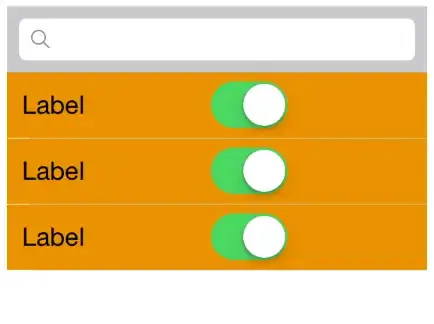
with UISearchBar, the final result would be like this:

with Search Bar

Community
  • 1
  • 1
holex
  • 23,961
  • 7
  • 62
  • 76
  • I mean, I definitely need to make xib for a cell? Without it will not work? – Alexey Nakhimov Jul 15 '14 at 09:22
  • no, you don't need to make xib for a custom cell, you can create the custom content entirety programmatically, if you'd prefer better that way. – holex Jul 15 '14 at 09:23
  • Could you suggest how can I make it in my project? – Alexey Nakhimov Jul 15 '14 at 09:24
  • I'm afraid I don't understand your question... you can add custom views/layers to your custom cell in e.g. the `–init(style:reuseIdentifier:)` or in general you can use the `–willMoveToSuperview(newSuperview:)` or in even the `–didMoveToSuperview()` method for customising a view. – holex Jul 15 '14 at 09:30
  • Ok. Try to use standard table with Search Display Controller – Alexey Nakhimov Jul 15 '14 at 09:32
  • Without custom `UITableViewCell not work again` :-( `Search Bar and Search Display Controller` crush. Created new question - http://stackoverflow.com/questions/24755279/search-bar-and-search-display-controller-in-uitableviewcontroller-in-swift – Alexey Nakhimov Jul 15 '14 at 10:05
  • I have not experienced any unpleasant behaviour with `UISearchBar`, after I added such thing to my `tableView`, it still works like a charm. – holex Jul 15 '14 at 10:10
  • I think I have a little misunderstood .... I did not use a custom `UITableViewCell`, only the standard `UITableViewController` and `Search Bar and Search Display Controller`. All the same, the application is stopped when trying to click on search. – Alexey Nakhimov Jul 15 '14 at 10:19
  • that is a huge misunderstanding, because if you are _not_ using custom table cells, what would you like to register for the tableview? and why? the custom cells should be registered only for having better performance while the system loads them in to the memory. – holex Jul 15 '14 at 10:23
  • Due to the fact that there are problems with the `Search Bar and Search Display Controller`, I decided to stop using Custom `UITableViewCell`. I thought that the problem will disappear with the `Search Bar and Search Display Controller`, it has not disappeared. That's why I created a new question where already there is nothing about Custom `UITableViewCell`. – Alexey Nakhimov Jul 15 '14 at 10:31
10

Adding self before tableView fixes the issues:

var cell = self.tableView.dequeueReusableCellWithIdentifier(kCellIdentifier, forIndexPath: indexPath) as MyCell!
Chris Forrence
  • 10,042
  • 11
  • 48
  • 64
8

As error suggest you are getting your cell or UITestField nil and Swift doesn't support method call on nil object that's why you are getting crash. you can prevent crash by checking the object is nil or not as bellow

if var label = cell.cellMyCity{
    label.text = cellText
}

EDIT

I think I got what is the problem here...

You have drag-n-drop UISearchBar in your storyboard, So by defaults all data source and delegate set to your Controller say, ViewController(class in which you override UITableView DataSource methods) and in that ViewController you register MyCell class as your customize class. So your tableView displays perfect but when you type something to UISearchBar, same DataSource methods (ViewController) called and there as well, you registers MyCell for searchResultsTableView (UISearchDisplayController tableView thats display search result), but that doesn't know about MyCell and that's why cell.cellMyCity is coming as nil in case of search, that means searchResultsTableView expect the default UITableViewCell and you are not setting anything for default cell like -

cell.textLabel.text = countryList[indexPath.row]

this whole scenario you can observe by changing you DataSource methods as bellow

    override func tableView(tableView: UITableView!, cellForRowAtIndexPath indexPath: NSIndexPath!) -> UITableViewCell! {

    var cell = tableView.dequeueReusableCellWithIdentifier(kCellIdentifier) as MyCell!
    if cell == nil {
        //tableView.registerNib(UINib(nibName: "UICustomTableViewCell", bundle: nil), forCellReuseIdentifier: "UICustomTableViewCell")
        tableView.registerClass(MyCell.classForCoder(), forCellReuseIdentifier: kCellIdentifier)

        cell = MyCell(style: UITableViewCellStyle.Default, reuseIdentifier: kCellIdentifier)
    }
    if var label = cell.cellMyCity{
        label.text = countryList[indexPath.row]
    }
    else{
        cell.textLabel.text = countryList[indexPath.row]
    }
    return cell
}

As far as Solution is concern, there could be two possible solution..

A). Don't use searchResultsTableView (provided by UISearchDisplayController) and display your search results in the same tableView that you have in your ViewController. For that what you can do is - listen to the UISearchBar delegates when user type some thing in UISearchBar get your result datasource (May be in different array) by Predicates and Display results in the same UITableView.

B). Customize UISearchDisplayController and use your custom cell (i.e MyCell) in searchResultsTableView

Suryakant Sharma
  • 3,852
  • 1
  • 25
  • 47
2

make sure to remove register class if you are using storyboard as it will overwrite the storyboard and all the outlink associated with it

please check https://stackoverflow.com/a/26350795/4453583

it works for me =)

Community
  • 1
  • 1
1

You must remember to register the cell for any tableView that use it -- including searchDisplayController.tableView.

JimmyB
  • 326
  • 3
  • 12