2

I've made a custom select box, with a custom drop down arrow and it looks fine in Google Chrome and Safari but in Mozilla (strangely) and Internet Explorer (not so strangely) the original arrow is still there as well as the new one.

Here is the CSS style:

    .sb2_panes select {
        padding-top: 5px;
        padding-bottom: 5px;
        padding-right: 20px;
        margin: 0;
        -webkit-border-radius: 4px;
        -moz-border-radius: 4px;
        border-radius: 4px;
        background: url(img/search_arrow.png) no-repeat right #f8f8f8;
        color: #888;
        border: none;
        outline: none;
        display: inline-block;
        -webkit-appearance: none;
        -moz-appearance: normal;
        appearance: normal;
        cursor: pointer;
    }

Here is what it looks like in Google Chrome:

Here is what it looks like in Google Chrome:

Here is what it looks like in Mozilla:
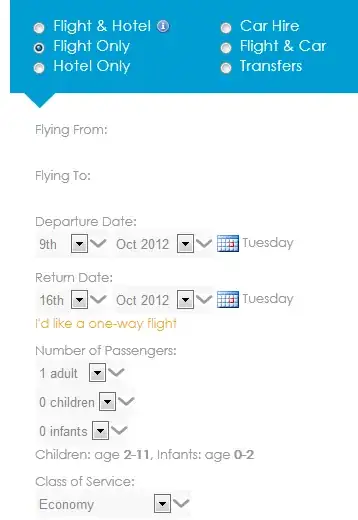
Here is what it looks like in Mozilla:

Thanks.

EM-Creations
  • 4,195
  • 4
  • 40
  • 56
  • Have you tried: `-moz-appearance: none;` ? – Gunnar Oct 02 '12 at 15:25
  • 1
    Actually, the above doesn't work. This appears to be a bug with Firefox. I think this post can help with the problem: http://stackoverflow.com/questions/6787667/what-is-the-correct-moz-appearance-value-to-hide-dropdown-arrow-of-a-select – Gunnar Oct 02 '12 at 15:29
  • Thanks for trying to help. So.. it's been on bugzilla since mid 2011 and it's still not being worked on; brilliant. Any known work-arounds? – EM-Creations Oct 02 '12 at 15:35
  • Only thing I can think of is to position the image a few pixels to to left, overlapping the default arrow. I have seen it beeing a workaround for "replacing" an upload button. In that case, you could have to specify that part of CSS only for Firefox browsers. If that doesn't help, I'm out :) – Gunnar Oct 02 '12 at 15:44
  • For IE, what happens if you set `appearance: none;`? Or `ms-appearance: none`? – 11684 Oct 02 '12 at 15:56
  • `appearance: none;` isn't valid and doesn't do anything and `ms-appearance: none;` doesn't make any difference either. – EM-Creations Oct 03 '12 at 08:29

2 Answers2

5

As Gunnar mentioned, this is still a bug in Firefox (https://bugzilla.mozilla.org/show_bug.cgi?id=649849).

A possible work-around would be to set the select width greater than 100% and apply overflow: hidden.

select {
    overflow: hidden;
    width: 125%;
}

Or you could use JavaScript.

Artur Kim
  • 425
  • 4
  • 15
  • No that doesn't work for me within the constraints I have to work in, I did try this before but to no avail. For now what I've done is load in a different CSS file to handle the styling of the select box based on which web browser the user is using. So if they're using Internet Explorer, Firefox or Opera it loads the CSS file with the background colour but not the custom drop down arrow, so at least there's not two drop down arrows; which looks ridiculous. – EM-Creations Oct 03 '12 at 08:22
  • 1
    Except this is not a bug. The select widget has anonymous children, completely unrelated to OS-default `-moz-appearance` rendering. WebKit happens to implement all select rendering via it's non-standard `-webkit-appearance` property (which is not the same thing as the non-standard `-moz-appearance` property), but per spec what Gecko is doing is just fine. – Boris Zbarsky Oct 04 '12 at 22:57
1
select {
    -moz-appearance: none;
    text-indent: 0.01px;
    text-overflow: '';
}

This code works in FF

jaredjacobs
  • 5,625
  • 2
  • 27
  • 23
alalmighty
  • 21
  • 2