I have created ubuntu vm on centos 5.7 server using virtualbox. There is not any issue of connecting remote desktop. But my problem is I cant figure out how to setup connection between host and guest os so that guest os(Ubuntu 10.04 server) can access internet of host os (centos 5.7).
Below is my few commands output.
VBoxManage showvminfo "Ubuntu 10.04.4.1 Server" --details
Name:            Ubuntu 10.04.4.1 Server
Guest OS:        Other/Unknown
UUID:            bf9f83a7-80c8-4e23-b0ad-06d82bf81f95
Config file:     /root/VirtualBox VMs/Ubuntu 10.04.4.1 Server/Ubuntu 10.04.4.1 S
                                        erver.vbox

Snapshot folder: /root/VirtualBox VMs/Ubuntu 10.04.4.1 Server/Snapshots
Log folder:      /root/VirtualBox VMs/Ubuntu 10.04.4.1 Server/Logs
Hardware UUID:   bf9f83a7-80c8-4e23-b0ad-06d82bf81f95
Memory size:     2048MB
Page Fusion:     off
VRAM size:       8MB
CPU exec cap:    100%
HPET:            off
Chipset:         piix3
Firmware:        BIOS
Number of CPUs:  1
Synthetic Cpu:   off
CPUID overrides: None
Boot menu mode:  message and menu
Boot Device (1): Floppy
Boot Device (2): DVD
Boot Device (3): HardDisk
Boot Device (4): Not Assigned
ACPI:            on
IOAPIC:          off
PAE:             on
Time offset:     0 ms
RTC:             local time
Hardw. virt.ext: on
Hardw. virt.ext exclusive: on
Nested Paging:   on
Large Pages:     off
VT-x VPID:       on
State:           running (since 2012-06-28T13:12:03.578000000)
Monitor count:   1
3D Acceleration: off
2D Video Acceleration: off
Teleporter Enabled: off
Teleporter Port: 0
Teleporter Address:
Teleporter Password:
Storage Controller Name (0):            SATA Controller
Storage Controller Type (0):            IntelAhci
Storage Controller Instance Number (0): 0
Storage Controller Max Port Count (0):  30
Storage Controller Port Count (0):      30
Storage Controller Bootable (0):        on
Storage Controller Name (1):            IDE Controller
Storage Controller Type (1):            PIIX4
Storage Controller Instance Number (1): 0
Storage Controller Max Port Count (1):  2
Storage Controller Port Count (1):      2
Storage Controller Bootable (1):        on
SATA Controller (0, 0): /root/Ubuntu_10_04_4_1_Server.vdi (UUID: a5211900-c9f8-4
                                        ee8-b396-8ffe9ada43ba)

IDE Controller (1, 0): Empty
NIC 1:           MAC: 080027C57C53, Attachment: Bridged Interface 'eth0', Cable
                                        connected: on, Trace: off (file: none), Type: Am79C973, Reported speed: 0


Mbps,                                                                                        Boot priority: 0, Promisc
Policy: deny
NIC 2:           disabled
NIC 3:           disabled
NIC 4:           disabled
NIC 5:           disabled
NIC 6:           disabled
NIC 7:           disabled
NIC 8:           disabled
Pointing Device: PS/2 Mouse
Keyboard Device: PS/2 Keyboard
UART 1:          disabled
UART 2:          disabled
Audio:           disabled
Clipboard Mode:  Bidirectional
Video mode:      640x480x0
VRDE:            enabled (Address 0.0.0.0, Ports 3390, MultiConn: on, ReuseSingl
                                        eConn: off, Authentication type: null)

VRDE port:       3390
Video redirection: disabled
VRDE property: TCP/Ports  = "3390"
VRDE property: TCP/Address = <not set>
VRDE property: VideoChannel/Enabled = <not set>
VRDE property: VideoChannel/Quality = <not set>
VRDE property: VideoChannel/DownscaleProtection = <not set>
VRDE property: Client/DisableDisplay = <not set>
VRDE property: Client/DisableInput = <not set>
VRDE property: Client/DisableAudio = <not set>
VRDE property: Client/DisableUSB = <not set>
VRDE property: Client/DisableClipboard = <not set>
VRDE property: Client/DisableUpstreamAudio = <not set>
VRDE property: H3DRedirect/Enabled = <not set>
VRDE property: Security/Method = <not set>
VRDE property: Security/ServerCertificate = <not set>
VRDE property: Security/ServerPrivateKey = <not set>
VRDE property: Security/CACertificate = <not set>
VRDE property: Audio/RateCorrectionMode = <not set>
USB:             disabled
USB Device Filters:
<none>
Available remote USB devices:
<none>
Currently Attached USB Devices:
<none>
Shared folders:  <none>
VRDE Connection:    active
Clients so far:     4
Start time:         2012/06/28 15:11:51 UTC
Sent:               2766202 Bytes
Average speed:      -1579784 B/s
Sent total:         66513170 Bytes
Received:           49059 Bytes
Speed:              -28017 B/s
Received total:     102689 Bytes
User name:
Domain:
Client name:        KAMALJOSHI
Client IP:          192.168.1.64
Client version:     7600
Encryption:         RDP4
Guest:
Configured memory balloon size:      0 MB
OS type:                             Other
Additions run level:                 0
Guest Facilities:
Facility "Seamless Mode": not active (last update: 2012/06/28 13:33:45 UTC)
Facility "Graphics Mode": active/running (last update: 2012/06/28 13:33:45 UTC)
VBoxManage list hostonlyifs
Name:            vboxnet0
GUID:            786f6276-656e-4074-8000-0a0027000000
Dhcp:            Disabled
IPAddress:       192.168.23.100
NetworkMask:     255.255.255.0
IPV6Address:     fe80:0000:0000:0000:0800:27ff:fe00:0000
IPV6NetworkMaskPrefixLength: 64
HardwareAddress: 0a:00:27:00:00:00
MediumType:      Ethernet
Status:          Up
VBoxNetworkName: HostInterfaceNetworking-vboxnet0
VBoxManage list bridgedifs
Name:            eth0
GUID:            30687465-0000-4000-8000-80ee7332935e
Dhcp:            Disabled
IPAddress:       173.201.33.100
NetworkMask:     255.255.255.0
IPV6Address:     fe80:0000:0000:0000:82ee:73ff:fe32:935e
IPV6NetworkMaskPrefixLength: 64
HardwareAddress: 80:ee:73:32:93:5e
MediumType:      Ethernet
Status:          Up
VBoxNetworkName: HostInterfaceNetworking-eth0
ifconfig -a (ON Host)
eth0      Link encap:Ethernet  HWaddr 80:EE:73:32:93:5E
          inet addr:173.201.33.100  Bcast:173.201.33.255  Mask:255.255.255.0
          inet6 addr: fe80::82ee:73ff:fe32:935e/64 Scope:Link
          UP BROADCAST RUNNING MULTICAST  MTU:1500  Metric:1
          RX packets:3405846 errors:0 dropped:0 overruns:0 frame:0
          TX packets:443817 errors:0 dropped:0 overruns:0 carrier:0
          collisions:0 txqueuelen:1000
          RX bytes:578723148 (551.9 MiB)  TX bytes:293187427 (279.6 MiB)
          Interrupt:82 Base address:0x8000
lo        Link encap:Local Loopback
          inet addr:127.0.0.1  Mask:255.0.0.0
          inet6 addr: ::1/128 Scope:Host
          UP LOOPBACK RUNNING  MTU:16436  Metric:1
          RX packets:119430 errors:0 dropped:0 overruns:0 frame:0
          TX packets:119430 errors:0 dropped:0 overruns:0 carrier:0
          collisions:0 txqueuelen:0
          RX bytes:25806194 (24.6 MiB)  TX bytes:25806194 (24.6 MiB)
sit0      Link encap:IPv6-in-IPv4
          NOARP  MTU:1480  Metric:1
          RX packets:0 errors:0 dropped:0 overruns:0 frame:0
          TX packets:0 errors:0 dropped:0 overruns:0 carrier:0
          collisions:0 txqueuelen:0
          RX bytes:0 (0.0 b)  TX bytes:0 (0.0 b)
vboxnet0  Link encap:Ethernet  HWaddr 0A:00:27:00:00:00
          inet addr:192.168.23.100  Bcast:192.168.23.255  Mask:255.255.255.0
          inet6 addr: fe80::800:27ff:fe00:0/64 Scope:Link
          UP BROADCAST RUNNING MULTICAST  MTU:1500  Metric:1
          RX packets:0 errors:0 dropped:0 overruns:0 frame:0
          TX packets:29 errors:0 dropped:0 overruns:0 carrier:0
          collisions:0 txqueuelen:1000
          RX bytes:0 (0.0 b)  TX bytes:6154 (6.0 KiB)
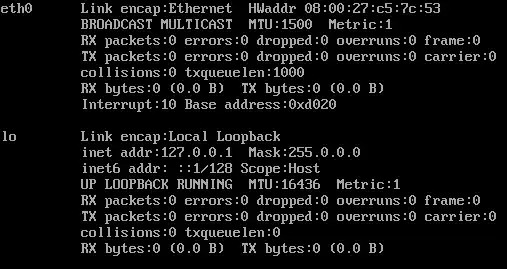
ifconfig -a (guest os)
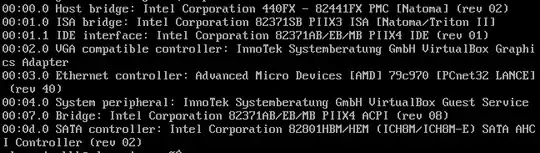
lspci (guest os)
sudo lshw -class network (guest os)

Please let me know what I need to do?
TIA


