The best solutions involve changing your habits not to use rm directly.
One approach is to run echo rm -rf /stuff/with/wildcards* first. Check that the output from the wildcards looks reasonable, then use the shell's history to execute the previous command without the echo.
Another approach is to limit the echo command to cases where it's blindingly obvious what you'll be deleting. Rather than remove all the files in a directory, remove the directory and create a new one. A good method is to rename the existing directory to DELETE-foo, then create a new directory foo with appropriate permissions, and finally remove DELETE-foo. A side benefit of this method is that the command that's entered in your history is rm -rf DELETE-foo.
cd ..
mv somedir DELETE-somedir
mkdir somedir                 # or rsync -dgop DELETE-somedir somedir to preserve permissions
ls DELETE-somedir             # just to make sure we're deleting the right thing
rm -rf DELETE-somedir
If you really insist on deleting a bunch of files because you need the directory to remain (because it must always exist, or because you wouldn't have the permission to recreate it), move the files to a different directory, and delete that directory.
mkdir ../DELETE_ME
mv * ../DELETE_ME
ls ../DELETE_ME
rm -rf ../DELETE_ME
(Hit that Alt+. key.)
Deleting a directory from inside would be attractive, because rm -rf . is short hence has a low risk of typos. Typical systems don't let you do that, unfortunately. You can to rm -rf -- "$PWD" instead, with a higher risk of typos but most of them lead to removing nothing. Beware that this leaves a dangerous command in your shell history.
Whenever you can, use version control. You don't rm, you cvs rm or whatever, and that's undoable.
Zsh has options to prompt you before running rm with an argument that lists all files in a directory: rm_star_silent (on by default) prompts before executing rm whatever/*, and rm_star_wait (off by default) adds a 10-second delay during which you cannot confirm. This is of limited use if you intended to remove all the files in some directory, because you'll be expecting the prompt already. It can help prevent typos like rm foo * for rm foo*.
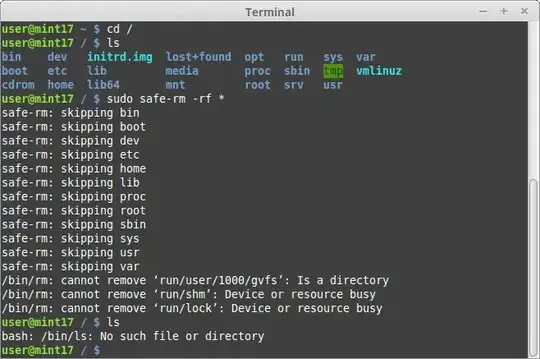
There are many more solutions floating around that involve changing the rm command. A limitation of this approach is that one day you'll be on a machine with the real rm and you'll automatically call rm, safe in your expectation of a confirmation… and next thing you'll be restoring backups.




rm -rf . /mydirinstead ofrm -rf ./mydirand kill whatever directory you were in. I find this happens more often. – user606723 Dec 02 '11 at 18:01rmis not a gun, it is a computer program, it could be smart enough to determine that the user is going to delete some important files and issue a warning (like it actually does if you try to dorm -rf /without star). – Valentin Nemcev Dec 02 '11 at 19:40rmcommand is a perfectly legitimate sysadmin question. – Gilles 'SO- stop being evil' Dec 02 '11 at 20:13rm -rf /*is an age-old Unix rite of passage! Now it's time for you to learn thefindcommand to save yourself from this kind of grief in the future. Certainly you should avoid some of the bad advice that is found in the answers to this question. Suggestions such as using specially-named-ifile are akin to telling a kid learning to ride a bike to never pedal, just push on the ground with your feet, oh and also make sure to hold in the brake lever all the time. If you want to ride with the big boys, usefind. – aculich Feb 26 '12 at 16:07rm&gunanalogy is horrible.rmis something you use a dozen times a day - with & without safety in your regular programming life even if you aren't from Texas. Please don't make it a gun debate ;) – user Jul 01 '13 at 07:23/path/to/rm -rf /bin/ rm. The/path/tobit is to stop some idiot running it and trying to report me - it had happened! – Mar 01 '15 at 09:12set -uin your bash scripts. If you are working with folks that blow away/often, then consider nfs diskless or initrd ram disk diskless booting. There are other ways to make/read-only but it gets tricky depending on your setup. – Aaron Nov 22 '16 at 05:08alias rm="rm -i"to be a dangerous practice, rather than a safe one. Here's why: it causes a person to expect that rm will always ask them first whether they really want to do the thing. If they're then on some other system, or logged into a different account (perhaps root!), or whatever, and the alias isn't there... they expect it, don't get it, and a catastrophic removal very likely ensues.instead, use
– lindes Feb 21 '21 at 00:38echo rmor typerm -icommands. Making these into habits is, IMHO, the best way to prevent these sorts of things.rm $MYDIRENAMEEMPTYVAR/kind of language. train your eyes. – Volodymyr Boiko Feb 14 '24 at 22:56