8

I'm a Centos user and have just started my first Debian install. In Centos the ls command lists output in color to indicate whether an item is a file, directory, symlink and if a file/directory is world-writable.

Here's an example...
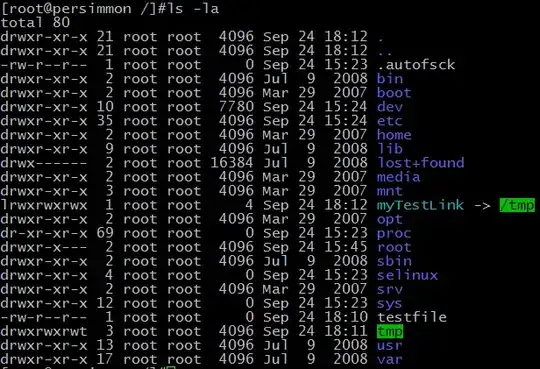
Centos directory listing in color

How can I enable this color display in Debian? Thanks

Xoundboy
  • 603

3 Answers3

16
alias ls='ls --color=auto'

Put it in your .bashrc

Or if you prefer create a file in your profile named .bash_aliases and put there your alias (by default in debian's .bashrc that gets sourced)

hmontoliu
  • 3,793
2

Under Debian and derivatives (example: raspbian for Raspberry Pi), if you edit the /root/.bashrc file you'll find some line commented about "ls colorization". Just uncomment them and run "source /root/.bashrc" or relogin:

# You may uncomment the following lines if you want `ls' to be colorized:
export LS_OPTIONS='--color=auto'
eval "`dircolors`"
alias ls='ls $LS_OPTIONS'
alias ll='ls $LS_OPTIONS -l'
alias l='ls $LS_OPTIONS -lA'
sromero
  • 161
0

uncomment those line in the file .bashrc of you home directory:

export LS_OPTIONS='--color=auto'
alias ls='ls $LS_OPTIONS'

and type: exec bash for reload you bash with colors

galoz
  • 1