21

Suppose a hacker creates a Windows application that looks and feels like a legitimate web browser. The user believes they are using, say, Google Chrome. If you simply watched the bits going to and from the computer over the network, it would look like the user in fact was using a legitimate browser like Google Chrome.

However, on the client side, this fake browser records all keystrokes entered by the user, and from that data, deduces the user's website/password-manager passwords. In the background, this data is continuously transmitted to the hacker.

Alternatively, this fake browser could act like a legitimate browser for all URL's entered by the user except for some specific exceptions. Perhaps for a banking URL like chase.com, the browser does a phony DNS-resolution and serves up content from a different site owned by the hacker, fooling the user into entering login credentials or other sensitive info.

Are attacks like these possible? If not, what mechanisms are in place to thwart such attempts?

I tried googling for phrases like "fake browser hack" but have not found anything that seems to resemble this.

dshin
  • 337
  • 2
  • 5
  • 11
    Code signing is supposed to mitigate that problem. Adversaries can spread the browser using Google Ads (so it comes up at the top when you search the name). This has historically happened with brave. – belkarx Apr 19 '22 at 23:23
  • 33
    A good question, but too narrow. What protects users from fake things of any kind? Fake messaging apps? Fake operating systems? Fake graphics cards? Fake iPhones? Fake Ferraris? Fake Gucci handbags? Fake dollar bills? Fake college diplomas? Fake homework answers? It's all really the same in every case: evaluate the trustworthiness of where you get it from; if the source isn't trustworthy then you can try to verify the authenticity (by your own knowledge, or by looking for hard-to-fake symbols of authenticity, or by consulting a trusted expert). If you can't verify it, don't accept it. – CBHacking Apr 20 '22 at 00:31
  • Comments are not for extended discussion; this conversation has been moved to chat. – Rory Alsop Apr 22 '22 at 21:49

6 Answers6

67

Are attacks like these possible?

Yes. A hacker just needs to download the Firefox source code, recompile it, and distribute it.

If not, what mechanisms are in place to thwart such attempts?

A user could download browsers from their official sites, not third party sites. They could also use package managers or app stores that are associated with many operating systems.

ThoriumBR
  • 53,925
  • 13
  • 135
  • 152
  • 2
    Download from official sites + verify the key. – gerrit Apr 20 '22 at 12:16
  • 34
    @gerrit The kind of people that manually verify signatures on stuff they download are not the type of people who these attacks are likely to be aimed at. – Radvylf Programs Apr 20 '22 at 13:56
  • 4
    @RadvylfPrograms Unless they have a billion dollar bitcoin wallet, perhaps? – gerrit Apr 20 '22 at 13:56
  • 8
    @gerrit Possibly, but if you have people targeting you individually, that's a totally different situation, and as far as I can tell, far from the scope of this question. – Radvylf Programs Apr 20 '22 at 13:58
  • 8
    @gerrit - If I verify the checksum against the same website where I download the file, how does it add security? – Vilx- Apr 20 '22 at 17:10
  • 1
    @Vilx- https://security.stackexchange.com/questions/261213/why-trust-a-pgp-signature-if-it-is-distributed-along-with-the-data-being-verifie – ThoriumBR Apr 20 '22 at 17:15
  • 1
    @RadvylfPrograms "people that manually verify signatures on stuff they download are not the type of people who these attacks are likely to be aimed at" So because fake browsers aren't a popular targeted attack today, that means we should not encourage people to use available security measures if they are tech-savvy enough to do so? – Luc Apr 20 '22 at 18:58
  • @Luc Oh, I'm definitely not advising not to check signatures on things. Just that expecting and relying on the fact that people will do that is a bad idea, especially for things like browsers that have an intended userbase consisting mostly of ordinary users. – Radvylf Programs Apr 20 '22 at 19:06
  • Well if you have a public key then things are different of course. I was talking about plain unsigned MD5/SHA hashes which are the most common option. Although it is unclear what @gerrit meant. – Vilx- Apr 20 '22 at 21:08
  • @RadvylfPrograms Why would you need to manually verify the key? Communication between the user's OS installed browser and the official site for the user wanted browser is encrypted and signed using TLS, right? Any "key" you can manually verify, would have to be compared with something...say the official site? – Aron Apr 21 '22 at 06:35
  • @Vilx- to you, maybe. What do you not understand about what gerritt said? – Luc Apr 21 '22 at 10:11
  • @Aron Well, you're missing the first half of gerrit's comment: "download from official sites + verify the key". Of course verifying the key doesn't do any good if you don't have a legitimate source for it. – Radvylf Programs Apr 21 '22 at 13:30
  • @Luc - I don't really understand what he means by "key". If he means a public key with which the download is signed by the author - then yes, I agree. Checking such a signature after completing the download does add security. But the typical download page doesn't provide that. What you normally get is an MD5 or SHA1 hash of the download. And if an adversary has gotten deep enough to replace the download file on the official website, then he can also replace the hash value next to it. [Continued] – Vilx- Apr 21 '22 at 16:45
  • 1
    The best you can do with such a hahs is to verify that the file hasn't gotten corrupted in transit - however since most websites today use HTTPS, even that advantage is gone, because HTTPS already performs such checks. – Vilx- Apr 21 '22 at 16:46
  • @RadvylfPrograms Vilx took the words out of my mouth. Either you are manually checking the "key" against an "in band" message (completely pointless), or you are checking the key against an "out of band" message, which becomes a bootstrap problem. Public Key encryption was developed specifically for this problem. Since PKE is applied to the entire HTTPS channel, what does "manually checking the key" do? – Aron Apr 22 '22 at 02:25
  • @Aron Don't ask me, I wasn't the one who suggested it :p. But checking the key is never really harmful, and it could be that you get the key from an HTTPS site, then the actual program via an HTTP mirror. That's not something your ordinary user would be doing, and not for an ordinary program like a browser, hence my first comment in response to gerrit. – Radvylf Programs Apr 22 '22 at 02:40
  • @RadvylfPrograms Sure, but we live in 2022, where we have flying cars, meals in a pill, teleportation and CDNs. HTTP mirrors were a solution to the HTTP proxy/locality problem. CDNs solved that without the downsides. – Aron Apr 22 '22 at 02:50
  • @Aron And that's a point I won't really disagree with. My point was never really that verifying signatures is always a great idea, and in fact my original few comments were critical of that in a similar way to how you are. My more signature-positive comments were in response to Luc, who as best as I can tell was talking about situations, however rare, where checking a signature would be recommended. But I think at this point we're mostly just talking past each other and the chain is 17 comments long, so I don't think there's much value in continuing it :p – Radvylf Programs Apr 22 '22 at 03:01
23

The challenge the attacker would face would be duping users into installing the malicious web browser on their system.

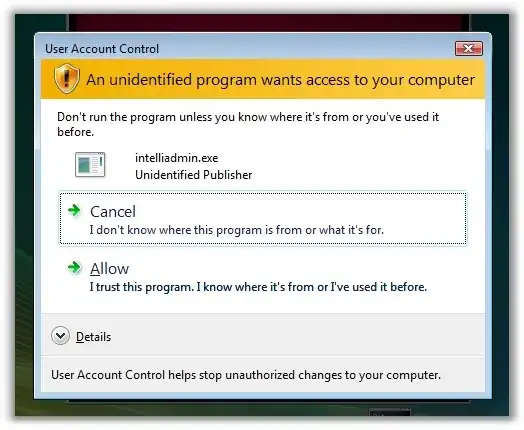
Windows has a security feature called User Account Control (UAC) specifically for the purpose of mitigating this threat. When a user attempts to install a new program on a Microsoft Windows system, Windows checks that the installation file is digitally signed using a certificate that Windows trusts. If the program is not signed using a trusted certificate, then the user is presented with a warning like the one below:

Alt text

mti2935
  • 23,468
  • 2
  • 53
  • 73
  • 4
    +1, I believe MacOS also has an equivalent feature. – nobody Apr 19 '22 at 23:27
  • 6
    Thanks. I imagine the bigger threats are installation on a public computer by a malicious administrator, or installation on a user’s personal device via unauthorized physical access. – dshin Apr 19 '22 at 23:53
  • 2
    The screenshot doesn't work for me; my browser believes that it's unsafe to connect to the site that's hosting it. – ruakh Apr 20 '22 at 14:38
  • It's trivial to install a modified malicious version of the browser without administrator permissions by copying the executables to a different directory. – the default. Apr 20 '22 at 16:44
  • 4
    @dshin If your threat model includes public computers with unscrupulous admins or unauthorized physical access to your machine, there are a dozen better ways to surreptitiously install keyloggers on such machines that don't involve someone hijacking your browser. For example, if your computer has a Bluetooth dongle, they could replace it with a keylogging model. – Nzall Apr 20 '22 at 17:59
  • 3
    @dshin: Using a public computer means fully trusting its admins with the security of any information you type into it. Both trust to not be malicious themselves, and trust to have successfully locked-down the computer to prevent previous non-admin users from having installed malware. And keeping up with security updates to prevent that, unless one of those previous users knows about a 0-day exploit they can point a browser at to get control of a locked-down public machine. – Peter Cordes Apr 20 '22 at 22:53
  • A public computer could also have a camera behind your shoulder filming your keystrokes, or a modified keyboard, cable, hardware, software... anything. If you enter sensitive information into an untrusted device, anything can happen. – Falco Apr 21 '22 at 12:52
10

Yes, it is completely possible to create such a browser. Given that chromium is open-source, it is easy to make minor modifications and produce a browser that, on the surface, appears to be Google Chrome, but is in fact a malicious knock-off.

The difficult part is distributing this browser to users. Any sane user would install Chrome by going to Google's website and downloading the official installer. It helps that googling anything like "install Chrome" naturally leads to Google's website as the first link. Thus, normal users will end up with the official version of Chrome and not your knock-off.

nobody
  • 11,555
  • 2
  • 43
  • 60
  • I suppose to be safe, I should assume that any untrusted public computer like at a library or a hotel is running such knock-off web browsers? – dshin Apr 19 '22 at 21:22
  • 27
    @dshin Of course you should always assume an untrusted computer is untrusted. It could be running a malicious browser, or a real browser but with a keylogger installed, or have a hardware keylogger installed, or no keylogger but a custom certificate installed to allow MITM... In short, there are any number of ways a public computer can be compromised. Never do anything sensitive on it. – nobody Apr 19 '22 at 21:26
  • 38
    Isn't chrome already a malicious knockoff of chromium? :P – qwr Apr 20 '22 at 06:03
  • 1
    @dshin normally public computers have restricted users. The users can not install anything. But the best way to use these computers is to not use them. – J_rite Apr 20 '22 at 12:40
  • 2
    @Jungkook While that is generally true, it is also true that public computers usually have poor security, meaning an attacker often does not face any significant difficulty in escalating privileges. So best to avoid them altogether. – nobody Apr 20 '22 at 13:53
  • 1
    @Jungkook public computers have an administrator. Someone has to install the software on them. You probably don't know who the admin is or what they installed. Don't trust it. – Seth R Apr 20 '22 at 14:47
  • 1
    @SethR you can trust they are traceable and don't want to go to jail... usually. You can't necessarily trust someone hasn't plugged in a keylogger when the staff weren't looking – user253751 Apr 20 '22 at 15:08
  • Malicious browser distributers might try to fake Google's website by e.g. replacing the o's with Greek ο's or Cyrillic о's or something. I believe that Google anticipated this and bought all similar-looking domains to redirect to the real one, but there could still be some out there. If you type the URL yourself on a normal keyboard, you won't fall for that, and of course, such spoof sites won't be very high in search results (especially since Google themselves run the search engine...) But it's a thing to look out for. – Darrel Hoffman Apr 22 '22 at 13:36
9

Faking a complete browser is not necessary for most attacks. There are phishing lures which fake a single browser window displaying a Facebook/Gmail login page in the attempt to collect usernames and passwords. Some of these lures are javascript applets running in your real browser (google "Browser in the browser attack"). This has a big advantage of having access to passwords stored in the real browser: users who would have installed a complete fake browser would be suspicious if they find that there is no stored password for Facebook in it.

Dmitry Grigoryev
  • 10,152
  • 1
  • 27
  • 56
  • 1
    The password manager won't autofill the user's ID&Password to a spoof site - this useful warning that something dodgy is going on – CSM Apr 21 '22 at 06:35
1

Administrators creating user accounts without administrative access to the computer is a very strong deterrent for these sorts of attacks because it requires an administrator to install new software. It also prevents a broad range of other attacks that users fall prey to.

For use cases outside of an administrated network, there is little to protect users from themselves. They can and frequently do install operating systems from unauthorized sources.

The best way to protect against these threats is simply to try and teach people about the most basic methods to protect themselves.

Paul
  • 131
  • 1
  • 11
  • 1
    Very few people install operating systems from anywhere, and on a private computer, there is nobody but the user themselves to decide what is "unauthorized". Probably you meant to say "They can and frequently do install applications from untrustworthy sources." – IMSoP Apr 20 '22 at 15:27
  • 2
    I have several friend who were getting pirated copies of Windows from Pirate Bay. I would link to the very well seeded images, but I suspect SE doesn't like that. – Paul Apr 20 '22 at 15:44
1

I believe the answer is that anti-virus software could potentially pick it up as malicious based on "heuristic analysis" -- that is, modern AV software has an understanding of common malicious hooks and suspicious actions and can flag programs based on that, even if it has never seen that particular program before. This is why sometimes innocent programs end up getting flagged by antivirus: they were doing something that may not have been intended as malicious but fit some recognized pattern.

Alternatively, the heuristics never catch it but eventually it gets found out, and added specifically to AV software as "known malicious".

Disclaimer: I'm no expert on what, precisely, heuristic AV is looking for, or what you can get away with without setting it off, but no one else has mentioned it.

More info: https://usa.kaspersky.com/resource-center/definitions/heuristic-analysis

JamieB
  • 119
  • 1