5

I'm trying to revive an old travelMate 518tx and I'm currently in the process of searching for bottlenecks. I want to check if the RAM sticks are still functional or not, but they're both very old, and I'm unsure how I can test them.

Is there a way to either insert them into my computer or to see if they work?

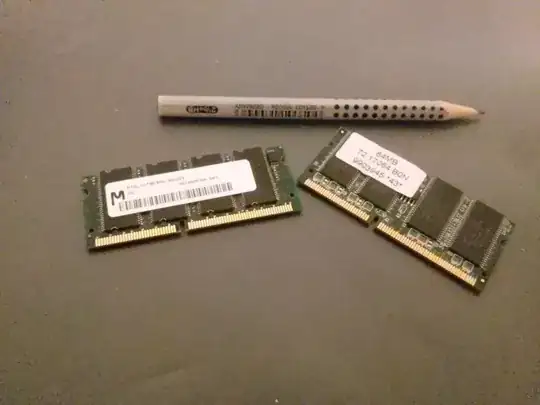
Picture of the RAM sticks (pencil for scale):
enter image description here

Bálint
  • 1,103
  • 9
  • 15

1 Answers1

7

Those look like 144-pin SO-DIMM memory modules. It's a very old memory technology. If the computer you pulled them from isn't working, your best bet is to find a known-working laptop of about the same age that takes that type of memory, install the RAM sticks one at a time, and run MemTest86+ from a boot CD or floppy to check the memory.

Mark
  • 8,556
  • 1
  • 40
  • 63
  • @StephenKitt Memory technology ages quickly. That's why you (probably!) own a >1TiB drive, for example. – wizzwizz4 Oct 11 '16 at 22:12
  • @Bálint I misread the Wikipedia article, the JEDEC standard does indeed date back to 1999. SO-DIMM refers to the physical format; they use SDRAM. – Stephen Kitt Oct 13 '16 at 08:55
  • @Bálint um? That's like pointing to a loaf of bread and saying "that's not a loaf, it's bread." What you have is SDRAM (post-EDO, pre-DDR), in SO-DIMM format. – hobbs Oct 15 '16 at 05:34
  • "It's a very old memory technology" ...Now I feel old. My notebook still runs on these... (: – nyov Aug 31 '19 at 13:23