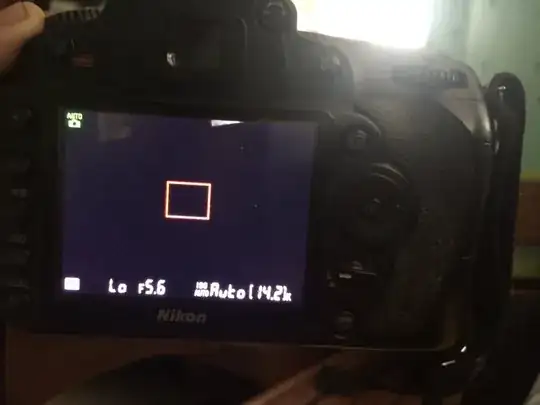
0

enter image description here

The LCD screen is dark when I shoot, even when I am not in a dark environment. Sometimes it's also blurry.

The pictures come out fine when I use flash.

Is there a problem with my screen?

inkista
  • 52,065
  • 10
  • 88
  • 161
mark
  • 1
  • 1

2 Answers2

5

This is not a problem with the LCD screen. The images are under exposed.

In easy terms, not enough light is hitting the sensor to 'take' the picture, so it's coming out black.

When it's blurred, it's because the shutter speed is too long and is recording everything in sees in the period of time the shutter is open (hence the blur as if you're handholding, you will be moving the camera).

It works when you fire the flash, because that's illuminating everything you see.

I suggest learning about the exposure triangle.

I notice in the picture above you're in a darkened room as well. One thing to note, it may appear light to your eye, but your eye is considerably more senstive to light than your camera.

Crazy Dino
  • 4,854
  • 1
  • 24
  • 48
  • OP said "The pictures come out fine." & never mentioned flash. it's only the live preview that's dark & not the screen itself, as we can see the info overlay, it's just the scene view that's dark. I don't know the camera so don't know how much gain it ought to be able to add to a scene in live view, but my D5500 will ramp up any scene so I can at least see it, however noisy or indistinct. – Tetsujin Jan 26 '17 at 21:02
  • He says that "the pictures come out fine" – kazanaki Jan 26 '17 at 21:02
  • @Tetsujin flash is mentioned in the title. I answered this before the edits were made as well and it did not mention the pictures coming out normally. – Crazy Dino Jan 26 '17 at 21:09
  • @kazanaki However when I answer this, the 'pictures coming out fine' was not in the post body. Please check the edits. – Crazy Dino Jan 26 '17 at 21:10
  • 1
    Ugh - I just read the edit stream... the current question has had so much random addition by non-OP editors that the original sense [what little there was] no longer remains. The question is no longer what the OP said, it's what several people imagined it may have said. That is not good editing. It should have just been closed as 'unclear'. – Tetsujin Jan 26 '17 at 21:16
  • @Tetsujin I stuck in an edit to clear up about the pictures coming out fine when using flash. It could very well be a live view issue though (i'm a canon user, but makes sense). Definitely stick as another answer! – Crazy Dino Jan 26 '17 at 21:22
  • @CrazyDino - reading back through the revisions, your answer looks more than likely correct, tbh. I only have about '2 rep' on this SE, so I can't do anything more than comment really, but I would have VTC as unclear had I only seen the original post. [I do have a thing about salient points from the title being re-stated in the body, for the hard of thinking like myself, so re-iterating the flash variable in the body would have saved me from missing it ;) – Tetsujin Jan 26 '17 at 21:29
  • @CrazyDino; may want to edit the title again--it almost reads like the LCD isn't dark if the flash is turned out, which wouldn't be the case. – inkista Jan 27 '17 at 17:47
0

In addition to the above answer, theres a super bright bit in that image beyond the camera. It has to do maths (metering) to work out the exposure for you when you are in auto/P mode. If you are metering using a bright window it will assume the whole image is this bright and your dark areas will end up underexposed.

Samuel A
  • 21
  • 1
  • but notice that it says "Lo" in the display. That means the camera's already at maximum time, coupled with F5.6 and auto iso, this seems excessive. – ths Jan 26 '17 at 16:21
  • He says that "the pictures come out fine" – kazanaki Jan 26 '17 at 21:03