41

I was searching for methods of lossless image rotation and happened upon this question which explains it rather nicely:

Are "Windows Photo Viewer" rotations lossless?

So I created a 256×256 JPEG with random pixels (Photoshop cloud filter) and then rotated it using Windows Picture Viewer. After rotation, the file size actually increased, but only on the first rotation. Every subsequent rotation thereafter, the file size remained static. I know it's rotating losslessly because I've rotated it multiple times with no noticeable quality loss whereas a 257×257 image being rotated 20 times became very lossy.

oscilatingcretin
  • 553
  • 1
  • 5
  • 8
  • 10
    How much did the file size it increase by in your tests? – James Snell Nov 07 '16 at 09:12
  • 3
    @JamesSnell I knew I should have included that. The one I just did using GIMP's difference clounds filter was originally 14,583 bytes, but changed to 23,638 bytes after roation. That's a difference of over 9000 bytes which seems like a lot of additional data if we're tlaking about metadata alone. – oscilatingcretin Nov 07 '16 at 11:26
  • @JamesSnell So I just repeated the same test with a 512x512 image and the file difference is 9,612 bytes (it was 9,055 with the first one). Since the increased file size was not proportionate to the increase in dimensions, I think it's safe to say it's indeed metadata – oscilatingcretin Nov 07 '16 at 12:25
  • 5
    That seems like a lot of additional metadata. I wouldn't be too quick to assume all of that additional data to be metadata. Seems to me that the difference in size due to metadata should almost be a constant (to within a few bytes to account for string representation of some numbers). – scottbb Nov 07 '16 at 12:33
  • 4
    When providing additional information that is germane to the question, please edit into the question rather than in the comments. Comments are ephemeral and can get cleaned up from time to time. – scottbb Nov 07 '16 at 12:34
  • 1
    What happens if you rotate using some other (better) image manipulation tool? Heck, I wouldn't be surprised if WPV saved the original pixels :-( – Carl Witthoft Nov 07 '16 at 12:36
  • 2
    Uploading the original version of your test image would be helpful. – CodesInChaos Nov 07 '16 at 13:10
  • 2
    @CodesInChaos - a 'before and after' set of files would allow us to answer the question fully. But they'd need to be supplied in a way that doesn't alter them, so not the usual imgur etc route. – James Snell Nov 07 '16 at 14:28
  • Couldn't it just be that Windows Picture Viewer re-saved the picture with a smaller compression ratio? – 0xFF Nov 07 '16 at 14:34
  • The point si tha WPV re-compress the image on first rotation, but it compress it in a way that if size is multiple of 8 subsequent rotations can be done by simply applying byte transformations to the compressed bytestream, my answer correctly adress that, even if it is downvotet it has the full explaination (And it is actually the only correct answer) – CoffeDeveloper Nov 07 '16 at 14:36
  • As @DarioOO, but trying to make it clear. Losslessly doesn't mean equal nor idempotent. Re-coding a jpg, one could have better compression (computer with better algorithm/memory vs. camera), and this is true with or without rotation. Losslessly just means that the uncompressed image will be the same, nothing about the original (compressed) image. – Giacomo Catenazzi Nov 07 '16 at 15:32
  • 2
    @GiacomoCatenazzi Theoretically speaking you're right, but in practice JPEG compression makes this nearly impossible. The lossless 90deg JPEG rotation is done exactly without compression, via transposition of compressed data. As I understand your comment, you say there is always recompression, just indistinguishable while DarioOO says that there is only initial recompression into transposable format and it's transposed from there on. I believe that MCU-aligned JPEG is transposable out of the box. http://www.betterjpeg.com/lossless-rotation.htm – Agent_L Nov 07 '16 at 15:57
  • MS compression libraries are poor and often yield less compression than other engines using the "same" algorithm. – Joshua Nov 08 '16 at 00:03

8 Answers8

41

This is most likely caused by entropy coding, which is the final lossless stage of JPEG compression, after the image data has been quantized to reduce its size.

When a JPEG image is losslessly rotated, this final lossless encoding layer must be undone, the unpacked DCT coefficients shuffled around, and then the shuffled coefficients need to be entropy coded again. Since the efficiency of the entropy coding layer depends on the order of the DCT coefficients within each block, which rotating the image will change, it should not be surprising that the rotated image file may be a few percent smaller or larger than the original.

There are also several different ways in which the entropy coding step can be done, so it's quite possible that the file size of the exact same JPEG image may vary depending on the software that does the encoding. Some of the potential differences between encoders include:

  • choice of arithmetic encoding (rare but potentially more efficient, used to be patented) vs. Huffman encoding (simpler, standard);
  • choice of sequential (each 8x8 pixel block is encoded one at a time) vs. progressive (low frequency components of all blocks are encoded before the higher frequency components, usually slightly more compact) encoding order;
  • choice of using the standard Huffman symbol tables (faster, simpler, may be more efficient for very small images) vs. custom tables optimized for each image (usually more efficient for large images, slower and more complex to encode);
  • if custom Huffman tables are used, different encoders may potentially generate different tables for the same image data;
  • various low-level details of the encoding process itself, such as whether and when to include restart markers in the data stream, may also vary between encoders.

Also, the "JPEG files" people normally work with actually contain JPEG-compressed image data wrapped in a JFIF or an Exif container, which combines the image data with one or more metadata blocks, and introduces its own set of complications. Even if the software that rotates the image does not actually make any substantive changes to the JFIF/Exif metadata, simply rearranging the data could potentially affect the file size by a few bytes.

In particular, the JFIF/Exif metadata may contain one or more thumbnails of the full-size image, and software that rotates images really should regenerate (or also losslessly rotate!) the thumbnails so that they will match the new orientation of the full-size image. This alone could easily account for the observed size difference.

Ilmari Karonen
  • 4,693
  • 1
  • 20
  • 32
  • 4
    For a 9KB (60%) difference, my guess would be thumbnails. – BlueRaja - Danny Pflughoeft Nov 07 '16 at 18:07
  • JPEG may be too simple for this to be worth encoders doing, but video encoders like x264 can actually consider the ability of the entry coder to encode what they're about to output next, when making rate vs. distortion tradeoff decisions. (i.e. deciding how many bits each alternative could cost, and weighing that against the lossy error). This is called trellis quantization. See Notes on the implementation of trellis quantization in H.264 from the author of x264 (Loren Merritt); he starts with a pretty basic explanation of the purpose. – Peter Cordes Nov 09 '16 at 00:59
  • Anyway, point being, the JPEG encoder may have chosen DCT coefficients such that they compressed well with the entropy coder, so even an optimal compressor couldn't make a rotated version as small. (Because putting them in a different order would probably make them compress less well.) This would almost certainly be a small effect for JPEG, since every 8x8 block is coded separately (resetting the state of the entropy coder, AFAIK). (I-frames in h.264 use intra-prediction, predicting from other blocks in the same frame, making them smaller than a JPEG at the same visual quality.) – Peter Cordes Nov 09 '16 at 01:05
26

I went ahead and repeated the experiment to see if I could figure out what's going on.

Procedure

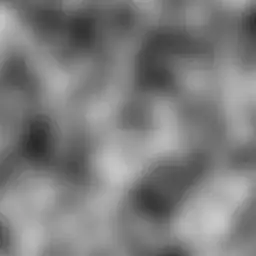
I generated a random 256-by-256 pixel RGB image using the "Solid Noise" filter in GIMP (Filters > Render > Clouds > Solid Noise...) using the default settings (shown below):
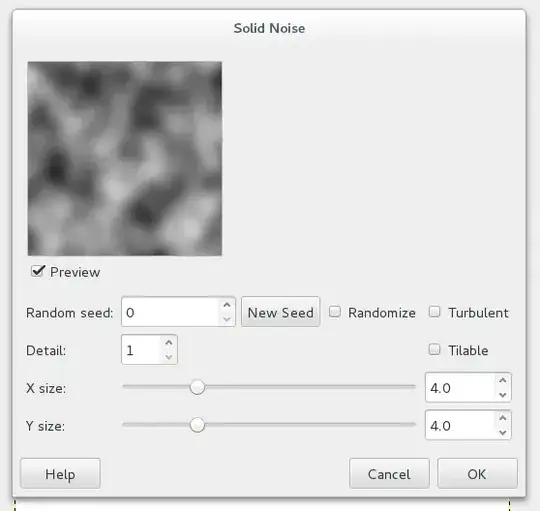
enter image description here

And the result:

enter image description here

Then I saved the image as a JPEG using the default settings:
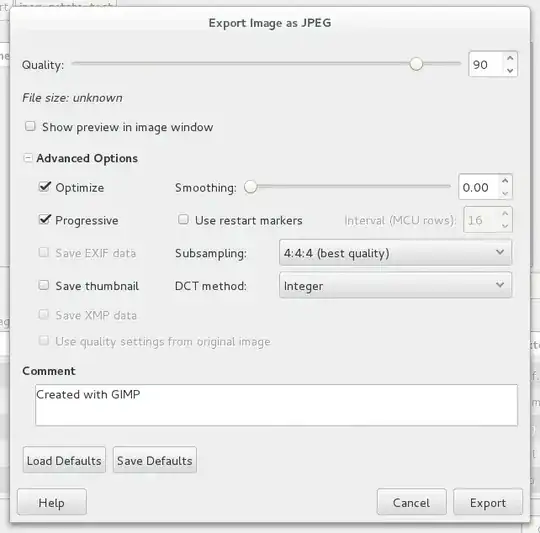
enter image description here

Then I transferred the image to Windows and opened the image with Windows Photo Viewer by right-clicking on the image in the File Explorer and choosing Preview from the menu. Then I rotated the image using the buttons in the bottom, and saved the image by navigating to the next image using the arrow keys.

For each of the tests below I started with a copy of the original image, and rotated (clicked on the rotate button) the corresponding number of times before saving. Here are the reslting sizes (ls -l -r):

                    size in bytes    last-modified date 
                          VVVVV        VVVVV
-rwxrwx--- 1 root vboxsf   6258 Nov  8 11:24 original.jpg
-rwxrwx--- 1 root vboxsf  23645 Nov  8 11:30 cw.jpg
-rwxrwx--- 1 root vboxsf  23636 Nov  8 11:30 cw-cw.jpg
-rwxrwx--- 1 root vboxsf  23649 Nov  8 11:30 cw-cw-cw.jpg
-rwxrwx--- 1 root vboxsf   6258 Nov  8 11:27 cw-cw-cw-cw.jpg
-rwxrwx--- 1 root vboxsf  23649 Nov  8 11:31 cw-cw-cw-cw-cw.jpg
-rwxrwx--- 1 root vboxsf  23649 Nov  8 11:29 ccw.jpg
-rwxrwx--- 1 root vboxsf  23636 Nov  8 11:29 ccw-ccw.jpg
-rwxrwx--- 1 root vboxsf  23645 Nov  8 11:29 ccw-ccw-ccw.jpg
-rwxrwx--- 1 root vboxsf   6258 Nov  8 11:27 ccw-ccw-ccw-ccw.jpg
-rwxrwx--- 1 root vboxsf  23649 Nov  8 11:30 ccw-ccw-ccw-ccw-ccw.jpg

Immediate observations

  • Windows Photo Viewer (WPV) does increase the size dramatically; the amount of increase is around four times in this test!
  • All the new images increase to around the same size, but they are not identical.
  • WPV does not re-encode or even re-save the image when it is rotated by a multiple of 360 degrees. (The timestamp, 11:27, is when the files were first copied.)

Using cmp -l on files that should have identical content allows us to see where the files differ.

robert@unity ../jpeg-rotate-test % cmp -l cw.jpg ccw-ccw-ccw.jpg
 2223  63  62
 2224  60  71
 2226  60  64
 2227  60  66
robert@unity ../jpeg-rotate-test % cmp -l cw-cw.jpg ccw-ccw.jpg
 2223  63  62
 2224  60  71
 2226  60  64
 2227  62  64
robert@unity ..jpeg-rotate-test % cmp -l ccw.jpg cw-cw-cw.jpg
 2223  62  63
 2224  71  60
 2226  64  60
 2227  61  64
robert@unity ../jpeg-rotate-test % cmp -l cw.jpg cw-cw-cw-cw-cw.jpg
 2221  60  61
 2223  63  61
 2224  60  66
 2226  60  61
 2227  60  61
robert@unity ../jpeg-rotate-test % cmp -l ccw.jpg ccw-ccw-ccw-ccw-ccw.jpg
 2223  62  63
 2224  71  60
 2226  64  65
 2227  61  64

These files differ in only four bytes (actually in a timestamp), meaning that WPV is doing the same thing every time; now we only need to figure out what that is.

Detailed Observations

For this I used JPEGsnoop to see what exactly was is in the images.

Since the outputs are fairly long I've linked to them as a gist. Here's a summary of the differences:

  • GIMP uses only an APP0 (JFIF) and COM (comment) segment for metadata. WPV leaves the APP0 segment untouched, but curiously adds a null byte to the comment (so that it is null-terminated).

  • WPV adds two APP1 segments, which are Exif and XMP metadata. These segments are 4286 and 12726 bytes, respectively. Together they account for almost the entire increase in filesize.

  • GIMP produces a progressive JPEG, while WPV produces a baseline (non-progressive) JPEG. For this reason GIMP's image has multiple scan segments, while the WPV image has only one. In my experience the progressive image is sometimes slightly smaller.

  • GIMP used 1×1 chroma subsampling, while WPV used 2×2 subsampling. This leads me to believe that WPV is not using "true" lossless rotation, unless it is somehow able to detect this is a black-and-white image.

To resolve these issues, I ran a second test.

Procedure

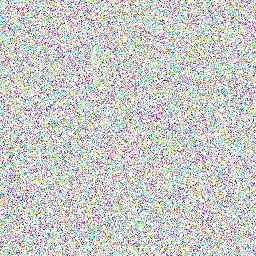
I followed similar steps to the first test. I created a random 256×256 RGB image using the RGB Noise filter (Filters > Nose > RGB Nose...) with the following settings:
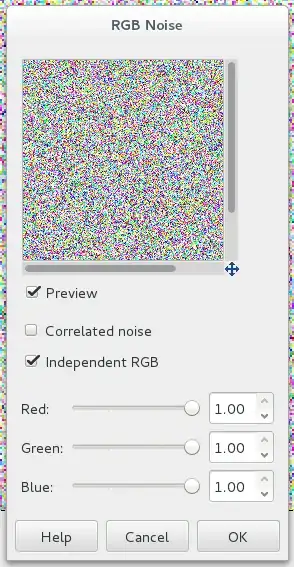
enter image description here

Here is the result:

enter image description here

I exported the file as JPEG using the following settings:
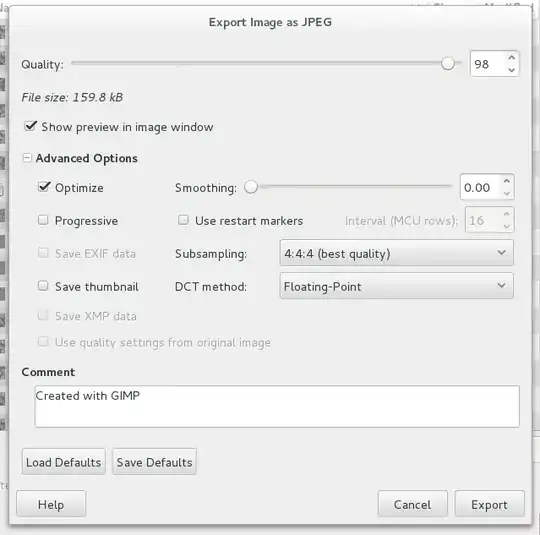
enter image description here

Progressive has been turned off, but Subsampling is still set to 4:4:4 (which is another name for 1×1 subsampling). The quality is increased to 98.

I copied the image and rotated the copy clockwise; then copied the rotated version and rotated that copy counterclockwise, so that we can directly compare the quality between the original and the WPV processed copy.

Results

-rwxrwx--- 1 root vboxsf 159774 Nov  8 16:21 original-random.jpg
-rwxrwx--- 1 root vboxsf 222404 Nov  8 16:24 cw-random.jpg
-rwxrwx--- 1 root vboxsf 222467 Nov  8 16:24 cw-ccw-random.jpg

Although the increase this time is smaller in relative terms (around 40%) the absolute increase is even greater—around 62 kB. This suggests that WMV is using a less efficient encoding.

I'll use ImageMagick to compare the two images:

robert@unity ../jpeg-rotate-test % compare -verbose -metric AE original-random.jpg cw-ccw-random.jpg null:
original-random.jpg JPEG 256x256 256x256+0+0 8-bit sRGB 160KB 0.000u 0:00.009
cw-ccw-random.jpg JPEG 256x256 256x256+0+0 8-bit sRGB 222KB 0.010u 0:00.010
Image: original-random.jpg
  Channel distortion: AE
    red: 0
    green: 0
    blue: 0
    all: 0
original-random.jpg=> JPEG 256x256 256x256+0+0 8-bit sRGB 0.050u 0:00.020

There are zero pixels different between the original and rotated copy. So, even if WPV is not using "true" lossless rotation, it is doing a good enough job. I suspect I know what is going on, and to explain I'll divert a little bit into the math behind JPEG compression.

The JPEG compression algorithm breaks an image into 8×8-pixel blocks. Each one of these blocks is then subjected to a Discrete Cosine Transform (DCT). The resulting DCT coefficients describe the block as a sum of different-frequency waves. The algorithm then "throws away" some information in the high-frequency waves that correspond to noise and very small detail. The decoding process reverses the DCT, adding the stored waves together to get back the block.

It is possible to rotate the DCT "waves" without actually undoing and redoing the transform (basically you turn all the horizontal waves into vertical waves and vice-versa). What I think happens in WPV is that the image is actually decoded, rotated, and then re-encoded. During the re-encoding process, since our image's size is a multiple of 8 in both dimensions, each of the new blocks corresponds to one of the original blocks. Importantly, since each block has no high-frequency components, the algorithm doesn't throw away any information, and finds exactly the right DCT components that a "true" lossless rotation would have.

Lastly, I'll look at the components of the JPEG files again. The results are again linked as gists. Comparing the two:

  • The WPV image contains an extra 4286+2 bytes of Exif metadata, 1 extra byte in the comment, and 12,726+2 bytes of XMP metadata. This is a total of 17,017 bytes of additional metadata. What is all that data used for? I peered into the file with my trusty hex editor and a copy of the relevant standards:

    • Exif metadata is structured like a TIFF image, which contains a number of tags (there's way more complexity, but I'll skip right over it). Most of the bytes in the Exif segment are contained in two identical tags with tag number EA1C (59,932 decimal). That tag number is not documented anywhere I could find. Both tags contain 2060 bytes of "undefined" type, which are all null bytes except for the first six (1C EA 00 00 00 08). I have no idea what these tags are, why there are two of them, and why they need to be 2 kB each.

    • The XMP metadata is actually an entire embedded XML document with namespacing and long UUIDs, that just contains the WPV version string (that was already in the Exif metadata). However, that only accounts for around 400  bytes. The remainder of the segment is 122 repetitions of 100 spaces followed by a newline. That's over 12,000  bytes of totally wasted space.

  • Like the previous test, both GIMP and WPV use the same DCT quantization tables. This means that they should be calculating the exact same DCT coefficients, which is why the images are exactly the same. I'm not sure if WPV just happens to be using the same quantization tables or if it copies the tables from the input.

  • Unlike the previous test, this time WPV uses 1×1 subsampling, so it may actually be detecting that this is a color image (or at least that higher samples are necessary to losslessly re-encode the image).

  • GIMP and WPV use different Huffman tables (part of the entropy coding step). The tables for WPV are larger by a total of 279 bytes, and in one case contain 7 times as many codes.

    Looking at JPEGsnoop's statistics, we can see that some of these codes are rarely used. For example, in the ID: 1, Class: AC table, of the 119 16-bit codes defined, only 23 are actually used. Overall, the actual scan segment is 28.5% larger in the WPV version.

Summary

  • WPV may not be doing "true" lossless rotations, but the rotations seem to be practically lossless.

  • The extra size is partially due to a fixed amount of added metadata, and partly due to less efficient entropy coding.

Version Information:

  • OS (Linux) (uname -a):

    Linux unity 3.16.0-4-amd64 #1 SMP Debian 3.16.36-1+deb8u1 (2016-09-03) x86_64 GNU/Linux
    
  • OS (Windows):

    enter image description here

  • GIMP (Linux): 2.8.14 (from package gimp, version 2.8.14-1+deb8u1)
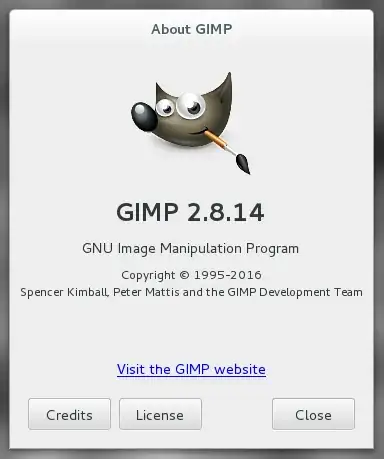
    enter image description here

  • Window Photo Viewer (according to image metadata):

    Microsoft Windows Photo Viewer 10.0.10586.0
    
2012rcampion
  • 542
  • 3
  • 10
20

EDIT: This answer was posted before I knew that the files had increased in size by around 9 KiB (9055 bytes for the 256×256 image, 9612 KiB for the 512×512 image).

In all likelihood, when you first rotated the image, Windows Picture Viewer did one (or both) of the following things:

  1. Added an EXIF tag that was not in the original JPEG image (perhaps the Orientation tag);
  2. Modified/added information to a tag that already existed (perhaps Processing Software or Image Software tags).

This increased the file size because of the additional EXIF tag (and/or additional data to existing tags).

Subsequent rotations didn't increase the file size because all of the tags and/or tag data that WPV would have added/modified were already there. Only the Orientation Tag value changed (and perhaps date/time tag values as well).


EDIT: It is almost certain that this explanation cannot account for about 9 KiB of additional data in the file. Further, absent any other reasons for the size increase, this explanation would expect that the increase in size would be more or less constant (modulo some length differences between string representations of numeric data, probably a few bytes). That is obviously not what is happening here, at least not the complete explanation.

scottbb
  • 32,685
  • 12
  • 104
  • 188
  • 1
    And an EXIF tag is going to take up 9kB? Well, this at least is easy to test -- have the OP delete EXIF or other tags from the rotated image and see how the file size changes. – Carl Witthoft Nov 07 '16 at 12:35
  • 2
    @CarlWitthoft the 9kB is new information. Editing to mention that. – scottbb Nov 07 '16 at 12:35
3

Without reverse engineering the jpeg en/decoder it's impossible to say for sure. There are actually a number of jpeg standards and contrary to popular belief, not all of them can be modified without re-encoding.

It's possible that the first save is a lossy rewrite into its favoured jpeg flavour and the subsequent rotations are a simple metadata tweak or an operation directly on the DCT table (which is possible for some encoding schemes).

The increase in filesize may also include some additional metadata, though 9k seems a lot, it's possible. The increase may also be accounted for by the addition of a thumbnail which may not have been present in the output from GIMP. We may be able to get more information from the files directly (before WPV and after).

In any case, trying to work loslessly with jpeg is really a fool's errand as it's only useful with certain image sizes, not all decoders and encoders are identical and it requires those editors to work directly with the jpeg content which you cannot rely on to be the case... Just because it does so now does not mean it will continue to in the future.

Your better bet is to work with a lossless format and avoid the pain entirely.

James Snell
  • 9,709
  • 25
  • 39
  • 2
    I'm not at all convinced that rotating jpeg data should cause a re-encoding in the first place. – Carl Witthoft Nov 07 '16 at 12:37
  • Depends on if you're a programmer or not... My guess is you're not. You'd have to be specifically looking for that optimisation to make that minimal change otherwise a save operation would start from the uncompressed bitmap. – James Snell Nov 07 '16 at 13:37
  • 3
    From the linked question, it is clear that Windows Photo Viewer does rotate JPEGs losslessly. – vclaw Nov 07 '16 at 13:41
  • But under which circumstances... That's the part we don't know. – James Snell Nov 07 '16 at 13:43
  • 2
    @James I'm not a low-level programmer, tho' I play on on TV :-) . The OP provided a link to an accurate description of when there would be re-encoding and when there isn't. I had inferred from that discussion that he'd only been rotating by $\frac{\pi}{2}$ . I agree that arbitrary angle rotation causes re-encoding, and for that matter is going to cause information loss unless the X-by-Y image is embedded in a region at least as large as the hypotenuse. – Carl Witthoft Nov 07 '16 at 13:43
  • The point isn't what's mathematically feasible. It's about what the code actually does though. What the OP is seeing is that iteration 1 causes a change in the file size but subsequent iterations do not. There are causes for that and I'll do an edit in a bit to explain what may be happening. – James Snell Nov 07 '16 at 14:06
  • The cause for the lossless rotation (which is a poor term; better would be reversible) is when the dimensions of the image are multiples of 8 or 16, which is the Minimum Compressible Unit. If a JPEG does not contain partial MCUs, then it can be rotated/flipped without any change to the DCT data blocks. There's no re-encoding at all in that case, merely changing a matrix of indexes to those blocks. – scottbb Nov 07 '16 at 14:20
  • @scottbb - that only applies to certain encoding methods within the jpeg spec. and it relies on the software looking for that optimisation. All we know is (a) yes, it's possible under certain circumstances and (b) that we don't know exactly what this application is doing... – James Snell Nov 07 '16 at 14:23
  • 1
    We're pretty sure we know that WPV is rotating reversibly for images with dimensions multiples of 8/16. See @Tristan's comment to Matt Grum's answer to the question linked to in the OP. Tristan worked on the WPV team at Microsoft, and basically confirms. – scottbb Nov 07 '16 at 14:26
  • @scottbb - only for the 2nd and subsequent ones. We DON'T know what is happening with the first one and that's what we're attempting to figure out here. – James Snell Nov 07 '16 at 14:33
1

Lossless JPEG rotation is only possible without introduction of boundary artifacts if the image dimensions are multiples of the block size (typically[/always?] 8). See the jpegtran man page (sorry I don't have a good canonical link for it; feel free to edit if you find one) for details on what's involved:

The transpose transformation has no restrictions regarding image
dimensions. The other transformations operate rather oddly if the image dimensions are not a multiple of the iMCU size (usu- ally 8 or 16 pixels), because they can only transform complete blocks of DCT coefficient data in the desired way.

jpegtran's default behavior when transforming an odd-size image
is designed to preserve exact reversibility and mathematical
consistency of the transformation set. As stated, transpose is
able to flip the entire image area. Horizontal mirroring leaves any partial iMCU column at the right edge untouched, but is able to flip all rows of the image. Similarly, vertical mirroring leaves any partial iMCU row at the bottom edge untouched, but is able to flip all columns. The other transforms can be built up as sequences of transpose and flip operations; for consistency, their actions on edge pixels are defined to be the same as the end result of the corresponding transpose-and-flip sequence.

For practical use, you may prefer to discard any untransformable
edge pixels rather than having a strange-looking strip along the
right and/or bottom edges of a transformed image. To do this, add the -trim switch:

I suspect the Windows Photo Viewer is avoiding this issue by performing decompression and extreme-high-quality recompression to simulate lossless behavior when the image dimensions are not multiples of 8, rather than actually performing lossless rotation. A good utility would just do actual lossless, artifacts and all, or drop a few pixels, rather than ruining the quality of the whole image (and increasing the file size).

0

I have no definite answer but some possible theories of why that happened. Some file types work in such a way two different codes for an image of that file type don't necessarily produce different images. For example, the PNG file type works in that way because it allows for a transparent background but an image with a transparent background and one that's the same except that the same background is white appear exactly the same way. An image file is said to be compressed if it takes up less than 3 bytes of memory per pixel. I believe that except for the ones with a transparent background, no two PNG files generate the exact same image. When ever you save an image as PNG, it converts it into a code that generates the original image and except for very unusual images like one where each pixel is a random color of all 2^24 colors, the code will take up less memory than 3 bytes per pixel so saving as PNG is said to be lossless compression. On the other hand, to save memory, only certain images can be generated by the code of a JPEG image file. There's probably more than one JPEG file type and I don't know if any of them have the property that two different images of that file type can generate the exact same image. I'm assuming that a bunch of times you just rotated an image then saved it as JPEG and will gives an explanation of what happened under the assumption that that's what you did which I don't know if is true. A rotation you did is lossless if there's a way to get back the exact same image file code as you had before you rotated it and saved it. You might not be correct that you really did do a lossless rotation. If it really was lossless, one possible reason is that two different image codes really do generate the exact same image and it was the code of the image you had and not which image you had that determined the image you got after you rotated it then saved it.

Timothy
  • 101
-3

The reasons behind this are a few

the way images are coded and compressed will change the size simply because of the compression algorithm. you can test this by saving it as a bitmap and then rotating it. In that format or any raw format the size should remain the same. If it does not then the program saving the image is adding new data possibly some metadata or something.

But why are you rotating a jpeg 20 times?

Cc Dd
  • 95
  • 1
  • 2
    If you read the link in the original question, at least for Windows Picture Viewer, if the dimensions of a JPEG are a multiple of 8, then rotations of JPEGS in WPV are lossless transformations. A simple way to test that is to rotate 4 times (resulting in the same orientation as the original) and performing a simple pixel-by-pixel image subtraction. – scottbb Nov 07 '16 at 12:27
  • @scottbb This is not necessarily just a problem with windows picture viewer. Anything that rotates a lossy format has to recalculate the compression. rotating an image in multiples of 8 means everything fits in 8 bit words and may not get compressed in a way that adds artifacts. This is based on how the algorithm works and is implemented in the program used. – Cc Dd Nov 07 '16 at 21:20
-3

Because of how compression of images works. Any format like PNG or JPG in general do not preserve file size after rotation.

To the compressor the rotated image is just a different image, due to how compressione heuristic works there's no guarantee it will compress a rotated image the same.

Of course if the compression is lossless, if you rotate the image 4 times the 4th time the image is again the same (rotated until it becomes tilted as original): in that case it should become again of the same compressed size, if not then it is because one of the following reasons:

  • Added metadata: the program added some chunk of text for some reason
  • Compressor changed: the program may choose to just re-save the image as the original if there are no changes, but if you apply any change (even 4 rotations of 90 degrees) it may decide to re-compress the image again using its own compressor (the program no longer knows it is still the same image).
  • In general the same compressor (libPNG or libJPG) yields very different results across different implementations, different versions of same library and with different compression parameters (also operative system and compiler makes a difference here sometimes).

Image compression works by compressing images into 4x4 or other sizes chunks. In general a compressor sees a rotated image as a different image, however since a compressed pixel chunk is Just a linear decomposition, if the chunks on the image are the same it is possible just to Transpose/Mirror the linear decomposition matrices effectively keeping the same quality:

Note this has to be implemented on a per feature basis, and that also explain the initial increase in size => on first rotation it just trys to compress the image in chunks that are rotable:

  • If it fails to do so: the image quality degrades
  • If it is successfull it increase the size only once then every rotation keeps same quality.

  • That operation is successfull only if the image is made by equal chunks. (size of image is multiple of chunk's size).

The scottbb answer ins wrong and you can do a simple test:

  • Open the original image: Screenshot it
  • Rotate the image 4 times with WPV: Screenshot it
  • Compare the 2 screenshots

You will see the image changed (it is recompressed on first rotation). However that change is limited in time, you can now rotate it again without quality loss (if the image has a size that is a multiple of 8)

To directly answer OP:

I know it's rotating losslessly

Not it is not rotating losslessy, it lose quality at least once (on first rotation: because it should first compress it in a way that can be rotated), then it maintains its quality.

  • 1
    The question is about lossless rotation, so recompression is avoided. – Agent_L Nov 07 '16 at 14:15
  • I program a graphic editor so I know what I say, when the file is saved => it is compressed. At least what is added to the file is "rotation" information. – CoffeDeveloper Nov 07 '16 at 14:17
  • I know what I say and even implemented a image compressor. It is possible if you implement that just for rotation (meaning you know rotation is the only change to the image), in general case this is not possible. Seems developers of windows photo editor did that trick – CoffeDeveloper Nov 07 '16 at 14:24
  • 5
    OP asked not about general case but exactly about that one piece of specific software and that one specific case that does it. Your answer is not wrong, it just answers a different question than what OP asked. – Agent_L Nov 07 '16 at 14:28
  • No it answers. Read it again. I edited that a while ago. – CoffeDeveloper Nov 07 '16 at 14:31
  • 1
    First 3 sentences are still to a different question: "how compression of images works" - there is no compression in lossless rotation. "To the compressor the rotated image" - again, the compressor is not invoked. "if the compression is lossless" - the compression is lossy. The rotation is lossless. Now, this is how far I am willing to take this argument. I can see your point, I agree with it, but it's completely out of place here. BTW, I am a programmer too and I did my share of raw file reading and writing. – Agent_L Nov 07 '16 at 14:47
  • You seems to take that too personally. IT IS NOT LOSSLESS ROTATION: just read the small experiment and do that your self. It basically shows your last comment is wrong. U.u You may even be a programmer too, but I don't believe you coded ever a image compressor (even a simpler one) – CoffeDeveloper Nov 07 '16 at 14:48
  • I am sorry then, what experiment can I do to show it? Because an experiment was done in the linked question. Am I interpreting the results wrong? – Agent_L Nov 07 '16 at 14:50
  • 1
    I've created an image in Paint, rotated it 4 times and it's identical, but the size nevertheless jumped from 1.6 to 8.1 KB. Binary diff shows that image data was untouched, it's just huge chunk of metadata in <?xpacket tags. – Agent_L Nov 07 '16 at 15:07
  • PAint image is not a good canditate u.u I just did the experiment with a real phot.. Did you used a Image differ ? Sorry but which windows version do you have? – CoffeDeveloper Nov 07 '16 at 15:10
  • I took a screenshot, pasted it into paint and cropped to 128x128. It looks like same chunk of core data is repeated, but the rotated version has huge chunk of almost empty <?xpacket added. I don't have a proper binary diff here so I can't tell. After I uploaded both to verexif.com and they came back identical to each other but not to original. But as I said, I compare them by hand i hexeditor so I probably missed a lot. Windows 8.1 – Agent_L Nov 07 '16 at 15:23
  • 1
    If a JPEG's dimensions are evenly divisible by 8 (or 16 with subsampling), it can be rotated in increments of 90 degrees losslessly. The key is to not decode it all the way to RGB, but to work directly with the DCT coefficients. It's a specialized function that isn't often included in a general image editor. See for example https://en.wikipedia.org/wiki/Libjpeg#jpegtran. If you performed your experiment with Windows Photo Viewer as specified in the question, you'd see that it is indeed lossless. – Mark Ransom Nov 08 '16 at 20:33