1

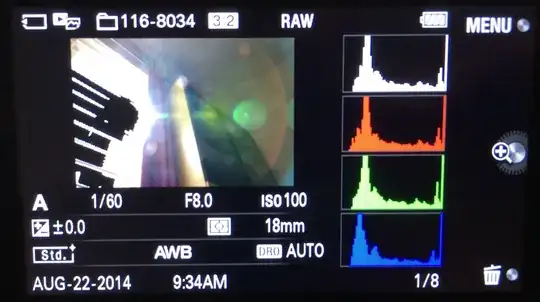
My camera shows a histogram in the preview:
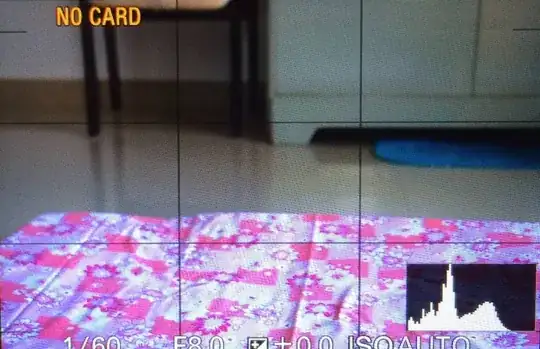
enter image description here

And after I take the photo:

enter image description here

  1. I shoot RAW, but as I understand it, the histogram is computed from JPEG, so it might indicate that the highlights and/or shadows are clipped, even if they actually aren't in the RAW. Am I correct? If so, the histogram doesn't serve its purpose for me, which is to tell me if the photo I took fails to fully capture the dynamic range in the scene, in which I case need to take another photo.

  2. Does the above point hold for the preview histogram, or the histogram I see after the photo was taken, or both?

  3. What's the relationship between the R, G and B colors on the histogram with the white histogram? Would I be correct in assuming that if there's no clipping on the white histogram, then there's no clipping on any of the histograms for the individual color channels, either?

This is on the Sony NEX-5R, if it matters.

Kartick Vaddadi
  • 4,726
  • 10
  • 52
  • 94

2 Answers2

2
  1. You are correct, it is computed from the JPEG and that makes it harder to tell if you've clipped the shadows/highlights. It doesn't make it less useful though.
  2. Most likely both histograms are calculated from a "gamma corrected" image and they will not be able to tell you if you've clipped for sure.
  3. The R, G and B channels on your histogram represent the gamma corrected tonal range of the different colours and the white histogram shows the gamma corrected of the entire tonal range of the image. Also all three channels must clip to blow out the "white histogram" so you can't assume that there has been no clipping in any on the three colour channels just because the "white histogram" hasn't clipped.

The common way to calculate histograms among camera manufacturers is from the JPEG file. This means that you can't use the histogram straight off to tell for sure if the shadows and highlights are clipped. If you only use the histogram to determine if you've clipped you're using them wrong and they are in fact very useful indeed when they are generated from JPEGs.

Why is the histogram calculated from the JPEG file?

In fact there is a very strong reason to the histograms being calculated from the JPEG though and that has to do with how our eyes responds to light. Chemical film mimics the eye's response but the digital sensor does not since it's lenear and what's called a "gamma correction" has to be applied to get an image that is usable. The RAW file is essentially a raw dump of the data and the gamma correction has not yet been applied to it. The JPEG however has been gamma corrected which makes it more film like and using it's histogram makes a lot more sense. If you're exposing the image based on th RAW histogram you will not use the cameras dynamic range correctly and this translates to a noisier image than it has to be.

You can't use the histogram as the sole determinant for your setting to get a good exposure. The histogram is a tool and it's properties has been tunes to show useful information regarding ho humans perceive images. You have to use it accordingly. By practising you will get a feel for when the shadows/higlights are blown and how to avoid it.

Adobe has two goodpapers related to why the histograms are calculated from the JPEG ("Raw Capture, Linear Gamma, and Exposure") and about RAW capture in general ("Understanding Digital Raw Capture") that I higly recommend you to read to get a better understanding of how to use the histogram of the camera. Also check out this question on photo.SE.

Hugo
  • 8,288
  • 9
  • 46
  • 85
  • Thanks. I've already read the linked questions, and I will read the two Adobe papers. In the mean time: why don't cameras convert the RAW to a 16-bit bitmap image, and then compute a histogram based on that? Then the histogram will accurately represent clipped highlights and shadows, as in Lightroom. – Kartick Vaddadi Aug 24 '14 at 04:49
  • @KartickVaddadi Read my answer more closely. I did explain why cameras uses gamma corrected versions of the histograms and that they are not good alone to detect clipping. In Lightroom you can't see if the RAW file is clipped by reading the histogram as it's in the prophotoRGB space with a sRGB tone curve applied. – Hugo Aug 24 '14 at 08:34
  • @KartickVaddadi Also the RAW file already is a bitmap image (often derived from the bitmap format tiff), albeit compressed, and can have bit depths of 12, 14 and 16 bits depending on model/settings. – Hugo Aug 24 '14 at 08:35
  • Thanks, Hugo. What I meant to say is: Why can't the camera do gamma correction and demosaicing and whatever else it does to 'develop' the RAW, but not reduce it down to 8 bits per channel. Instead, it should keep the same bit depth, whether that's 12, 14 or 16 bits per channel. Think of exporting a RAW as a 16-bits-per-channel TIFF. Then compute the histogram using this image, for it to be more useful. – Kartick Vaddadi Aug 25 '14 at 02:40
  • Regarding your point that I can't determine from the Lightroom histogram whether there's clipping in the RAW, thanks — I won't read the histogram for this purpose. Does your comment also apply to the option in the Develop mode where it shows clipping on the image itself (not on the histogram) by showing the clipped highlights as red, and the clipped shadows as blue? Is that also not accurate (to determine whether there's clipping in the RAW)? Finally, I understand that histograms have multiple purposes, but in this question, my goal is just to figure out if there's clipping. – Kartick Vaddadi Aug 25 '14 at 02:43
  • @KartickVaddadi These follow up questions are better suited as new questions. Ask then as individual questions and I will answer them to. Otherwise this comment thread will just grow and that's not what it's for. – Hugo Aug 25 '14 at 07:17
  • I can ask the question about LR as a separate question, but the point about why the camera converts the RAW to an 8-bit-per-channel image when it could use a higher bit depth is related to this one. – Kartick Vaddadi Aug 26 '14 at 06:29
  • @KartickVaddadi Perhaps related but other people may have the same questions and if they are answered in a comment the information is not as accessible. I really want to help you but just ask two new questions and I will answer them as well as I can. – Hugo Aug 26 '14 at 07:52
  • 1
    The bit depth and gamma correction are irrelevant, there's absolutely nothing stopping the camera from looking at the RAW numbers that come out of the ADC and telling the user how close to saturation they are. – Matt Grum Aug 26 '14 at 08:03
  • Hugo, I asked the question about Lightroom in a separate question, but it doesn't make sense to split the question about in-camera histograms into two, both covering the same issue, and rehashing the same issues in both questions. If you disagree, that's fine, but I don't think it helps to continue to discuss this. – Kartick Vaddadi Aug 29 '14 at 04:29
0

1. There's no way to get a proper RAW histogram in any digital camera that I know of, they all use the JPEG preview.

There are white balance hacks (to ensure unity scaling of each colour channel) and picture style settings (turn contrast and saturation all the way down) that make the histogram look a little more like a RAW histogram would.

2. Both histograms will be computed from the JPEG conversion.

3. The individual R,G,B histograms are computed from the colour channels of the JPEG image, that is clear. It is unclear whether the white histogram is simply the sum of the three individual histograms (in which case if any colour shows clipping the white will show clipping), or whether it is based on a luminance measure, in which case the opposite might be true. It's a moot point really as the individual colour histograms are highly inaccurate (because they are not based on RAW data) therefor however they are combined the result will be inaccurate.

In summary there is no reliable way to find out whether the dynamic range of the scene fits within the range the camera can capture. I would advise you take two bracketed shots anyway (one for the shadows and the other exposed to ensure highlights are captured).

Memory cards are cheap and that way you can download the images, look at the RAW histogram and if the DR does fit within one image you can just ignore the other one, and if it doesn't then you have two exposures to blend.

But if you really want to get the perfect exposure the advice I always give is to bracket your shots. Memory cards are cheap these days.

Matt Grum
  • 118,892
  • 5
  • 274
  • 436
  • Thanks, Matt, I would like to bracket shots only when one shot doesn't cover the dynamic range of the scene (if there's clipping). Which brings us back to the original question of determining when that's happening, which you seem to say doesn't have a good answer. LR doesn't help here because by the time I return to my home or hotel and import the photos into LR, it's too late to go back and get another shot. – Kartick Vaddadi Aug 26 '14 at 13:56