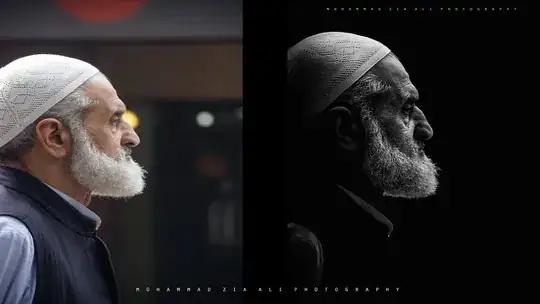
I want to get black background in portrait and effect like this,check my attach image file. by using which software I can get this,I guess by Lightroom but I try and failed.So Please anyone help me to get out of this problem
I want to get black background in portrait and effect like this,check my attach image file. by using which software I can get this,I guess by Lightroom but I try and failed.So Please anyone help me to get out of this problem
Lightroom isn't designed for this type of photo editing; this is what Photoshop is designed to do. Even if you don't eventually use Photoshop, search Google/Youtube for "Photoshop Masking", or "Replace Background Photoshop". There are literally hundreds of tutorials that will walk you through how to mask.

Little late, but here's your answer:
I found the photographer, Mohammad Zia Ali, on Facebook, and came across this incredible video he posted on his post-processing technique using Adobe Camera RAW and Photoshop. Make sure you watch in HD.


