10

As far as I know, a ISO setting on a DSLR camera corresponds to a mixture of both analog and digital settings set before a shot is taken and governs how much amplification the incidence luminosity is to be amplified by to obtain the final data stored in the RAW file.

On the analog side, this corresponds to various gain settings at the sensor and ADC sites to boost the effective voltage to higher/lower levels. On the digital side, this corresponds to some specific technique used to increase the value of the digitized luminosity value to a higher level before it is stored into the RAW format, all done in the digital side of things.

When composing shots, I've always taken the approach to minimize the digital ISO applied onto images and instead rely on post processing to boost exposure. To clarify, in a scenario where the correct image sensitivity setting lies between two native ISO settings I would be tempted to lock my ISO to the lower native sensitivity, taking the picture slightly underexposed, and boosting it in post (as opposed to taking it with correct exposure directly).

However, I've noticed that this procedure seems to result in lower quality images compared to in-camera digital ISO boosts. The processed shots in lightroom tend to develop a purple tint as well as seem noisier in general.

The following demonstrates two sample shots in which the exposure of the ISO 6400 one is raised by 1 EV in post via lightroom. Both shots are 100% crops of a condenser microphone's grill.
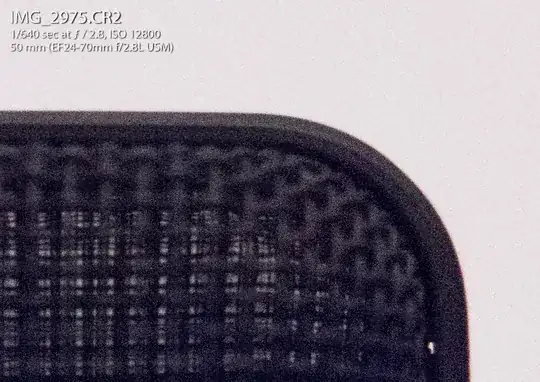
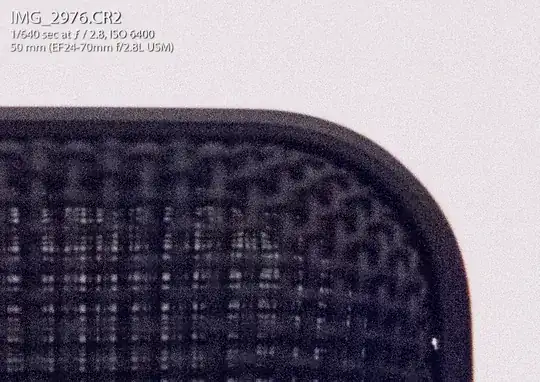
ISO 12800 Image Sample ISO 6400 Image Sample

Notice the purple hue from the 6400 shot as compared to the 12800 shot. Funnily enough, the 12800 shot seems more usable despite being considered to be an "expanded" ISO for the EOS 7D (Though both shots look terrible).

Given that digital ISO boosting happens, well, digitally, why is there a disparity between the digital ISO boost applied in camera vs the one applied in post by Adobe Lightroom? I would be have assumed the reverse where the post-processed image is superior due to the increased processing power and lack of realtime preview requirements that camera processors have.

I have thought about the whole theory of exposing to the right and have tried such a theory whilst maintaining my habit of locking to the nearest native ISO but the results were not much different to the ones shown above (purple hue, apparent noise increase, etc).

initramfs
  • 220
  • 2
  • 8
  • 2
  • @entonio I'm talking about digital ISO, not native (sensor/ADC gain) ISO differences. – initramfs Jun 19 '14 at 19:02
  • 3
  • @CPUTerminator, there's one thing I don't get. If you're shooting at lower native sensitivity, taking the picture slightly underexposed, and boosting it in post, aren't you maximising the digital part of the process, even if it's via post rather than via camera? Auiu there's no signal to be gained digitally. – entonio Jul 02 '14 at 02:26
  • @entonio The two shots are at the same native sensitivity, one is not lower than the other. This comes from the fact that many camera's ISO expansion range does not increase native sensitivity but rather performs in-camera digital ISO boosting. Effectively both shots above are at a native sensitivity of ISO 6400 (in which the ISO 12800 has a in-camera digital ISO boost of +1 EV). – initramfs Jul 02 '14 at 07:03
  • @CPUTerminator I understand that. What I'm saying is that if you want to reduce the digital part of the process, then it doesn't make much of a difference whether your boosting is digital-in-post or digital-in-camera, what you should rather do is shoot at a higher native sensitivity. If that isn't possible, then it's also logical that the camera knows how to do its digital boost better than any 3rd party tool (that doesn't mean that the result is better or better in every way). That's why, given you have a clear understanding of it all, I don't get why you think in-post boost would be better. – entonio Jul 02 '14 at 14:28
  • @entonio Regarding "you want to reduce the digital part of the process, then it doesn't make much of a difference whether your boosting is digital-in-post or digital-in-camera" thats basically what my question is asking. And from above you can see there is quite a difference. Regarding why I find it unlikely that cameras can do it "better" is because of the vast limits imposed on a camera processor vs a desktop computer's processor. – initramfs Jul 02 '14 at 15:04
  • @entonio A camera's processor has to be realtime or else any sort of burst will essentially fail (or at least reduce maximum number of continuous shots). The processor also has a limited clock rate and complexity, reducing its capacity to do complex work fast. The RAM available to this processor will also be drastically limited. A computer generally does not have any of these limitations. Even with a superb algorithm, its hard to top out even 3rd party stuff when you got all these limits. Thats why I generally believe post-processing to be superior to in-camera given the same source material. – initramfs Jul 02 '14 at 15:05
  • @CPUTerminator ok, that's a legitimate expectation. However, don't forget the camera may (does) have specific hardware devoted to the acceleration of the very few things it does. It may even be adaptive and give worse results in burst mode so as to keep up the rate. What about Canon's own RAW converter utility for the PC, can it do exposure boosting? – entonio Jul 03 '14 at 10:52
  • There is an assumption that in the "extended" ISO ranges images are achieved through a mathematical transformation termed a digital ISO boost. The sample images are incongruent with the expected behaviour if that were the case; so either there is a brilliant algorithm at work or the assumption is wrong - meaning the answers suggested by entonio and mattdm are actually the right ones. – James Snell Sep 19 '14 at 13:57

4 Answers4

3

Canon 7D ISO 12800 does not look like it is pure digital ISO. The raw histogram lacks those gaps at each second bin which are a sign of 2x multiplication. Also, Lr often applies ISO-dependent noise reduction; and there are other converter-dependent effects too.

Iliah Borg
  • 2,031
  • 10
  • 13
  • On camera screen the histogram bins would be quite large so even an extreme modification wouldn't show there in 8-bit images, let alone the 12/14bit the camera works with. – James Snell Oct 19 '14 at 20:56
  • Not sure why you are discussing the histogram the camera displays. It is not a histogram of raw data. – Iliah Borg Oct 20 '14 at 00:40
1

That is due to the signal-to-noise ratio being higher when exposing properly than when you underexpose and raise exposure on a RAW processor like Lightroom. Setting the right ISO in-camera produces higher quality shots than raising the exposure in post-processing.

If perfect exposure can't be achieved, you either overexpose or underexpose.

I personally expose to the left (underexpose) because recovering shadows is much easier and cleaner than recovering highlights.

This should explain signal-to-noise ratios: http://www.cambridgeincolour.com/tutorials/image-noise.htm

Johnny
  • 11
  • 1
  • 1
    The SNR is irrelevant here as we are dealing with the same SNR for both pictures. As far as I know, in camera digital ISO boost (not native ISO) is doing the same thing as raising exposure in post (such as in Lightroom). The signal present directly after digitization for both shots in the question above should be identical (since the sensor and ADC gain is already maximized) thus having the same SNR. The question asks why digital ISO boosting appears to be superior to LR exposure correction. – initramfs Jun 21 '14 at 16:40
  • 1
    "The question asks why digital ISO boosting appears to be superior to LR exposure correction." Because the in camera algorithm used by Canon to boost ISO 6400 to ISO 12800 appears to be superior to the algorithm used by LR to boost an image taken by a Canon camera at ISO 6400 by one stop. They are both trying to do the same thing, but they are not using the same algorithms to get there. – Michael C Jun 22 '14 at 19:55
0

Since there is only one stop difference between the two photos in your example, I would be very prone to say the largest amount of influence over the differences between the two images is the difference between the way the in camera processor handles "extended" ISO settings versus the way LightRoom increases the exposure of the ISO 6400 image. They are not the same. Sometimes, depending on the specific camera model, they cam be quite different. Just the difference in the default behavior for noise reduction of high ISO images might explain the majority of the differences between the two shots in your sample.

You would probably get much closer if you compared the in camera results to the camera manufacturer's RAW convertor. The increased processing power is only useful if the RAW file is being interpreted by an algorithm as good or better than the one used by the in camera processor.

Michael C
  • 175,039
  • 10
  • 209
  • 561
  • Both shots are processed by Lightroom, the ISO 12800 shot simply has all default parameters set (in Lightroom). – initramfs Jun 19 '14 at 23:09
  • But the camera is applying different NR and other processing to the ISO 12800 image in camera than it is applying to the ISO 6400 image, because ISO12800 is an "extended" ISO setting for the 7D. – Michael C Jun 20 '14 at 01:25
  • 1
    As far as I know, NR and other processing is not applied directly to the RAW file but saved as a preference or hint for the RAW processor to use. Both images used all defaults (including NR) in Lightroom. Besides, the same phenomenon is present with ISOs not in the expanded range, I simply used the extreme to demonstrate the effect more clearly. – initramfs Jun 20 '14 at 07:20
  • @CPUTerminator Depending on the sensor/camera model some NR can be applied to the analog data coming off the chip before it is converted to digital. Additional NR may be also be applied to the digital data before it is saved in the proprietary RAW file. Further, Lightroom does not read any of the "maker notes" section (where in camera settings such as WB and NR are recorded) of the EXIF info in a Canon RAW file. LR applies its own default, or a default profile created by the user and stored in LR, regardless of what the in camera settings were at the time the image was taken. – Michael C Jun 22 '14 at 19:50
  • So you are saying, despite NR being turned off in camera there is still some destructive NR being applied to the digital data prior it being saved to the RAW. This seems very counterintuitive as the purpose of RAW is so you can do all the digital manipulations in post. Additionally, I did a check of whether the in camera noise reduction option had any effect on the RAW file and the results suggested it did not. – initramfs Jun 27 '14 at 08:24
  • Yes. Some cameras more than others. Nikon uses quite a bit of on chip NR before the data is read out. – Michael C Jun 27 '14 at 10:44
  • The in camera noise reduction setting would not affect whatever NR is being done to the data prior to the generation of the RAW file. The selected ISO speed might. The in camera NR setting would affect how much additional NR is done to the RAW file when it is converted to jpeg in camera. If you open the RAW file using an application that reads the maker notes section of the EXIF info, instead of ignoring it as LR does, only then would the in camera NR setting have an effect on how the RAW file is displayed when first opened. – Michael C Jun 27 '14 at 10:48
  • What would such an EXIF marker's corresponding key be? Because browsing through the EXIF with exiftool yields not much difference between the two shots. Unless this is something even exiftool fails to pick up... – initramfs Jun 27 '14 at 15:16
  • It is not a question of whether EXIF tool can see and display the "maker notes" section of the EXIF info correctly or if LR can display the EXIF info correctly. It is a question of what LR does with the information contained in the "maker notes' section. LR doesn't do anything with that information (except possibly use it to try and identify the lens model used), so it doesn't matter. – Michael C Jun 28 '14 at 14:20
  • I get what you mean with LR not doing anything with the NR side of things. I am simply looking for proof that such marker notes (about the NR) actually exist. Not saying I don't trust you but it would be nice if there is a way to definitely prove such a difference exists rather just blindly trusting something that appears to be more of a theory then actual explanation. – initramfs Jun 28 '14 at 15:06
  • I understand that such information (the way the camera chose to apply NR) may perhaps not even manifest itself in EXIF but there has to be a way that someone can definitely prove that the camera actually performs such noise reduction (or else how would anyone even know about it?). You mentioned that its in the EXIF, which I've digged around for a while now unable to find any difference between the two shots. What evidence can you present to prove that NR is applied to RAW independent of any NR settings. – initramfs Jun 28 '14 at 15:08
  • You totally misunderstand. The EXIF info includes what the in camera NR setting was when a particular shot was taken. This setting will only apply to the NR done after the RAW file has been recorded. Any NR done prior to that point will be done exactly the same for every shot the camera takes because it is hardwired into the hardware and/or the D/A convertor's firmware. In the case of firmware, the camera may use different protocols for extended ISO settings, but the protocol will always be the same for every photo taken at that particular ISO. – Michael C Jun 28 '14 at 15:13
  • I never thought the exif markers for in camera NR had anything to do with what you are proposing. I ignored all EXIF markers regarding customizable NR. I perhaps misunderstood you point about NR EXIF marker notes and thought you suggested that type and magnitude of NR applied before the RAW file would be placed as a EXIF marker, to be used for reference rather than anything practical. Leaving behind the whole EXIF business, what I ask (and what I've tried to ask all along) is that do you have any information to support this claim of NR being applied differently at different ISO settings. – initramfs Jun 28 '14 at 15:26
  • Any EXIF info with regard to NR is concerned with NR done downstream from the generation of the RAW file. Any NR done prior to the generation of the RAW file is just part of how the camera works. Since it works exactly the same every time for a particular ISO, why would that be needed in the EXIF info? – Michael C Jun 29 '14 at 03:16
  • One easy example of NR done prior to the generation of a RAW file is dark frame subtraction in which the noise generated in a "closed shutter" image taken at the same settings (i.e. Tv and ISO) is subtracted from the corresponding "open shutter" image. – Michael C Jun 29 '14 at 03:24
  • Authoritative sources are hard to find in regard to how each sensor/camera handles NR at different ISOs because the manufacturers do not want to reveal trade secrets. But is is generally accepted by those who do technical analysis and reviews of digital cameras that "extended" ISO settings in some cameras (including most Canon DSLRs over the past few years) do NR differently than the same cameras when set to "normal" ISO settings. – Michael C Jun 29 '14 at 03:30
-3

You are doing it wrong. You always want to use the best ISO you can from the camera and avoid amplification in post-processing.

The reason for this is that the sensor amplifiers are analog amplifiers which will more faithfully amplify the signal than is possible after you go through the ADC. The reason for this is simple, let's imagine you have a 12-bit sensor, 4096 different values, and the scene is really dark so the tonal values are tiny, like 1, 2, 3, 4, 5, 6 etc. So imagine we have image data like this:

2, 2, 4, 2, 0, 0, 5, 1, 2

Ie, really low values, it's dark. There will be noise, so for example, maybe the 5 should have been a 4 and the 4 should have been a 3 or whatever. Now if you just amplify this 4x in photoshop you will get this:

8, 8, 16, 8, 0, 0, 20, 4, 8

It just multiplies the values. No new information. However, if you increase the ISO and get analog amplification, you might get data like this:

8, 9, 14, 6, 3, 1, 17, 3, 7

So, this data might be noisy too, but you are getting much more accurate tones and a lot of new information. The basic rule is simple:

Set the ISO to maximize the dynamic range of your sensor.

Basically you want the ISO to be as high as possible without any oversaturation of any of the pixels. You can check the histograms to see if you are getting oversaturation. Even better is to use channel-specific filters which can block excessive light and allow you to pump up the ISO even further. For example, if you have a lot of excess blue light, you can use a yellow filter to mute it, then you can increase your ISO further without over saturation.

Clickety Ricket
  • 1,854
  • 1
  • 18
  • 35
  • "Basically you want the ISO to be as high as possible" Yay, let's all take all our images ISO 12800! –  Aug 16 '17 at 23:25
  • What a shame that DR gets lower the higher ISO you set, right? SNR, tonal range and color sensitivity get lower as well. So no, you shouldn't set your ISO as high as possible. For instance here is a nice graph: https://www.dxomark.com/Cameras/Canon/EOS-5D-Mark-IV---Measurements (hit Dynamic Range tab). High ISO is good if you NEED higher speed or if you're shooting in poor light conditions, NOT for getting higher quality. For IQ, the less ISO, the better quality. – walther Aug 17 '17 at 09:24
  • the OP evry explicitly talks about digital ISO (and wants to know why it is different than raising in post), while this answer discusses the benefits of analog ISO. so no, you're doing it wrong. – ths Aug 18 '17 at 13:57