I am trying to take a photo with precise colors. I am not sure what am I missing so I could get similar colors.
Here is the result that I would like to achieve:
 )
)
This is the photo that I took:
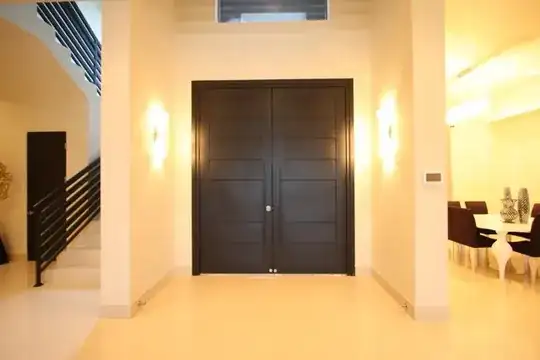
I am using a Canon 40D. EF-S 10-22mm f/3.5-4.5 USM.
I am trying to take a photo with precise colors. I am not sure what am I missing so I could get similar colors.
Here is the result that I would like to achieve:
)
This is the photo that I took:
I am using a Canon 40D. EF-S 10-22mm f/3.5-4.5 USM.
The image you took the first time looks like it was shot with auto white balance and the same lighting type in all of the lights in your room. Well that's different in your new scene. The lighting on the stairway is a different color temp, so skip the white balance, and just fix it in photoshop camera raw filter by desaturating yellows and reds and adjusting hue in yellows and of course a white balance change.
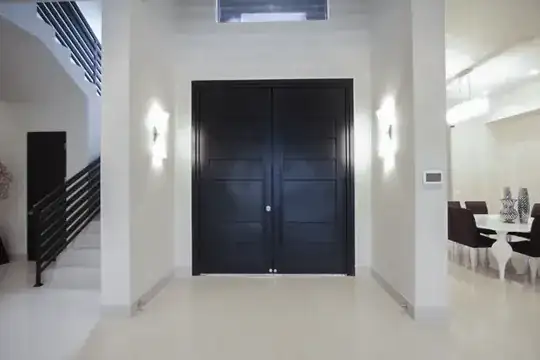
In reality, this is a bandaid fix at best because the difference in lighting will still be seen. Notice the lights in the scene your trying to match, especially the light on the right and the wall sconces. The second shot has blown out lights and shows that the first photographer had a lot more light to work with. Weather that's portable flash or sunlight is anybody's guess, but that's the missing link. Get enough light on this scene and you will carry the detail and have a better chance to match the color.

Several things at work here:

As well as white balance (which if shot in raw can easily be altered afterwards, I'd suggest maybe doing this as an HDR. Not one of those OTT hyper reality HDR's but you can also make them quite realistic. This would help result in an image which didn't blow out in the same way yours did as the 'darker' image would be used for the brighter parts, and conversely the lighter image used for darker parts...


