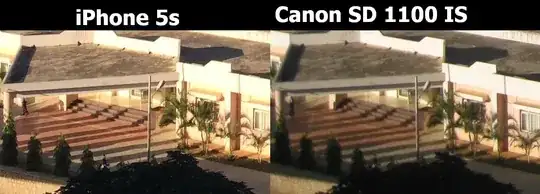
My point-and-shoot (Canon SD 1100 IS, bought in 2008) has for the past couple of years (that I've noticed) been taking hazy photos, as if I'm shooting through fog. I cleaned the lens using an air blaster followed by camera cleaning solution followed by a lens pen, and it has improved tremendously, but it's still somewhat hazy. Compare the following crops from the point-and-shoot:
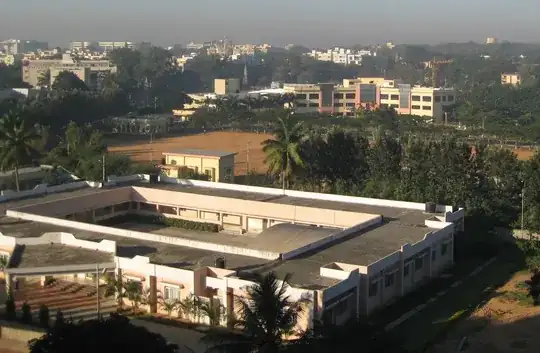
and the iPhone 5s:

Both photos were taken in auto mode. The cameras ended up choosing base ISO - 80 for the Canon and 32 for the iPhone. The Canon also chose a good f/8 (not the widest f/2.8) and the iPhone, of course, has a fixed aperture of f/2.2. The Canon was zoomed out fully. I did not lean against anything, but then I didn't need to, given that it was bright outside. Just to be sure, I took two photos and quickly compared them to see if one was blurry, but neither was, given the bright sunlight.
Please right-click each photo and choose Open in a New Tab so that you can see what I'm talking about:
Notice how the colors are muted in the first photo, and the whole photo has a hazy look. In particular, look at the bottom left, at the entrance of the building -- the point-and-shoot photo is hard to see and hazy / blurry, while the iPhone's has crisp, clear colors. Notice that the sunlight appears muted rather than bright in the point-and-shoot version, and that the man is harder to see.
Looking at the open ground in the middle-left of the photo, it has a muted, somewhat muddy appearance in the point-and-shoot photo, while it has a crisp, bright in the iPhone photo. These photos were taken within seconds of each other.
Is the point-and-shoot a worse camera than the iPhone 5s, or is somewhat wrong with it?
UPDATE (Dec 26): I sent the Canon camera to the Canon service center, who said that there's nothing wrong with it, and that they don't service point-and-shoots; only SLRs.
As per the comments below saying it's just a question of contrast / saturation adjustments, and asking me to edit the Canon photo, I tried punching up the Definition to 100 in iPhoto. I tried increasing the contrast and saturation but that made the photo look unnatural, so I didn't do that.
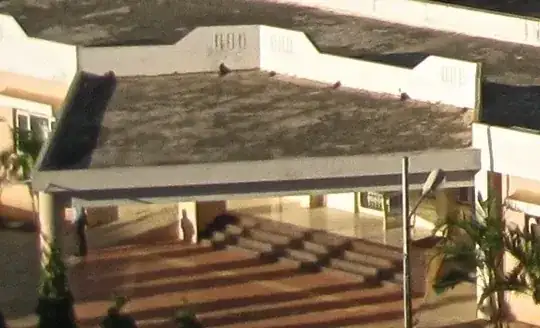
I also cropped the photos more. Compare the Canon:
with the iPhone:
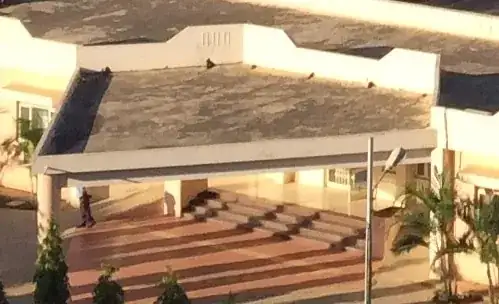
Notice that the iPhone photo is still clearer: the stairs in the Canon photo are blurry, while the ones in the iPhone photo are crisp. Notice the area around the man at the bottom-left: again, the Canon is a muddled mess, while the iPhone is clearer. The reddish area in the foreground has become desatured in the Canon, and the whole photo seems noisy.