I have a client who is having a lot of trouble managing his photos. He has multiple copies in multiple Aperture and iPhoto libraries, imports from old PCs, etc. What I'm looking for is a piece of software for OS X that can grab all these photos and reorganize them by EXIF data, say into YYYY/YYYY-MM-DD/*.jpg, eliminating duplicates as it goes. Does such a thing exist?
Asked
Active
Viewed 2,059 times

2 Answers
2
First off make backups of everything (especially when trusting strangers on the internet to help you :-)
iPhoto/Aperture store the photos in libraries which are semi-opaque. So they need to be exported, your first choice will be if you want to export the originals or a version of your photos with any edits you may have made in Aperture -- this is your choice, edited versions will obviously have any fixes you made in them, but if you edited out something, it will be lost (for example you crop me out of a picture).
- In Aperture with a library open, select all the projects

- Right click and select export (here is where you need to choose the Original or Version)

- Now you have the export dialog
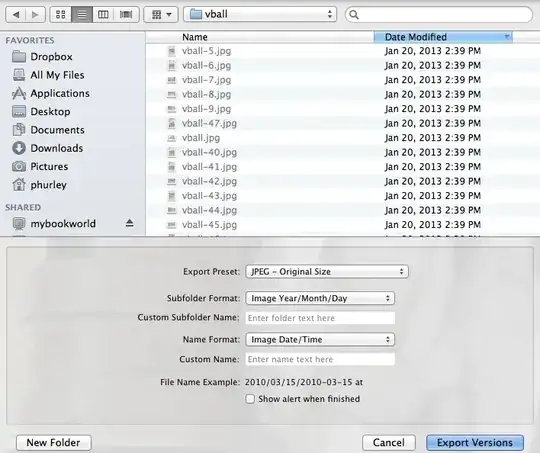
- Select the location you want to use to collect all your images (be sure there is enough disk space to hold everything).
- Select the Export Preset of JPEG - Original Size
- In the Subfolder Format select Edit...

- Create an export folder preset to match your desired format - click the + at the bottom left and then drag the Image Year, add a slash, etc.
- In the Name Format selection, pick this and select Edit...
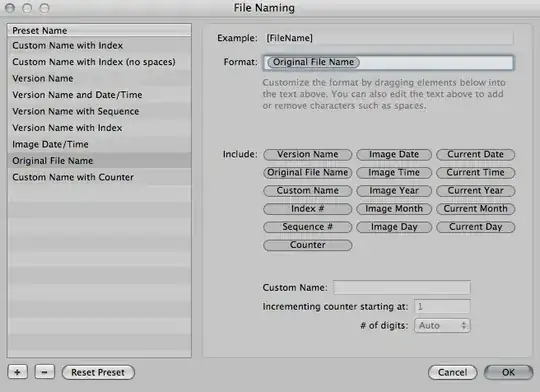
- Create an option to export with the original file name.
- Click the Export Versions or Export Originals
- Rinse and repeat for all your libraries

Patrick Hurley
- 2,661
- 12
- 13
-
1+1 for "...especially when trusting strangers on the internet to help you..." – Michael C Jul 12 '13 at 14:04
0
Picasa has a really useful (experimental) feature called "show duplicate files". It should work with pictures that are rescaled or slightly cropped too I guess.
Then you can manually delete all but one copy of each.

fortran
- 1,735
- 1
- 11
- 18
mdlsthat lists the metadata attributes for a specified file. You can create a bash script that recursively goes through the folders and renames the files based onmdlsmetadata. The good thing is that it works with raw files as well. To make more user-friendly, you can joint this solution withAutomatorto create a service or an application. – Pouya Jul 12 '13 at 07:36orcondition. The duplication is indicated based on the file name and exif data is only necessary to rename them so that should not be a problem. – Pouya Jul 12 '13 at 14:09