Is it possible to add an adjustment layer just to one layer in Photoshop? I've tried, but the adjustment layer seems to affect all layers.
Asked
Active
Viewed 8.4k times
16


-
Good question, I remember trying for ages to figure this one out! – Matt Grum Sep 26 '10 at 18:35
-
Hehe yea, it's pretty annoying. Thank you for the solution Matt. – grm Sep 26 '10 at 20:58
-
Does anyone know how this works in Photoshop CC (2014.2.1 release)? It looks like they did away with the button in the answer below. – Crowder Dec 04 '14 at 21:07
-
Found it. It's a tiny button. Select the adjustment layer and then open the Properties pane. – Crowder Dec 04 '14 at 21:08
1 Answers
14
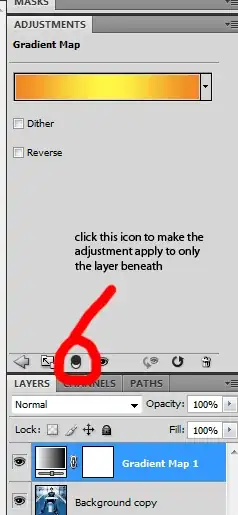
Yes it is possible in CS4 and (I assume CS5 though I don't have a copy). By default the layer affects all the layers beneath it, but if you click on the adjustment and bring up the adjustment window (where you set the properties of the adjustment) there's an icon which says
"This adjustment affects all layers below (click to clip to layer)"
Clicking on that icon sets the adjustment layer to apply only to the layer beneath it. See the following quick screenshot.


-
-
1This is called a clipping mask. You can also set this by holding Alt positioning the mouse between the two layers (the adj layer and the one beneath) and clicking. – MikeW Oct 13 '12 at 21:31