13

Given that the main purpose of demosaicing is to recover colour as accurately as possible, would there be any advantage to a "black and white only" demosaic algorithm? That is, instead of first recovering the colour and then converting black and white, might it be better to convert the RAW file directly to black and white?

I'm particularly interested in the image quality (e.g. dynamic range and sharpness). On a related note, which common demosaicing algorithms are most amenable for black and white conversion?

Michael C
  • 175,039
  • 10
  • 209
  • 561
Lars Kotthoff
  • 581
  • 1
  • 7
  • 17
  • 2
    Color is an intrinsic factor of a RAW image created from a color bayer sensor. The problem for converting it to grayscale is that you only have luminance for a single given color at any given pixel. It doesn't really matter if you only treat each pixel as a luminance value, or treat it as a color value, each pixel only represents approximately 1/3rd of the total luminance that was incident on the pixel at the time of exposure. "Demosaicing" is really unnecessary for grayscale images, however to get ideal grayscale images you would want to use a grayscale sensor... without the bayer at all! – jrista Feb 06 '13 at 19:21
  • 1
    As for which demosaicing algorithms are ideal for B&W conversion when using a color camera... I would say the simplest form, your standard quad interpolation. A lot of other more advanced demosaicing algorithms are designed to minimize color moire and other color related artifacts. If all you care about is B&W, then standard 2x2 pixel interpolation will preserve the most detail. – jrista Feb 06 '13 at 19:23
  • 2
    @jrista I'm not sure why a naïve interpolation would preserve more detail than one of the more advanced algorithms which attempt to distinguish between brightness and intensity changes. Iny any case colour artifacts can show up in black and white images as well depending on how the conversion is done. – Matt Grum Feb 06 '13 at 19:42
  • 1
    Well, I guess I'm basing that primarily off of AHDD, which tends to soften detail. At least, the implementation in Lightroom produces slightly softer results than the algorithm used by Canon DPP, which produces very crisp, sharp results from a simpler demosaicing algorithm (although I guess not as simple as your basic 2x2.) – jrista Feb 06 '13 at 20:14
  • "Comparison of color demosaicing methods" (Olivier Losson, Ludovic Macaire, Yanqin Yang) goes into a lot of detail on different demosaic algorithms. It isn't just a matter of decoding the color, the better algorithms take into account all of the surrounding information to obtain the best results at each pixel. I'm not convinced a dedicated grayscale decoder could do better. – Mark Ransom Feb 12 '18 at 23:20
  • Color matters in black-and-white. If I can't, for example, emphasize the red channel in the conversion (which, for example, makes blue sky darker, so clouds stand out more), I have to use a red filter when I take the picture. That blocks some of the the incoming light, so I have to increase exposure, which reduces my flexibility. And if I later determine that a yellow filter would have been better than red, I can't change it. Back to the olden days of film photography... – Pete Becker Jun 03 '18 at 20:50

5 Answers5

10

You need demosaic algorithm even if you convert an image to B&W.

A reason for that is quite simple - otherwise you'd get sub-pixel artifacts all over the place. You need to realize that image recorded by sensor is quite messy. Let's take a look at the sample from Wikipedia:

demosaicing

Now imagine we don't do any demosaicing and just convert RAW into grayscale:

grayscale

Well... you see the black holes? Red pixels didn't register anything in the background.

Now, let's compare that with demosaiced image converted to the gray scale (on a left):
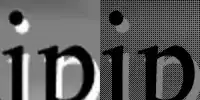
normal vs broken

You basically lose detail, but also lose a lot of artifacts that make the image rather unbearable. Image bypassing demosaicing also loses a lot of contrast, because of how the B&W conversion is performed. Finally the shades of colours that are in-between primary colors might be represented in rather unexpected ways, while large surfaces of red and blue will be in 3/4 blank.

I know that it's a simplification, and you might aim into creating an algorithm that's simply: more efficient in RAW conversion to B&W, but my point is that:

You need computed colour image to generate correct shades of gray in B&W photograph.

The good way to do B&W photography is by removing colour filter array completely - like Leica did in Monochrom - not by changing the RAW conversion. Otherwise you either get artifacts, or false shades of gray, or drop in resolution or all of these.

Add to this a fact that RAW->Bayer->B&W conversion gives you by far more options to enhance and edit image, and you got pretty much excellent solution that only can be overthrown by dedicated sensor construction. That's why you don't see dedicated B&W RAW converters that wouldn't fall back into demosaicing somewhere in the process.

Michael C
  • 175,039
  • 10
  • 209
  • 561
MarcinWolny
  • 1,400
  • 1
  • 14
  • 35
9

There is no way to convert a RAW file directly to black and white without recovering the colour first, unless your converter takes only one of the R,G,B pixel sets to produce an image. This approach would result in a substantial loss of resolution.

In order to not lose resolution when converting to black and white you have to use all R G and B pixels, which implicitly means colour calculations must be performed, at which point you might as well use one of the advanced colour demosaicing algorithms, and then convert the result to black and white.

Matt Grum
  • 118,892
  • 5
  • 274
  • 436
  • 1
    halfing the resolution without weighted average of the quads by extracting one colour would not be the expected greyscale image as it would be like putting a green or red or blue filter on a monochrome camera. And a philosophical question: dividing each axis by 2, reducing the Mp count by 4. I would call this half resolution. But you seem to call sqrt(2) per axis /2 Mp count "half resolution". Which definition is technically correct? If resolution is the ability to resolve, then width/2 and height /2 is half resolution in a 2D system where you want to preserve rotational invariance? – Michael Nielsen Feb 07 '13 at 08:15
  • extension of my view on resolution I think that Mp is not the resolution, its a photography marketing number. As an image processing engineer a resolution is given as w X h. – Michael Nielsen Feb 07 '13 at 08:34
  • @MichaelNielsen What "expected greyscale image"? There are many different methods to convert to greyscale, the question didn't specify an equal weighting approach. Secondly, if you had a linear detector and halved the number of samples, the resolving power, i.e. the maximum amount of detail detectable would halve, you wouldn't say it reduced by a factor of root 2. From that it stands to reason that if you have a 2D field of detectors (such as an image sensor) and halve the number of samples in both directions, leaving you with one quarter, you'd say the resolution was reduced by a factor of 4. – Matt Grum Feb 07 '13 at 09:27
  • if you halve only the x or y axis, you have different resolutions in each direction thus defeating the ability to count a total resolution in terms of Mp and computing a single factor "/2 resolution". Ofc. lenses dont have equal resolution , either, but sensor manufacturers are pretty proud to announce that nowadays their pixels are quadratic and square, thus yielding equal resolution on both directions, this means resolution of 640x = 480y. See how the pixel number itself means nothing. resolution 640 is the SAME resolution as 480. – Michael Nielsen Feb 07 '13 at 09:45
  • Therefore to keep the relevance of equal quadratic resolution, to halve it (globally), you need to half both directions. Otherwise you MUST go out of your way to say you halved one dimension. It cannot be pooled into one single resolution number. – Michael Nielsen Feb 07 '13 at 09:46
  • 2
    Greyscale: I didnt say equal weighted. And I know there are many different greyscale versions, but I can bet you that R, G or B is not one of the expected ones by the OP. Highest probable one is the 0.11b+0.59g+.3*r version. – Michael Nielsen Feb 07 '13 at 09:49
  • If resolving power is measured as the number of line pairs per mm along a specific axis I would tend to think using 1/4 of the pixels would yield 1/2 resolution along both axes. Of course when using RGBG the resolving power of each pixel is compromised by the interpolation intrinsic to demosaicing. – Michael C Feb 07 '13 at 10:55
  • Also try checking out this question: http://photo.stackexchange.com/q/23331/4559 – Pete Feb 07 '13 at 11:08
  • @MichaelNielsen I think you've kind of lost the point that I was making, which was unless you want to lose resolution (however you decide to measure it) by taking a pure R G or B conversion, then you have to produce a colour image as an intermediate step in the process of converting RAW to black and white. – Matt Grum Feb 07 '13 at 11:24
  • I know that was your original point, but I just like a good discussion and your alternative to doing the full conversion was not the only one, but the simplest one with some trouble that was interesting to discuss. ;) – Michael Nielsen Feb 07 '13 at 11:46
1

Machine vision cameras with bayer filters can give greyscale images directly but it does this by demosaicking, converting to YUV, and sending only the V channel (the ones I normally use at least). If they had a better way by bypassing this colour reconstruction I think they would, as they are constantly pushing framerates (the typical camera I use runs 100FPS for example).

If it were to ignore the colour based demosaicking it could half the resolution and weighted average each 2x2 quad, but if you want full resolution it is better to use the normal colour demosaicking algorithm which tries to preserve edges better. If we know we want greyscale we just get a monochrome camera from the start, slap on a colour filter if we look for a certain colour, as this setup is vastly superior in image quality, reducing the need for resolution oversampling, which in turn allows use of a fast low resolution sensor with larger pixels, which in turn gives an even better image.

Michael Nielsen
  • 10,644
  • 35
  • 48
  • You wrote: "converting to YUV, and sending only the V channel" Surely you mean sending the Y channel, since Y is luminance channel. – TopCat Jun 04 '19 at 09:51
1

The effect of the color filters over each pixel well in the Bayer layer are the same as shooting B&W film with color filters over the lens: it changes the relationship of the gray levels of various colors in the scene being photographed. To get an accurate luminance level for all colors in the scene the signals from each pixel must be demosaiced. As others have mentioned, a sensor with no Bayer layer would yield a monochrome image that need not be demosaiced. This should result in better image sharpness if the circle of confusion from the lens is equal to or less than the width of each pixel.

In practical terms, I've noticed several things converting RAW files to monochrome using Canon's Digital Photo Professional (DPP).

  1. White Balance adjustment can effect a change in overall perceived luminance in the same way that contrast adjustment can. As such, it can be used to fine tune contrast.
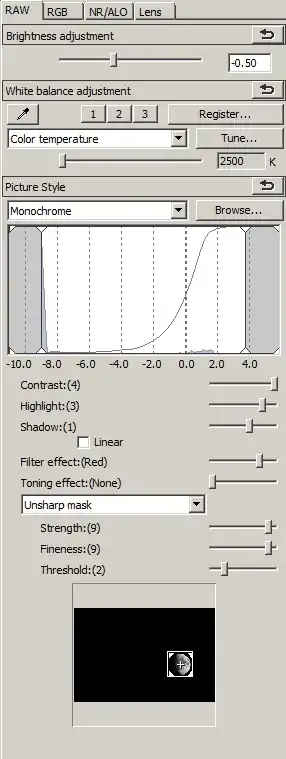
  2. White Balance will also have an affect on the relative luminosity of different colors in the scene. This can be used to fine tune application of the "Orange", "Yellow", "Red", etc. filter effects. Red seems to be the most affected by this and is much darker at 2500K than at 10000K. Surprisingly, at least to me, is that blue tones do not demonstrate the reverse.
  3. Since for all practical purposes there is no chrominance noise in a B&W photo, it can be left at "0".
  4. The unsharpen mask tool will give much more control over sharpness than the simpler "Sharpness" slider. Especially if you have a few "warm" or "hot" pixels in the image, you can increase overall sharpness without emphasizing them.

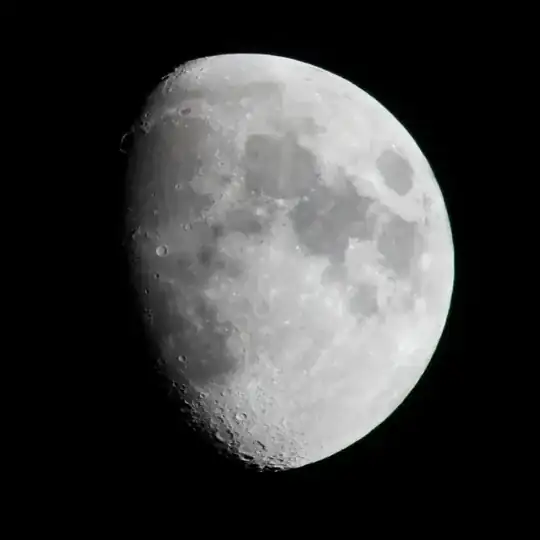
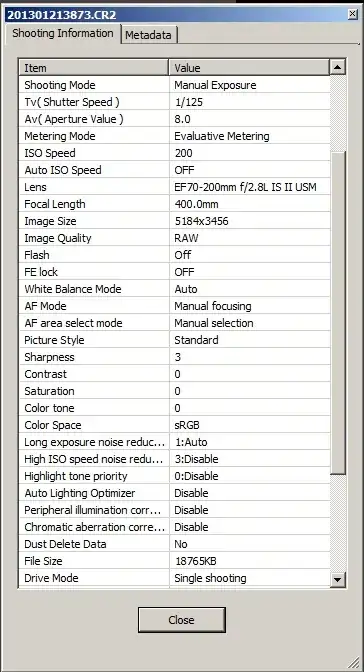
Below are two versions of the same exposure shot on a Canon 7D with an EF 70-200mm f/2.8L IS II lens and a Kenco C-AF 2X Teleplus Pro 300 teleconverter. The image was cropped to 1000X1000 pixels. The first was converted using the in camera settings shown below it. The second was edited with the settings shown in the screen shot. In addition to the RAW tab, a Luminance Noise Reduction setting of 2 was applied, as was a Chromatic Aberration value of 99.

Moon - unedited

In camera info

Moon - edited

Settings

Michael C
  • 175,039
  • 10
  • 209
  • 561
0

I would propose an algorithm like so (presumes your target is white and has consistent colour temperature):

  • Demosaic RAW Bayer to RGB
  • Downsample colour to grayscale
  • Create a LUT between raw bayer values and grayscale values (this would need to be performed once per colour plane RGGB or RGB)
  • Use the LUT per colour filter to transform the RAW Bayer directly to Grayscale without any inter-pixel filtering

In theory this would approach the results of a true monochrome sensor.

Elliot Woods
  • 101
  • 1