8

I just received a 35mm f/1.8 DX lens for my Nikon D50 for Christmas, and took some shots where the lights on the tree were the main source of illumination. Almost all of them exhibit very prominent green after-images of the tree lights. For example, in this image they run from the left side of the mirror down to the left side of the fireplace:
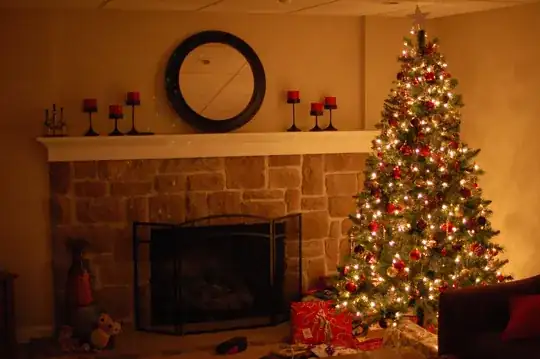
Tree with green lights

Are these artifacts caused by the lens, the camera, the filter (a Tiffen 52mm UV protector), or a combination of them? How can I avoid them in future shots?

Michael C
  • 175,039
  • 10
  • 209
  • 561
Matt McHenry
  • 183
  • 1
  • 4

3 Answers3

14

Those are almost certainly reflections from the UV filter. I recommend taking it off.

This is a topic of much debate, but the fact is filters do cause artifacts visible in your photos — you've got the evidence right there. You can get better results from a more expensive filter, but then it'll cost almost as much as your lens. Lenses aren't as fragile as they seem. Just be careful, use a lens hood, and put the lens cap on when you're not shooting.

mattdm
  • 143,140
  • 52
  • 417
  • 741
7

The UV filter likely explains this.

As I've explained in this answer, any filter will degrade image quality, but some do so more than others. Tiffen filters do not have anti-reflective coatings and are thus prone to flare. You should either remove the filter or use a high-quality one from a brand like B+W or Hoya.

bwDraco
  • 5,936
  • 2
  • 37
  • 69
2

it's definitely the filter, even my 30 dollar hoya does this in low light, it really screwed up some pics before.

jidz
  • 21
  • 1