If I have saved an image in JPG format after doing some edits, is there a way to identify that it is edited with Photoshop?
Asked
Active
Viewed 2.1k times


4 Answers
12
it depends what you're looking for.
1) File Meta-info: the meta information contained within the file can reveal which s/w saved the photo last (with possible edits). But this can easily be changed afterwards or deleted by another s/w.
2) Image data: now, if you're looking to find out if a photo file has been tempered (edits made to it), you should look into Error Level Analysis and photo forensics.
errorlevelanalysis.com, hackerfactor.com and other such software are only made available to governments!


-
Also see this question: Software that guesses which algorithm saved a given JPEG – Roflo Jun 30 '16 at 16:51
4
It's easу. Photoshop CAN write its name into the EXIF Software tag, so you can locate images that have been edited by Photoshop using any photo management program that can locate images by the EXIF Software tag:

However, if you save your images as JPEG using File > Save for Web option (Ctrl + Shift + Alt + S) make sure that you checked the option below:
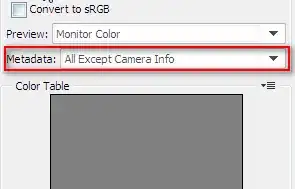
otherwise you will not be able to identify your images later by EXIF/XMP Software tags.

Murat - Daminion Software
- 975
- 4
- 8
-
1What if I modify the EXIF to specifically not note that the software was photoshop? How can you then tell that it was or was not edited in photoshop? – dpollitt Aug 13 '12 at 16:48
-
Not by EXIF/XMP software tags, but yes by other means, known colloquially as "I can haz see d pixelz". :) (plus, what dpollitt said.) – William C Aug 13 '12 at 16:51
-
1Simple check, even when No EXIF is selected open the file in a hex editor and the first few lines include 'Adobe'. – Phil Aug 14 '12 at 00:39
-
1I tried just now, and I ws able to to edit the file and substitute another word, such as "ScanJet", for "Adobe", in the file and the image was still valid. But when I tried to put in larger data it corrupted the image. – Mar 16 '13 at 02:06

-1
Some photo editing software also add the name of the editor into the file. So it would look like this
EXtSoftware\x00Paint.NET v3.5.11
And it would be in the middle of the file.

aidan
- 1
- 1
-
Looking into the file meta info is already part of the accepted answer. – Olivier Jun 30 '16 at 15:32