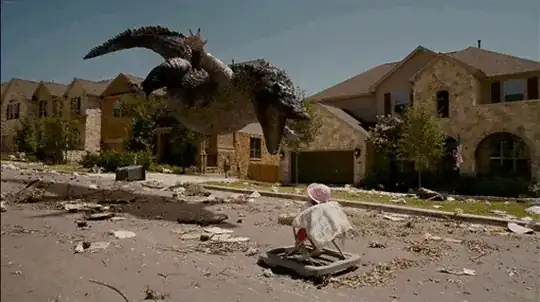
While technically this isn't a "3D" photo, it does simulate a three-dimensional look by exploiting parallax displacement. Cameras are what we call "monocular" devices, in that they have a single lens system and single sensing device. As such, they are not parallax devices, and cannot sense depth directly...only indirectly via other effects such as depth of field. The human eye is "binocular", in that there are two lenses and two sensing devices offset from each other along a single plane. This gives us the ability to detect depth for the very same reason the image in your question has a pseudo-3D appearance.
The sample image simulates a binocular device, or perhaps even used a binocular camera setup, to achieve a modicum of depth perception and provide the photographer with the ability to simulate 3D. You could achieve the same effect with a camera on a tripod, and the use of a macro focusing rail set up parallel to the scene would probably make the job a bit easier. Set up the camera on the tripod, and point it at a scene that has a variety of objects at varying depths. If you shoot a scene with most objects far, and no objects near, you won't really see any kind of "3D" effect if you created a 2-frame GIF like the sample you posted. Set the camera to manual, configure your exposure, and take a photograph. Now, shift the camera to the left or right a small amount...say maybe 5-6 inches (you might need to experiment to find an ideal amount of shift to perfect the effect). Using the exact same exposure settings, take another photograph. These two photographs should essentially be the same, with only a slight shift parallel to the scene.
Near objects will appear more shifted in the second photograph relative to the first than far objects. This is parallax motion, and demonstrates a facet of perspective. You will need to fine tune the images, crop them identically, and scale them down a ways (probably to the size of the sample image you posted). In a tool like photoshop, you can create a two-layer, two-frame GIF image using the animation panel. Show only the first layer for 1/2 a second, then show only the second layer for another 1/2 of a second. Play back the animation, and you should see something similar to the flying alligator and that poor little girl.
I honestly can't say much about the flying alligator...your on your own for that one. ;)