I've been working with NX2 for a long time, and now I downloaded NX Studio. To my supprice the programme only accepts NCP, NP2 and NP3 file input. There is no way I can get the programme accepting my Nikon NEF files (from D4)! How can I extend the file extention register?
Asked
Active
Viewed 94 times

3 Answers
4
Those file types are for picture control profiles, not images.
NX studio opens D4 NEF files just fine... You have to navigate to the folder in the location/folder tree on the left side.


Steven Kersting
- 17,087
- 1
- 11
- 33
-
Of course I navigate to the source folder and then the programme says there are no files in the folder, it does NOT recognize the NEF files – Kjell Johnsson Jan 25 '24 at 07:47
4
Do you mean you double-click a file and does not open with the software?
I'm sorry my OS screencaptures are in Spanish.
Assuming you are using Windows:
Open a folder that has one NEF file.
Right-click on it. > Open with
If the software is not on the list, Choose "another software"
On this new window, if the software is not there, keep scrolling and choose "More software" (Or similar) (Turn on the checkbox)

If it is still not there, scroll more. "Look for another application on this equipment" (or similar)


- Find the installation path of the software. Something like this: Program Files > Nikon > NXStudio
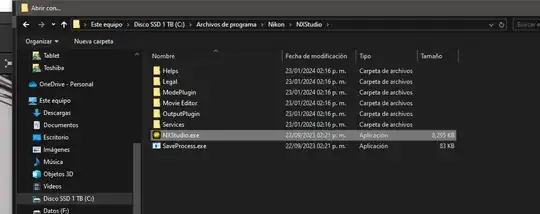


Rafael
- 24,760
- 1
- 43
- 81
-
Well, as I said in the comment above, the programme does not find any NEF files in the folder I navigate to. It says no files in folder despite there is. I have no problem with my old NX2, so I guess I will have to return to it. – Kjell Johnsson Jan 25 '24 at 07:58
-
1
are you sure you haven't loaded Nikon's "Picture Control Utility 2". It's used to make picture controls such as Standard, Neutral, Vivid... you can customize your own with that utility. This site has a whole load full of pre made picture control presets: https://nikonpc.com/

Darren Jew
- 11
- 3
-
Hello Darren. You have posted this information as an "answer", when it isn't really one. It's more of a comment, I would say. There's a distinction on this site between questions, answers and comments. Take a look at the short Tour to understand how the site works. – osullic Jan 29 '24 at 23:14
-
@osullic, I actually think this is fine as an answer. NEF files are Nikon RAW files and NCP, NP2 and NP3 are in-camera processing profiles you can create and then load onto the camera to use as presets. – inkista Jan 31 '24 at 05:15