5

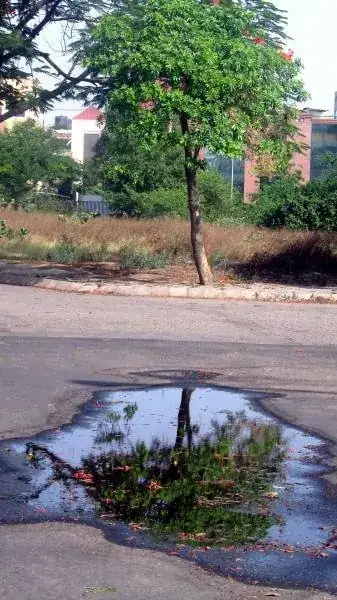
This photograph was taken at around 9:30 AM. The sunlight was bright. I can't shoot in raw. I have adjusted the brightness and the contrast by which at least the tree is appearing brighter.

Look at the ground, it is of some weird colour. Something pinkish. How to adjust that in JPG?

What are measures that should be taken while shooting in daylight before and after processing?

enter image description here

Aquarius_Girl
  • 5,602
  • 16
  • 59
  • 115
  • 1
    Relevant question: http://photo.stackexchange.com/questions/532/what-techniques-do-you-employ-to-control-contrast-in-your-landscape-shots – Karel Jun 15 '11 at 19:38

2 Answers2

11

Bright daylight is often considered problematic for photography, as it causes harsh shadows. You'll get the best results by waiting for a softer light - a sunset/sunrise or clouds blocking the direct sunshine. If waiting is not an option, a polarizing filter is usually used to somewhat tame bright daylight, as in this example -
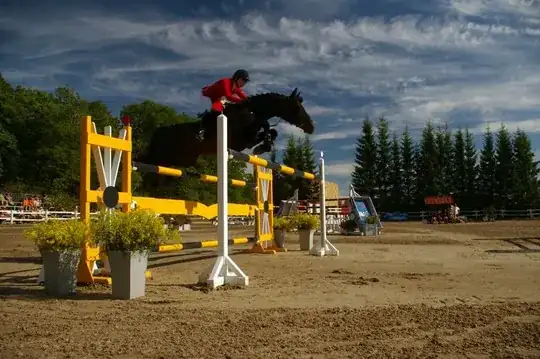
Kätlin Sehver and Lord Leu winning the Grand Prix in Ruila

Ground color on your photo is off because white balance is on the ground is off - the warm light makes tones warmer (gives a red/yellow hue). Different light shows colors differently. Human brain is somewhat able to adapt perception of colors in different light, but a camera can adjusted for only the whole scene. If you fix the red tint in warm light, the areas with cooler shadow light will show slightly blue. You might like it better (shadows are darker and therefore do not show as well) or not (humans generally prefer warmer tones).

You could try setting custom white balance by putting a gray card or a sheet of white paper in the light you want to appear as neutral and telling your camera "look, this is how white/gray should look like". How exactly to tell this depends on camera model (if you have a user manual, try looking for "setting custom white balance").

You could also adjust white balance in post processing; try sliding it towards blue. Or, even auto levels or automatic white balance would render your example cooler:
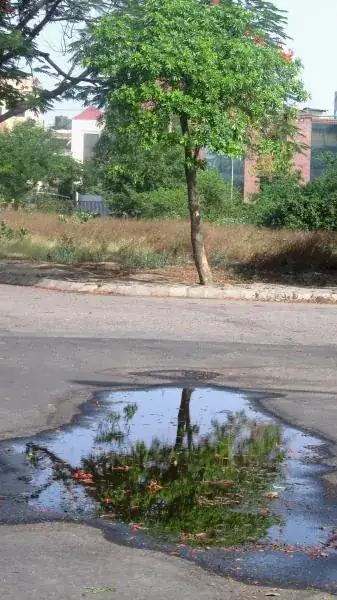
OP's sample picture + auto WB

Imre
  • 31,966
  • 11
  • 107
  • 177
  • Thanks for the response, I'll have to Google out, the meanings of "polarizing filter". what did you mean by "try setting custom white balance with a gray card or a sheet of white paper.". Please explain. – Aquarius_Girl Jun 14 '11 at 06:10
  • 1
    @Anisha I edited, hope it's better explained now – Imre Jun 14 '11 at 07:22
  • 1
    Indeed your answer now is more helpful than before ;) I'll take time to look through the links. – Aquarius_Girl Jun 14 '11 at 07:28
  • Offtopic: Is this photograph worth anything? – Aquarius_Girl Jun 14 '11 at 07:30
  • 1
    @Anisha The idea of the reflection is great, but the photo is ruined by the bright white and red houses in background. They are not intended to be part of composition, but their color and sharpness demands attention from viewer. A shallow depth of field (not achievable for such a large scene using a small sensor camera) and tighter perspective (shooting and zooming from further away) might help to alleviate this. – Imre Jun 14 '11 at 09:01
  • Very helpful comment, Imre. :hattip: The maximum f I have is 8.0. Next thing you mentioned is zooming from further away, actually the problem was that I and the water were on same platform. So, if I moved away farther, I am not sure if reflection would have been visible? Does that make sense? – Aquarius_Girl Jun 14 '11 at 09:05
  • 1
    @Anisha Yes, it makes sense. You'd have to keep the angle to ground the same - so shoot from higher when further away. Of course, it might be impossible without special equipment. Another possibility is to find a similar tree+puddle combination with a better background - try starting with other trees around the same puddle. – Imre Jun 14 '11 at 09:18
  • You mean a tripod? I don't have a tripod yet. BTW, f8.0 is too less for blurring the background? Is it? I should have had f22, if possible? – Aquarius_Girl Jun 14 '11 at 09:21
  • 1
    @Anisha By "special equipment", I mean anything that would help you to shoot from a higher position, be it a tripod, monopod, ladder, kite, hydraulic lift, ... You'd need a bigger aperture (f divided by a smaller number) for blurring background, f/22 would be even worse than f/8. – Imre Jun 14 '11 at 09:31
  • OMG, :banghead: All this I was thinking that f22 would have blurred the background :mad: My lowest f is 3.1. – Aquarius_Girl Jun 14 '11 at 09:35
  • A news: today morning I was wearing orange coloured clothes and I pointed my camera to my clothes and let it grab the white balance through the setting "custom white balance". Then I took the picture of a sofa lying in shade in the room, the tinge in the photo turned out to be green :) and then I changed the custom white balance to black and the then the same photograph had a greyish shade :) I am yet to figure out which light gives which shade. – Aquarius_Girl Jun 15 '11 at 04:16
  • 1
    @Anisha that's why white balance should usually (unless you want a tinge) be set from a gray or white surface; if you use an orange surface, then camera will assume the light is orange, and will adjust all the other colors by subtracting orange from them. Black is unsuitable because the camera will not see any light and either picks something random or shows some error message. – Imre Jun 15 '11 at 04:59
  • Very helpful, again. One more question: The white balance which I'll set from a white sheet, should be done under sunlight or even the tubelight would do or it doesn't matter? – Aquarius_Girl Jun 15 '11 at 05:09
  • 1
    @Anisha Custom white balance should be set under the same light you are going to take the picture, preferably close to where your subject will be (because there may be multiple light sources, or some reflecting surface also throwing in some color). – Imre Jun 15 '11 at 05:20
  • Thanks, I'll read up those links now, and post back if I have any more queries :) – Aquarius_Girl Jun 15 '11 at 05:26
0

There is no right 'white balance' setting. The real world if full of different colors and color casts.

Shadows are colder than areas lit directly from sunlight. Colored objects reflect colored light etc.

Boris
  • 244
  • 1
  • 3
  • Nice, so what white balance setting should be preferred in sunlight? How should I edit this now? – Aquarius_Girl Jun 14 '11 at 07:04
  • In sunlight, the camera usually sets the correct white balance. – Boris Jun 14 '11 at 07:23
  • In this concrete photo, nothing is necessary wrong. There are some more reddish colors but since they are not in other parts of it, I would say they are part of the scene and not a wrong white balance (which is for the whole picture). – Boris Jun 14 '11 at 07:25
  • Actually the default white balance known as AWB gives me a blue tinge on my photographs always, so I don't prefer to use it. And I don't understand the meaning of "shadows are colder". – Aquarius_Girl Jun 14 '11 at 07:29