4

I recently did a product photoshoot.
After a few pictures, I noticed that some of the photos are warm coloured, some of them are cold. I have not touched the object, my camera was on a tripod, and I used the same settings (in manual mode) for every picture. It is really annoying because I need to create a GIF from about 15 photos and some of them are yellow, some are blue. Even some photos turned out half yellow / half blue on the same picture.

Here is an example showing the different colour temperature. They are shot with the same settings, same light, same camera, same tripod, etc...:
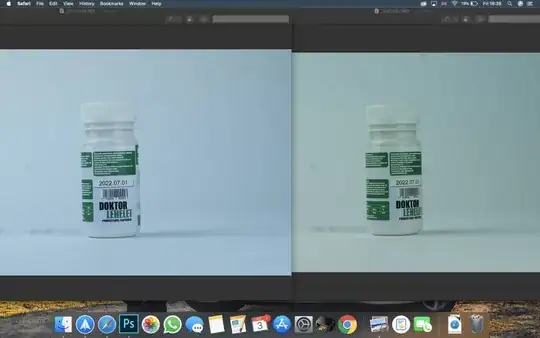
enter image description here

For the shoot, I used two softboxes (continuous light) and they remained at the same place for the whole time. These are my settings (identical for all pictures):

  • Focal length: 50 mm
  • Aperture: f/5.6
  • Shutter speed: 1/320
  • White abalnce: 5260 K
  • Spot metering

I was wondering if the problem was that I had my camera set to spot metering mode, but I am not sure.

Any suggestions or ideas why is this happening?

I shoot in RAW, so I know that I can fix this in Photoshop, but it's a lot of work with 15-20 images. Especially that it says that the yellow and the blue images have the exact same level of temperature and tint. So I probably have to reduce the temperature of the yellow one to match with the blue images but that's very complicated, because not all the images are the same.

Saaru Lindestøkke
  • 8,648
  • 3
  • 39
  • 94
  • 1
    Could you perhaps include 1-2 example pictures? Do you know what kind of bulbs were used as continuous light sources? – Saaru Lindestøkke Jul 03 '20 at 15:34
  • It is clearly an issue with the white balance. You can fix it in post (hope you shot NEF). Some setting to do with white balance got messed up apparently. – raviputcha Jul 03 '20 at 15:35
  • 1
    Point 3 of this answer might be relevant. – Saaru Lindestøkke Jul 03 '20 at 15:38
  • 1
    Are you sure that bracketting is turned off? It could be set to whitebalance. – Orbit Jul 03 '20 at 15:42
  • I added the photos to my post!

    Thanks for the answers so far! I will check on the bracketing. I was also wondering if the metering could cause this problem.. but i thought that would only affect the exposure not the white balance.. it seems like to me that on every picture the camera is using a different spot to adjust the white balance.. But again i use the same settings with a tripod so dont know how that could happen.. The bulb what im using got a cold colour. And i adjusted the WB manually to that.. some pictures were ok some were yellow.. Well.. idk..

    – Anikó Ficsor Jul 03 '20 at 22:54
  • 4
    I have a nagging feeling this could be the continuous lighting, with an exposure time of 1/320. Test without any artificial lighting at all, then test with the lights on but exposure under 1/60. – Tetsujin Jul 04 '20 at 07:16
  • The thing is that i used these lights for several times before and never had this issue with them.. must be a camera setting which i dont realise.. but i will try what u said thanks! – Anikó Ficsor Jul 04 '20 at 10:00
  • Specifically what kind of light is it? Some LEDs have variable color temp (for example, I have a ring light that goes from about 3000 to 7000 Kelvin with a knob to adjust it), and there are other lights (particularly fluorescents) that could cause this. – AVLien Jul 05 '20 at 21:29
  • 1
    @Orbit means that you may have white balance bracketing on, which works the same way that exposure bracketing does but in relation to color temperature. – AVLien Jul 05 '20 at 21:32
  • @AnikóFicsor The problem will only manifest itself when you use shutter times shorter ("faster") than the amount of time it takes your lights to go through a complete alternating current cycle. If you were using exposure times of about 1/100 or longer ("slower") before, you would not have had the effect from the flickering lights. – Michael C Jul 09 '20 at 23:27

1 Answers1

4

Your LED lights are likely using pulse width modulation (do you have dimmers on them?). White LEDs attain their light using a fluorescence effect that creates yellow light via fluorescence from the LED's "native" blue light. When the LED is driven with pulsed current, the blue light will change faster than the yellow light follows, particularly on the on-off transition.

The other possibility is that room lighting, like fluorescent light bulbs, adds pulsed light with a different color balance.

Of course the elephant in the room would be if you have a setup with adjustable colors where separate dimmers using pulse width modulation are on different-colored LEDs.

  • 1
    Some telephones can shoot slo mo movies at 240 fps, maybe it can become visible on those if played frame per frame. This sounds like the most likely reason so far. +1 – Orbit Jul 04 '20 at 10:27
  • 1
    Yeah - some do flicker, some don't. I was confused enough that mine don't to ask this question a while ago - https://photo.stackexchange.com/questions/87697/led-flicker-has-technology-eliminated-it – Tetsujin Jul 04 '20 at 11:33
  • 1
    I've posted it on the question as well, but I think this blog post shows the fluorescent modulation very well. – Saaru Lindestøkke Jul 04 '20 at 21:04
  • I know we're not supposed to do this, but you lot know your lights! If Stack Overflow had people like the ones on this thread, it might actually be helpful! Cheers! That's a pretty succinct way to resolve the quandary in any case @Orbit, and of course you are also (most likely) correct user92899 (change your username though dude...pretty please, because I'd like to upvote more of your answers in the future, but those digits are cumbersome ). – AVLien Jul 05 '20 at 21:41