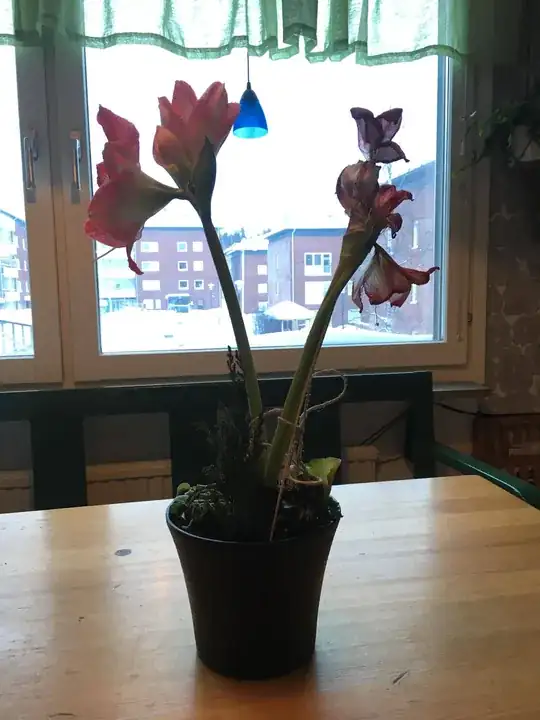
What you seem to be after is a metering mode that places the highest priority on not blowing the highlights. This is important for many photographers and many lighting situations. But there are also other times when getting the shadows or the midtones properly exposed is more important to the photographer. At those points where the dynamic range of the scene exceeds the dynamic range of the camera, the choice has to be made whether to clip highlights, shadows, or a bit of both.
Canon has long had an option called Highlight Tone Priority for their digital cameras. Nikon has pretty much the same thing called Active D Lighting. There are differences in the way each is implemented, but both start at exposing lower to avoid blown highlights and then pushing the tone curves of the shadows and mids in raw conversion. Other camera makers have offered similar options. Along with the metering mode selected (Spot, Partial, Center Weighted, Evaluative), HTP will affect the exposure decisions made by the camera in semi-automatic exposure modes (P, Tv, Av) and will also affect the meter reading in Manual exposure mode.
More recently there have been even more sophisticated methods introduced for avoiding overexposed highlights. In their higher level models both Nikon and Canon have introduced newer metering/exposure methods that make avoiding blown highlights the highest priority. Nikon calls it Highlight Weighted Metering (it is only available with D, G, and E lenses - it can't be used with other lenses, even if they are "chipped"). Canon still calls it HTP, but the way it is implemented is far more sophisticated than early versions, and the versions currently used in the lower models, of HTP.
Beyond that, the introduction of RGB or RGB+IR color light meters with hundreds of thousands of pixels divided into hundreds of metering zones has enabled very sophisticated "library" based metering where a metered scene is compared to a stored library of typical lighting scenarios. This has further refined the camera's ability to more often correctly guess when the highlights are more important and when the shadows are more important. To some degree such light meters are miniature imaging sensors. Meter readings, though not recorded to the camera's memory card, are effectively low resolution images upon which the camera bases exposure decisions similar to what mirrorless cameras (or DSLRs when shooting in Live View) do using the camera's main imaging sensor.
In your examples, the iPhone underexposed the main subject in order to only partially blow out the background. Had the DSLR been focused properly (or held steadier) more details of the flower and table would have been noticeable. Your DSLR exposed the subject a bit more and allowed the background outside the window to totally blow out. With the much more shallow depth of field in the image taken with the DSLR, the background, even if properly exposed, would have been so blurry as to have no discernable details anyway.
In general, smart phones tend to reduce contrast when used to photograph high dynamic range scenes. Some will even automatically take multiple frames at different exposure levels and merge the results. Most DSLRs at their default settings tend to "punch" the contrast a bit. Their in-camera jpeg engines increase contrast, saturation, and add some sharpening into the mix. When saving the raw data, these things are still applied to the jpeg preview image attached to the raw file. Depending upon what raw processing application you use, these settings may or may not be applied when you first open the raw file on your computer. To view a "raw" image as anything more than a near black blob of nothingness, a LOT of processing must be done to the data between reading the numbers in the raw data and what is displayed on your screen.
You can alter your EOS 5D Mark II camera's 'Contrast' settings under the [Shooting (Red) tab 2 → Picture Style] menu options.
These settings will affect in-camera produced JPEG images as well as the JPEG review image attached to raw files. The state of each setting at the time the image was captured will also be saved in the EXIF info of the raw file. As is mentioned above, this information may or may not be used when you first open the raw file using a computer based raw conversion application. They won't affect that actual raw value collected from each sensel (a/k/a pixel well) on the sensor.
The various 'Picture Styles' from Canon are what some would call "presets" intended for different types of shooting. The Landscape Picture Style, for instance, is optimized to give blue skies and green vegetation more "pop". The Portrait Picture Style attempts to give pleasing skin tones. The Standard Picture Style does what we described a few paragraphs above: it increases contrast and color saturation as well as applies some sharpening to give images a little more "pop".
The Neutral and Faithful Picture Styles use a flatter contrast curve that allows a wider range of brightness levels to be depicted in the same photo. For most scenes, this makes the image a bit "flat" looking. But for capturing very high contrast scenes, such as in your example, it allows you to see more accurately what you are actually capturing in the raw data when you check the histogram on the back of the camera.
Within each 'Picture Style', the camera user can adjust values for 'Sharpness', 'Contrast', 'Saturation', and 'Color Tone'. You can either save those changes as one of three 'User defined settings' or save those changes to the 'Picture Style' itself. If the changes are saved to the 'Picture Style' itself, those changes will be applied each time that 'Picture Style' is selected. Keep in mind that the '0' values for contrast, saturation, and color tone (hue) within each 'Picture Style' are not the same. They are merely the starting point for that particular 'Picture Style'. The same is true for the initial sharpness setting of '1' to '7' within each 'Picture Style'. A '0' contrast setting for the Standard Picture Style will give more contrast than a '0' contrast setting for the Neutral Picture Style. Increasing or decreasing the setting from '0' to anywhere between -4 to +4 for contrast will move the amount of contrast relative to the '0' setting for that particular 'Picture Style'.
In the end, there's no such thing as correct or perfect exposure. There's only the image the photographer wishes to make. What may be perfect for one may be overexposed for another and too dark for yet another. Most photographers who are critically concerned about getting exposure "just so" will eventually learn to use Manual exposure mode so they can have complete control over all exposure parameters.
¹ Part of the difference in metering might be due to the window taking up a larger percentage of the frame in the second shot than in the first. Depending on which metering mode was selected, even if you had taken two shots with the same camera using an automatic metering mode, the one with a wider field of view that included more of the dark interior would have probably been exposed brighter than one in which the window fills more of the frame.