2

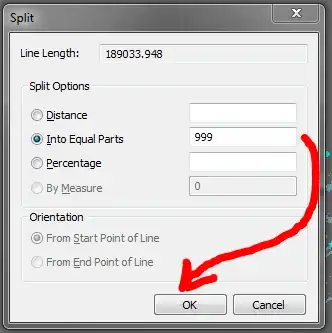
I would like to split multiple lines into equal aproximately 10m lengths. (Line length / 10m = number of segments) The split tool can only split one selected feature at a time. To overcome this I can merge multiple lines into a single multigeometry feature then run the split tool on the merged line. Works fine until I run into what seems to be a limitation - the split tool can only split into a maximum of 999 equal parts. When I enter a higher number the OK button goes dim.

Is there a workaround to overcome this limitation or another way to split mupliple lines into equal parts? Basic or Standard licence only.

Figure 1 - Split Tool dialog showing 999 equal parts:
enter image description here

Figure 2 - Split Tool dialog showing 1000 equal parts:

enter image description here

Jakub Sisak GeoGraphics
  • 20,294
  • 20
  • 104
  • 180

2 Answers2

2

There is the "Proportion" tool in the advanced editing toolbar that splits polylines by distance. It requires a standard or advanced license.

John Powell
  • 13,649
  • 5
  • 46
  • 62
R.V
  • 41
  • 6
  • There is no such tool on the Advanced Editing Toolbar but there is on on the COGO toolbar. The proportion tool is designed to proportionally split a line into several segments based on the entered values. It will not split a line into equal parts or by a specific distance. So it doesn't quite do what i need. Furthermore to split a line into 1000 segments i would need to enter the proportions manually 1000 times. – Jakub Sisak GeoGraphics Jan 07 '16 at 14:41
1

With the "Proportion" tool on the COGO toolbar you can enter the desired length just once, select the line you just entered and click on the "duplicate" button on the right. There you can enter the number of split segments (dividing the total length by the desired distance).