22

How can I change the field names (not the alias) in ArcGIS 10.2?

I already found this page on ArcGIS support: "Renaming shapefile fields (Defense Mapping)" but there is is not "Defense Mapping" on Customized Mode Categories In my ArcCatalog!

Without access to Defense Mapping, how can I change the field names?

PolyGeo
  • 65,136
  • 29
  • 109
  • 338
user1106951
  • 1,498
  • 2
  • 18
  • 29

9 Answers9

27

You can now rename a field using core ArcGIS Desktop GP tool - Alter Field (Data Management).

This tool provides the ability to rename fields or rename field aliases for any geodatabase table or feature class.

I have not installed 10.2.1 on a virtual machine yet (was released just a day ago), but my guess is that by feature class here Esri means both geodatabase feature classes and shapefiles, but I am not 100% on that.

This tool is available starting with 10.2.1.

Alex Tereshenkov
  • 29,912
  • 4
  • 54
  • 119
19

In short you cannot change a field name in a shapefile. What you need to do is create a new field of the same type but with your new name then copy the contents of the old field into it, then delete the old field.

Hornbydd
  • 43,380
  • 5
  • 41
  • 81
  • 5
    .. or start using geodatabase where you can change field name directly in the feature class properties. – Alex Tereshenkov Apr 09 '14 at 14:45
  • 2
    I'm using a geodatabase and I can only change the field alias, not the name. Am I missing something? – Anthony To Dec 09 '15 at 14:39
  • 1
    You cannot rename a field in a personal or file geodatabase. Not sure about SDE. Maybe. Same as with the shapefile, you have to create a new field copy the data over, then delete the old field. Unfortunatelly, the new field will be the last field. in order to change the order of the fiels in a feature class or shapefile you need to create an emty one with the fields in the correct order, then load the features. – Jakub Sisak GeoGraphics Aug 02 '16 at 17:35
  • 1
    I stand corrected. Just read @AlexTereshenkov's post below and apparently you now can rename fields in a geodatabase with the GP tool. – Jakub Sisak GeoGraphics Aug 02 '16 at 17:39
14

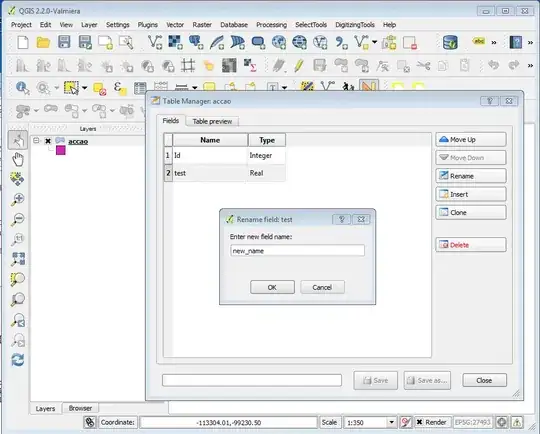
If you are willing to use other software to complement ArcGIS, you can use QGIS with the Table Manager Plugin (you can install it via Plugins > Install and Manage Plugins).

In QGIS:

  • Add your shapefile with Layer > Add vector layer...;
  • Select your layer in the "table of contents";
  • Open the plugin via Vector > Table Manager;
  • Select the desired field and press rename and choose the new name;
  • Don't forget to save, and then close.

enter image description here

Note: You can also reorder all your fields. Nice and easy, with no need for data duplication or temporary fields.

Alexandre Neto
  • 14,212
  • 2
  • 58
  • 85
6

You can import the shapefile into a file geodatabase, then change the field name. Then export it back out to a shapefile.

EDIT in response to comment by @Anthony To

This is done via the Arc Catalog Window by:

  • R-clicking on the Featureclass
  • Select the "Fields" tab
  • Change the appropriate Field Name

This still leaves the Field Alias as it was before but that is easily changed, as always.

And it leaves the Field in the same relative location when viewing the Attribute table, unlike the Alter Field Tool.

user23715
  • 792
  • 7
  • 9
  • 2
    So I've gotten a couple of down-votes for this answer but I hasten to point out that user1106951 (or others who view this question) may not have access to the required licensing level to use Alex Tereshenkov's answer. Also, user1106951 (or others) may only want to use shapefiles and not Feature Classes, so this answer is more complete than Alex Tereshenkov's comment with the first answer. Right? – user23715 Apr 11 '14 at 00:53
  • How can the field name be changed in a file geodatabase? It looks like I can only change the alias name – Anthony To Dec 09 '15 at 14:47
  • @AnthonyTo - updated answer in response to your comment. Sorry that my initial answer was a bit terse :) – user23715 Dec 09 '15 at 20:18
0

I was having the same problem as Anthony To where I can only edit Alias in ArcCatalog, but when I closed the ArcMap where the same feature class is being used, I was now able to edit the Field in ArcCatalog.

In short, make sure the feature class is not being used in any open ArcMap.

Mars
  • 11
  • 1
0

You can import the Shape file to PERSONAL GDB, then open it with MS Access. open the relevant table and change whatever you want. after the change being made, you can either open the personal gdb directly in Arc, or you can export it back to shape.

R.V
  • 41
  • 6
0

I just used Alter Field in Arc Toolbox//Data Management Tool// Fields. Works perfectly you can change alias or field name

nmtoken
  • 13,355
  • 5
  • 38
  • 87
0

I used Arc Toolbox -> Data Management Tool -> Fields -> Add Field since I am using ArcGIS 10.1. This process can let you add a field where you can provide the Field Name you want with max of 10 characters. You can also delete a field using Delete Field if you want to remove one. I have not seen any option to edit or rename the Field Name in this version.

aldo_tapia
  • 13,560
  • 5
  • 30
  • 56
Guest
  • 1
  • I used Arc Toolbox -> Data Management Tool -> Fields -> Add Field since I am using ArcGIS 10.1. This process can let you add a field where you can provide the Field Name you want with max of 10 characters. You can also delete a field using Delete Field if you want to remove one. I have not seen any option to edit or rename the in this version. – Guest Dec 13 '17 at 15:24
0

One smart move is to use the Spatial Join and rename all fields in once (just join it with another feature and delete the field immediatly). It works without just changing the "alias"!

Kadir Şahbaz
  • 76,800
  • 56
  • 247
  • 389
Raphi
  • 1