Is there a way to edit the precision of polygon points in QGIS so that each coordinate has the same number of decimal places?
For example, the coordinate 23.18273917, -84.29172638491 would be converted to 23.18274, -84.29173 if 5 was entered.
Is there a way to edit the precision of polygon points in QGIS so that each coordinate has the same number of decimal places?
For example, the coordinate 23.18273917, -84.29172638491 would be converted to 23.18274, -84.29173 if 5 was entered.


If your geometry features are stored in a PostGIS database, you can use ST_SnapToGrid to "snap" the coordinates to the nearest 0.00001 degree grid. E.g.:
SELECT ST_AsText(ST_SnapToGrid('POINT(23.18273917 -84.29172638491)', 0.00001));
         st_astext
---------------------------
 POINT(23.18274 -84.29173)
(1 row)
This works for any geometry, including polygons.

ST_SnapToGrid() function exists in Spatialite, too – so OP could save his layer in Spatialite then run a query in the DBManager and never 'leave' QGIS.
– Simbamangu
Nov 13 '13 at 15:43
Not a real 'rounding' solution, but you could use regular expressions to trim the decimal places in QGIS.
Use the Field Calculator and add a new text field (e.g. 'geom1') with the WKT of your whole polygon:
geomToWKT ( $geometry )
This will give you all the points of your polygons in WKT format, e.g. POLYGON((34.77736006488765241 -7.4507487326605899,35.30901941128683319 -7.44604378269245526,35.59131640937489749 -7.71422593087611386,35.32783921115937176 -8.14237637797634051,34.64562146577988955 -8.02475262877298157,34.77736006488765241 -7.4507487326605899))
Then, add and calculate a new text field (geom2) based on the WKT field:
regexp_replace ( "geom1", '(\\d+.\\d{6})\\d+', '\\1')
This results in a new WKT field with trimmed (not rounded!) decimal places: POLYGON((34.777360 -7.450748,35.309019 -7.446043, ...
The regular expression finds numbers in the format ##.######... (any number of decimals) and replaces them with ##.###### (exactly six decimals, change this by modifying the number inside the curly brackets {}).
Save the layer as a CSV file and then add it back to QGIS with the Add Delimited Text Layer, selecting the new geometry field:

Caution: depending on the size of your polygons, you may run into limits of the length of a text string in a shapefile's DBF field. Probably best to work within a spatialite format and use a varchar field for the new geometries.

The OpenJump desktop GIS has a tool called Precision Reducer. It is in the Tools\Edit Geometry menu. You must make your Shapefile editable (right-click layer, editable) to enable this tool. You can define the precision to preserve. You may want to first make a copy of your data.

A quick-and-dirty way to do it would be to use the copy-and-paste option on the geometry in QGIS, then parse the resulting WKT in Excel or OpenOffice or equivalent. This is not too difficult with points, but nightmarish with anything more complex!
Select the geometry in QGIS:

Edit|Copy, then move to a blank spreadsheet and paste:
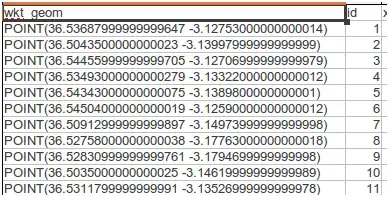
Parse using the MID() function to grab the X and Y coords, e.g. for this case 1*MID(A2,7,8), but with the correct number of decimals (you could also use the ROUND() function to limit your decimals):

Make a new geometry column with WKT text, e.g. ="POINT("&C2&" "&D2&")" then save it as a CSV file.

Add your geometry back to QGIS with the Add Delimited Text Layer, selecting the new wkt geometry field:

Embarrassingly ugly but it does work and you could set up a spreadsheet template to automate it.
(Cue the other respondents with far more elegant PostGIS and Python solutions ... ;) )