4

Is it possible to have different labels at different scales (without duplicating layers)?

For e.g. I have loads of point shapefiles and would like to label them with ID, Name and postcode.

My idea was to give more information as we zoom in - meaning 1) at full extent - no labels 2) at 1: 1,000,000 - ID only 3) at 1: 500,000 - ID and Name 4) at 1: 100,000 - ID, Name and Postcode

Any ideas or thoughts?

Mapperz
  • 49,701
  • 9
  • 73
  • 132
newbie
  • 41
  • 2
  • 2
    Do you have the Maplex Extension? With ArcInfo License (standard/advanced) it is available at no extra cost - http://resources.arcgis.com/en/help/main/10.1/index.html#/Exercise_1_Enabling_the_Maplex_Label_Engine_and_adding_the_Labeling_toolbar/00s800000036000000/ – Mapperz Mar 22 '13 at 14:57
  • I just have ArcView License – newbie Mar 22 '13 at 15:32
  • 1
    Maplex is available by default in ArcMap 10.1. You need to switch it on via the Labeling toolbar. – dmahr Mar 22 '13 at 18:08

2 Answers2

3

You could make a group layer and put copies of the feature you want to show different labels at different scales in it. and then you can set a different label expression and a set scale range in the general tab in the layer properties. So when you end up with is a group of the same feature that turns on and off at different scales (make sure to not overlap) and eatch feature has a different label expression.

Brian
  • 69
  • 2
3

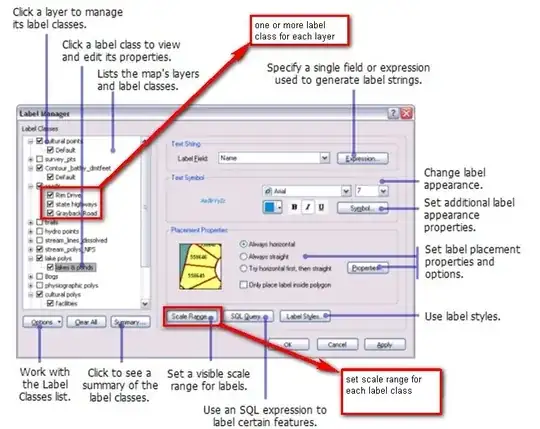
You can use label classes. If you use label classes it is easier to work with Label Manager than with Layers Properties Dialog Box. (It also works with ArcView license level and older versions of ArcView.)

  1. Open Labeling toolbar
  2. Click on Label Manager Button to open Label Manager
  3. add as many label classes as you need (3 in your example)
  4. set scale range for each label class

enter image description here

Jens
  • 6,219
  • 2
  • 30
  • 43