You would need to specify a projection in which to work so that you can transform the point, add the respective delta X and delta Y in meters, then you can transform it back to lon/lat. Here's how you can do it in Google Earth Engine:
function ptFromBearing_euclidean(pt, d, brng, proj, maxError){
  /* Pt from bearing in Euclidean space
   pt: the point in lon,lat (EPSG:4326)
   d: distance in meters
   brng: bearing from North, in degrees
   proj: Projection in which to calculate the distance
  */
  var lon = ee.Number(pt.coordinates().get(0));
  var lat = ee.Number(pt.coordinates().get(1));
  var D2R = ee.Number.expression("Math.PI/180")
brng = ee.Number(brng);
  d = ee.Number(d);
  var deltaY = ee.Number.expression(
    "rsin(a)",
    {r:d, a:ee.Number(90).subtract(brng).multiply(D2R)})
  var deltaX = ee.Number.expression(
    "rcos(a)", {r:d, a:ee.Number(90).subtract(brng).multiply(D2R)}

  )
  var pt2 = pt.transform(proj,maxError)
  var pt2Coords = pt2.coordinates()
  var eX = ee.Number(pt2Coords.get(0))
  var eY = ee.Number(pt2Coords.get(1))
  return ee.Geometry.Point([eX.add(deltaX), eY.add(deltaY)],proj)
  .transform(ee.Projection("EPSG:4326"))
}
for the spherical case, no need to specify projection:
function ptFromBearing_spherical(pt, d, brng){
  /* Pt from bearing in spherical coordinates
   pt: the point in lon,lat (EPSG:4326)
   d: distance in meters
   brng: bearing from North, in degrees
  */
  var lon = ee.Number(pt.coordinates().get(0));
  var lat = ee.Number(pt.coordinates().get(1));
brng = ee.Number(brng);
  d = ee.Number(d);
  var R = ee.Number(6371*1e3);
  var D2R = ee.Number.expression("Math.PI/180")
var sinLat = ee.Number.expression(
  "sin(lat)cos(d/R) + cos(lat)sin(d/R)cos(brng)",
  {lat:lat.multiply(D2R), brng:brng.multiply(D2R), d:d, R:R})

  var y = ee.Number.expression(
    "sin(brng)sin(d/R)cos(lat)",
    {lat:lat.multiply(D2R), brng:brng.multiply(D2R), d:d, R:R.multiply(D2R)})
  var x = ee.Number.expression(
    "cos(d/R)-sin(lat)sinLat2",
    {lat:lat.multiply(D2R), sinLat2:sinLat, d:d, R:R})
  var lon2 = ee.Number.expression(
    "lon + deltaLon",
    {lon:lon, deltaLon:x.atan2(y)})
  var lat2 = sinLat.asin().divide(D2R)
return ee.Geometry.Point(lon2,lat2)
}
Here's how you would apply it to your example point in your question:
var d = 8 // distance in meters
var brng = 210 // Bearing (degrees) from North
var pt = ee.Geometry.Point( -119.99520, 39.51003)
var ptSph = ptFromBearing_spherical(pt, d, brng)
var maxError = 0.1
var proj = ee.Projection("EPSG:3857")
var ptEuc = ptFromBearing_euclidean(pt, d, brng, proj, maxError)
and here's how it looks like in a map:
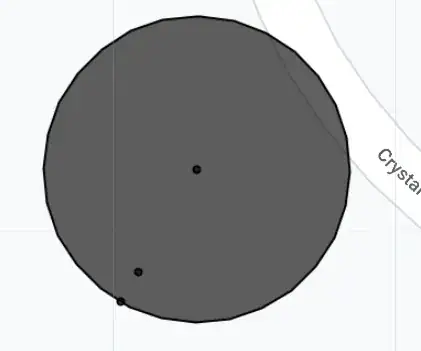
The circle around the original point was done by expanding the original point by a buffer of 8 meters, which by default works in a spherical coordinate system. You can see that one of the points (ptSph) lies in the perimeter of this circle, while the other one (ptEuc) is not.
The code below shows this example, as well as how to apply it to an arbitrary feature collection consisting of points, each with its own distance and bearing parameters.
https://code.earthengine.google.com/d85048c8f50397f0ba2ecdd9cd9d5c44
var randomPts = ee.FeatureCollection.randomPoints(geometry, 10)
randomPts = randomPts.randomColumn("distance").randomColumn("bearing").map(function(x){
  var distance = ee.Number(x.get("distance")).multiply(10) // from 0 to 10 m distance.
  var bearing = ee.Number(x.get("bearing")).multiply(360) // from 0 to 360 degrees.
  return x.set({distance:distance, bearing:bearing})
})
var randomPtsSph = randomPts.map(function(x){
  var pt = x.geometry()
  var d = x.get("distance")
  var b = x.get("bearing")
  var pt2 = ptFromBearing_spherical(pt,d,b)
  return ee.Feature(pt2, null)
})
var randomPtsEuc = randomPts.map(function(x){
  var pt = x.geometry()
  var d = x.get("distance")
  var b = x.get("bearing")
  var pt2 = ptFromBearing_euclidean(pt, d, brng, proj, maxError)
  return ee.Feature(pt2, null)
})


turf.destinationmethod for that, – TomazicM Oct 23 '23 at 08:42