Let's assume there is a polyline layer called 'lines' (five features) with its attribute tables, see the image below.

For this task only features' geometries are required, which is why each of them was converted into a list of QgsPointXYs:
# a list with lists of input points of the QgsPointXY type
input_points = [
    [QgsPointXY(6362950.825627493, 6156755.118187523), QgsPointXY(6362971.421678871, 6156750.437266757)],
    [QgsPointXY(6363045.146180965, 6156706.124550152), QgsPointXY(6363084.699961453, 6156712.677839229)],
    [QgsPointXY(6362883.8446895275, 6156753.833895289), QgsPointXY(6362882.908505374, 6156673.634119468), QgsPointXY(6362931.902142744, 6156704.528196536), QgsPointXY(6362926.909160591, 6156647.733024552)],
    [QgsPointXY(6362977.463104884, 6156702.343766843), QgsPointXY(6363009.605427489, 6156635.250569173), QgsPointXY(6363149.4089277545, 6156687.364820387)],
    [QgsPointXY(6363014.910471025, 6156803.763716814), QgsPointXY(6363017.406962101, 6156772.245516976), QgsPointXY(6363052.981959937, 6156772.245516976), QgsPointXY(6363042.371872864, 6156736.358457757)]
    ]
Further, it is shown as input_points = [...].
A list with QgsPointXYs can be easily converted back to a QgsGeometry using the fromPolylineXY() method of the QgsGeometry class.
The CRS of this data set is the EPSG:5348.
Perhaps you will find one of these solutions for smoothing corners in polylines suitable for you. All the output are of the LineString geometry type.
 Please, keep in mind, that:
- geometrical dependencies and logical inconsistencies were not handled yet, especially in solutions 1 and 2
- the try/except statements were not used
- technical issues were not exercised
- algorithms were not analysed to increase their performance
- improvements and suggestions to this answer are highly welcomed!
Solution 1 : Technique of circles with a specified radius
Proceed with Plugins > Python Console > Show Editor and paste the script below:
# imports
from math import sin, pi
from PyQt5.QtCore import QVariant
from qgis.core import (QgsGeometry, QgsPoint, QgsPointXY, QgsTriangle, QgsLineString, QgsCircularString,\
                       QgsCompoundCurve, QgsFeature, QgsField, QgsVectorLayer, QgsProject, QgsGeometryUtils)
a list with lists of input points of the QgsPointXY type
input_points = [...]
def proper_angle(angle: float) -> float:
    """
    Returns angles only in the range [0, 180] degrees.
    For angles bigger than 180 degrees, gives a value
    of the complementary angle to 360 degrees.
    Parameters:
    ==========
    :param angle: the input angle in radians
    Returns:
    ==========
    :return: angle in radians between 0 and pi
    """
return angle if 0 <= angle <= pi else 2 * pi - angle


def smooth_line_corners(points: list, radius: float) -> QgsLineString:
    """
    It smooths polyline corners using the technique of circles
    with a specified radius placed on the angle bisectors.
    Parameters:
    ==========
    :param points: a list with ordered points for each feature
    :param radius: a radius of a circle applied for smoothing
    Returns:
    ==========
    :return: smoothed feature's geometry of the QgsLineString type
    """
# making lists consisting of three points, starting from the first point and so on
trinities = list(zip(points, points[1:], points[2:]))
# finding angles between three points
angles = [proper_angle(
    QgsGeometryUtils.angleBetweenThreePoints(
        trinity[0].x(), trinity[0].y(),
        trinity[1].x(), trinity[1].y(),
        trinity[2].x(), trinity[2].y()
    )) for trinity in trinities
]
# creating triangles from previous lists
triangles = [QgsTriangle(trinity[0], trinity[1], trinity[2]) for trinity in trinities]
# getting circle centers inscribed into previously created triangles
incenters = [QgsPointXY(triangle.inscribedCircle().center()) for triangle in triangles]
# calculating distances to new circle centers using the provided radius
distances = [radius / sin(angle / 2) for angle in angles]
# finding coordinates of new circle centers that lie on the angles' bisectors
circle_centers = [
    QgsPointXY(QgsGeometryUtils.pointOnLineWithDistance(QgsPoint(values[0]), QgsPoint(values[1]), values[2]))
    for values in list(zip(points[1:-1], incenters, distances))
]
# creating groups consisting of triangles' circle centers and their three vertices
temp1 = {circle: trinities[indx] for indx, circle in enumerate(circle_centers)}

# creating the closest points to the circle centers on two triangles' sides
temp2 = []
for center, vertices in temp1.items():
    poi1 = QgsGeometryUtils.projectPointOnSegment(QgsPoint(center), QgsPoint(vertices[0]), QgsPoint(vertices[1]))
    poi2 = QgsGeometryUtils.projectPointOnSegment(QgsPoint(center), QgsPoint(vertices[1]), QgsPoint(vertices[2]))
    temp2.append(poi1)
    temp2.append(poi2)

# getting only inner points, without the first and the last
temp3 = temp2[1:-1]

# finding out how many sets to consider for calculations
s_num = len(temp3) // 2

# defining how many initial points to consider for calculations, and also skipping the first one
temp4 = points[1:s_num + 1]

# creating groups for comparison distances
pois_on_segment = [temp3[indx:indx + 2] for indx in range(0, len(temp3) - 1, 2)]
temp5 = {poi: pois_on_segment[indx] for indx, poi in enumerate(temp4)}

# comparing distances from the triangle's vertex to two projected points on the same triangle's side
for vertex, proj_pois in temp5.items():
    if (QgsGeometryUtils.sqrDistance2D(QgsPoint(vertex), proj_pois[0]) >
            QgsGeometryUtils.sqrDistance2D(QgsPoint(vertex), proj_pois[1])):
        mid_point = QgsGeometryUtils.midpoint(proj_pois[0], proj_pois[1])
        temp5[vertex] = [mid_point] * len(proj_pois)
        # the approach with a reversed list does not work properly
        # temp5[vertex] = list(reversed(proj_pois))

# flattening a dict to a list
temp6 = []
for k, v in temp5.items():
    temp6.append(k)
    temp6.extend(v)

# projecting first circle center on the first triangle's side
first_proj_poi = QgsGeometryUtils.projectPointOnSegment(QgsPoint(circle_centers[0]), QgsPoint(points[0]),
                                                        QgsPoint(points[1]))
temp6.insert(0, first_proj_poi)

# extending the list with the original pre-last vertex
temp6.extend([QgsPoint(points[-2])])

# projecting last circle center on the last triangle's side
last_proj_poi = QgsGeometryUtils.projectPointOnSegment(QgsPoint(circle_centers[-1]), QgsPoint(points[-1]),
                                                       QgsPoint(points[-2]))
temp6.extend([last_proj_poi])

# replacing the triangle's vertices inside the list with circle centers
points_to_replace = [i + 1 for i in range(0, len(temp6), 3)]
for i, point in enumerate(points_to_replace):
    temp6[point] = QgsPoint(circle_centers[i])

# preparing sets of three points e.g. (projected point on one side, circle center, projected point on another side)
pois_chunks = list(zip(*[iter(temp6)] * 3))

# creating circular strings from the sets of three points with a single arc representing the curve
# from the projected point on one side to projected point on another side with the circle center.
temp7 = []
for chunk in pois_chunks:
    circ_string = QgsCircularString.fromTwoPointsAndCenter(chunk[0], chunk[2], chunk[1], useShortestArc=True)
    temp7.append(circ_string)

# converting each arc to a LineString
temp7 = list(map(lambda curve: curve.curveToLine(), temp7))

# setting up a handler for the output geometry
compound_curve = QgsCompoundCurve()
# adding the first original point
compound_curve.addVertex(QgsPoint(points[0]))
# adding curves with extension of each previous one
for curve in temp7:
    compound_curve.addCurve(curve, extendPrevious=True)
# adding the last original point
compound_curve.addVertex(QgsPoint(points[-1]))

return compound_curve.curveToLine()


creating a polyline layer for the output
output_layer = QgsVectorLayer("LineString?crs={EPSG:5348}&index=yes", "solution1", "memory")
provider = output_layer.dataProvider()
provider.addAttributes([QgsField("id", QVariant.Int)])
output_layer.updateFields()
output_layer.startEditing()
looping over each element in the list
for i, points in enumerate(input_points):
# creating a feature with fields
feat = QgsFeature(output_layer.fields())

# setting new id attribute
feat.setAttribute("id", i + 1)

# providing geometry for feature
if len(points) == 2:  # if a straight line
    points = list(map(lambda point: QgsPoint(point), points))
    geom = QgsGeometry.fromPolyline(points)
else: # if a line consists of three and more vertices
    geom = smooth_line_corners(points, 10)
feat.setGeometry(geom)

# adding a feature
output_layer.addFeature(feat)


output_layer.endEditCommand()
output_layer.commitChanges()
adding output layer to the canvas
QgsProject.instance().addMapLayer(output_layer)
Change the input radius in this line smooth_line_corners(points, 10), press Run script  and get the output that will look like this:

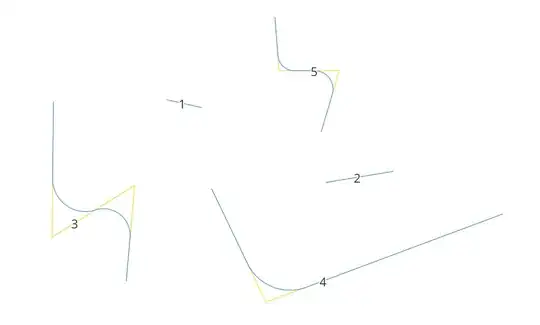
For example, there is a polyline with five points (A, B, C, D, E), see the image below. The resulting smoothed line (pinkish) is simply a polyline composed of (I) straight segments (connections either between the first/last point and projected circle centers or only between projected circle centers on two sides of the triangular, that are segments of the original polyline) and (II) curved lines (arcs created of circle centers and its projections on two sides of the triangular).

This approach also takes into account cases when the projected circle center of the next circle lies closer to the original vertex than the projected circle center of the previous circle. In such circumstances, the implication of a middle point between those two projected points will be considered, see the result below (most left polyline has such a condition).

Proceed with Plugins > Python Console > Show Editor and paste the script below:
# imports
from PyQt5.QtCore import QVariant
from qgis.core import (QgsGeometry, QgsPoint, QgsPointXY, QgsTriangle, QgsLineString, QgsCircularString,\
                       QgsCompoundCurve, QgsFeature, QgsField, QgsVectorLayer, QgsProject, QgsGeometryUtils)
a list with lists of input points of the QgsPointXY type
input_points = [...]
def smooth_line_corners(points: list) -> QgsLineString:
    """
    It smooths polyline corners using the technique of inscribed circles.
    Parameters:
    ==========
    :param points: a list with ordered points for each feature
    Returns:
    ==========
    :return: smoothed feature's geometry of the QgsLineString type
    """
# making lists consisting of three points, starting from the first point and so on
trinities = list(zip(points, points[1:], points[2:]))
# creating triangles from previous lists
triangles = [QgsTriangle(trinity[0], trinity[1], trinity[2]) for trinity in trinities]
# getting circle centers inscribed into previously created triangles
circle_centers = [QgsPointXY(triangle.inscribedCircle().center()) for triangle in triangles]

# creating groups consisting of triangles' inscribed circle centers and their three vertices
temp1 = {circle: trinities[indx] for indx, circle in enumerate(circle_centers)}

# creating the closest points to the circle centers on two triangles' sides
temp2 = []
for center, vertices in temp1.items():
    poi1 = QgsGeometryUtils.projectPointOnSegment(QgsPoint(center), QgsPoint(vertices[0]), QgsPoint(vertices[1]))
    poi2 = QgsGeometryUtils.projectPointOnSegment(QgsPoint(center), QgsPoint(vertices[1]), QgsPoint(vertices[2]))
    temp2.append(poi1)
    temp2.append(poi2)

# getting only inner points, without the first and the last
temp3 = temp2[1:-1]

# finding out how many sets to consider for calculations
s_num = len(temp3) // 2

# defining how many initial points to consider for calculations, and also skipping the first one
temp4 = points[1:s_num + 1]

# creating groups for comparison distances
pois_on_segment = [temp3[indx:indx + 2] for indx in range(0, len(temp3) - 1, 2)]
temp5 = {poi: pois_on_segment[indx] for indx, poi in enumerate(temp4)}

# comparing distances from the triangle's vertex to two projected points on the same triangle's side
for vertex, proj_pois in temp5.items():
    if (QgsGeometryUtils.sqrDistance2D(QgsPoint(vertex), proj_pois[0]) >
            QgsGeometryUtils.sqrDistance2D(QgsPoint(vertex), proj_pois[1])):
        mid_point = QgsGeometryUtils.midpoint(proj_pois[0], proj_pois[1])
        temp5[vertex] = [mid_point] * len(proj_pois)
        # the approach with a reversed list does not work properly
        # temp5[vertex] = list(reversed(proj_pois))

# flattening a dict to a list
temp6 = []
for k, v in temp5.items():
    temp6.append(k)
    temp6.extend(v)

# projecting first circle center on the first triangle's side
first_proj_poi = QgsGeometryUtils.projectPointOnSegment(QgsPoint(circle_centers[0]), QgsPoint(points[0]),
                                                        QgsPoint(points[1]))
temp6.insert(0, first_proj_poi)

# extending the list with the original pre-last vertex
temp6.extend([QgsPoint(points[-2])])

# projecting last circle center on the last triangle's side
last_proj_poi = QgsGeometryUtils.projectPointOnSegment(QgsPoint(circle_centers[-1]), QgsPoint(points[-1]),
                                                       QgsPoint(points[-2]))
temp6.extend([last_proj_poi])

# replacing the triangle's vertices inside the list with circle centers
points_to_replace = [i + 1 for i in range(0, len(temp6), 3)]
for i, point in enumerate(points_to_replace):
    temp6[point] = QgsPoint(circle_centers[i])

# preparing sets of three points e.g. (projected point on one side, circle center, projected point on another side)
pois_chunks = list(zip(*[iter(temp6)] * 3))

# creating circular strings from the sets of three points with a single arc representing the curve
# from the projected point on one side to projected point on another side with the circle center.
temp7 = []
for chunk in pois_chunks:
    circ_string = QgsCircularString.fromTwoPointsAndCenter(chunk[0], chunk[2], chunk[1], useShortestArc=True)
    temp7.append(circ_string)

# converting each arc to a LineString
temp7 = list(map(lambda curve: curve.curveToLine(), temp7))

# setting up a handler for the output geometry
compound_curve = QgsCompoundCurve()
# adding the first original point
compound_curve.addVertex(QgsPoint(points[0]))
# adding curves with extension of each previous one
for curve in temp7:
    compound_curve.addCurve(curve, extendPrevious=True)
# adding the last original point
compound_curve.addVertex(QgsPoint(points[-1]))

return compound_curve.curveToLine()


creating a polyline layer for the output
output_layer = QgsVectorLayer("LineString?crs={EPSG:5348}&index=yes", "solution2", "memory")
provider = output_layer.dataProvider()
provider.addAttributes([QgsField("id", QVariant.Int)])
output_layer.updateFields()
output_layer.startEditing()
looping over each element in the list
for i, points in enumerate(input_points):
# creating a feature with fields
feat = QgsFeature(output_layer.fields())

# setting new id attribute
feat.setAttribute("id", i + 1)

# providing geometry for feature
if len(points) == 2:  # if a straight line
    points = list(map(lambda point: QgsPoint(point), points))
    geom = QgsGeometry.fromPolyline(points)
else: # if a line consists of three and more vertices
    geom = smooth_line_corners(points)
feat.setGeometry(geom)

# adding a feature
output_layer.addFeature(feat)


output_layer.endEditCommand()
output_layer.commitChanges()
adding output layer to the canvas
QgsProject.instance().addMapLayer(output_layer)
Press Run script and get the output that will look like this:
Solution 3 : Chaikin's Algorithm
It is implemented via the smooth() method of the QgsGeometry class.
It is based on Chaikin's Algorithm for Curves. The parameters of this function can be adjusted, e.g. iterations=5.
Proceed with Plugins > Python Console > Show Editor and paste the script below:
# imports
from PyQt5.QtCore import QVariant
from qgis.core import QgsProject, QgsFeature, QgsPointXY, QgsLineString, QgsGeometry, QgsField, QgsVectorLayer
a list with lists of input points of the QgsPointXY type
input_points = [...]
def smooth_line_corners(points: list) -> QgsLineString:
    """
    It smooths polyline corners using Chaikin's Algorithm.
    Parameters:
    ==========
    :param points: a list with ordered points for each feature
    Returns:
    ==========
    :return: smoothed feature's geometry of the QgsLineString type
    """
    # creating feature geometry
    geom = QgsGeometry.fromPolylineXY(points)
    # applying the smooth function
    geom_ = geom.smooth(iterations=5, offset=0.25, minimumDistance=-1, maxAngle=180.0)
return geom_.mergeLines()


creating a polyline layer for the output
output_layer = QgsVectorLayer("LineString?crs={EPSG:5348}&index=yes", "solution3", "memory")
provider = output_layer.dataProvider()
provider.addAttributes([QgsField("id", QVariant.Int)])
output_layer.updateFields()
output_layer.startEditing()
looping over each element in the list
for i, points in enumerate(input_points):
    # creating a feature with fields
    feat = QgsFeature(output_layer.fields())
# setting new id attribute
feat.setAttribute("id", i + 1)

# providing geometry for feature
geom = smooth_line_corners(points)
feat.setGeometry(geom)

# adding a feature
output_layer.addFeature(feat)


output_layer.endEditCommand()
output_layer.commitChanges()
adding output layer to the canvas
QgsProject.instance().addMapLayer(output_layer)
Press Run script and get the output that will look like this:

See this article for more details: https://observablehq.com/@pamacha/chaikins-algorithm
Solution 4 : Technique of a quadratic Bézier curve
It is implemented via the fromBezierCurve() method of the QgsLineString class.
Note that in this solution controlPoint1 is equal to controlPoint2, and parameter segments=30.
Proceed with Plugins > Python Console > Show Editor and paste the script below:
# imports
from PyQt5.QtCore import QVariant
from qgis.core import (QgsProject, QgsFeature, QgsPoint, QgsPointXY, QgsLineString, QgsGeometry, QgsField,
                       QgsGeometryUtils, QgsCompoundCurve, QgsVectorLayer)
a list with lists of input points of the QgsPointXY type
input_points = [...]
def smooth_line_corners(points: list) -> QgsLineString:
    """
    It smooths polyline corners using a quadratic Bézier curve.
    Parameters:
    ==========
    :param points: a list with ordered points for each feature
    Returns:
    ==========
    :return: smoothed feature's geometry of the QgsLineString type
    """
    # getting only inner points, without the first and the last
    temp1 = points[1:-1]
    # converting each element to QgsPoint type
    temp2 = list(map(lambda point: QgsPoint(point), temp1))
# finding midpoints within inner segments
mid_points = [QgsGeometryUtils.midpoint(pts[0], pts[1]) for pts in zip(temp2[:], temp2[1:])]

# inserting midpoint to odd indexed in the temp2
for indx in range(len(mid_points)):
    temp2.insert(2 * indx + 1, mid_points[indx])

# adding original first vertex
temp2.insert(0, QgsPoint(points[0]))
# extending the list with the original last vertex
temp2.extend([QgsPoint(points[-1])])

# making lists consisting of three points, starting from the first point and so on
trinities = list(zip(temp2[::2], temp2[1::2], temp2[2::2]))

# creating feature geometry
geoms = [QgsGeometry(
    QgsLineString.fromBezierCurve(point[0], point[1], point[1], point[2], segments=30)) for
    point in trinities]
# collecting geometries
geom = QgsGeometry().collectGeometry(geoms)

return geom.mergeLines()


creating a polyline layer for the output
output_layer = QgsVectorLayer("LineString?crs={EPSG:5348}&index=yes", "solution4", "memory")
provider = output_layer.dataProvider()
provider.addAttributes([QgsField("id", QVariant.Int)])
output_layer.updateFields()
output_layer.startEditing()
looping over each element in the list
for i, points in enumerate(input_points):
# creating a feature with fields
feat = QgsFeature(output_layer.fields())

# setting id attribute
feat.setAttribute("id", i + 1)

# providing geometry for a feature
if len(points) == 2:  # if a straight line
    points = list(map(lambda point: QgsPoint(point), points))
    geom = QgsGeometry.fromPolyline(points)
else: # if a line consists of three and more vertices
    geom = smooth_line_corners(points)
feat.setGeometry(geom)

# adding a feature
output_layer.addFeature(feat)


output_layer.endEditCommand()
output_layer.commitChanges()
adding output layer to the canvas
QgsProject.instance().addMapLayer(output_layer)
Press Run script and get the output that will look like this:

References:


border-radiusworks – Alexander Petrushyn Jul 19 '23 at 09:33CompoundCurvegeometry after smoothing should solve the problem. – Comrade Che Jul 19 '23 at 12:11