Thin can easily be done using QGIS expressions. To get a layer with actual geometries, use Menu Processing / Toolbox / Geomtry by expression (see here for details) and an expression like this (see first screenshot):
make_triangle(
    make_point ( "attr_x" ,  "attr_y" ),
    make_point ( "attr_x"+2,  "attr_y" ),
    make_point ( "attr_x"+2 ,  "attr_y" +2)
)
By the way: If you create the fields attr_x and attr_y as virtual fields with the expression $x and $y respectively, whenever you set a point, it's attributes will get updated to the current x-/y-coordinates.
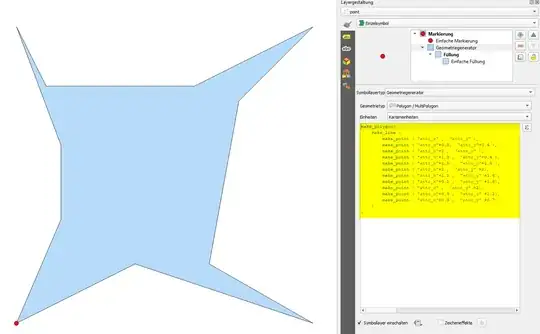
To get any kind of polygon, use an expression like this (see second screenshot):
make_polygon(
    make_line (
        make_point ( "attr_x" ,  "attr_y" ),
        make_point ( "attr_x"+0.8,  "attr_y"+0.4 ),
        make_point ( "attr_x"+2 ,  "attr_y" ),
        make_point ( "attr_x"+1.3 ,  "attr_y"+0.4 ),
        make_point ( "attr_x"+1.5 ,  "attr_y"+1.5 ),
        make_point ( "attr_x"+2 ,  "attr_y" +2),
        make_point ( "attr_x"+1.2 ,  "attr_y" +1.6),
        make_point ( "attr_x"+0.2 ,  "attr_y" +1.6),
        make_point ( "attr_x" ,  "attr_y" +2),
        make_point ( "attr_x"+0.3 ,  "attr_y" +1.2),
        make_point ( "attr_x"+0.3 ,  "attr_y" +0.7)
    )
)
The blue triangle is created based on the red point's attributes attr_x and attr_y using the expression from above (here with Geometry generator, for demonstration purpose):

Screenshot 2: creating any kind of polygon, defined by a ring of vertices: