Short answer
Right now (Nov. 2021), get version 3.22 for long support until Feb. 2023. QGIS 3.16 will not be supported after Feb. 2022.
Numbering of versions
Regular releases are numbered with even version numbers: 3.16, 3.18, 3.20, 3.22. Odd-numbered versions (3.17, 3.19, 3.21, 3.23) refer to development versions that are used for testing purpose, not for productive usage.
Release pattern for QGIS versions
There are always two different main QGIS versions currently supported: LTR (long term release, for stability) and regular realease (newest version with most features). Every four months (three times a year: February, June and October), a new main version is released - additionally, a point release for bug fixes, enhancing the two currently active versions, is released once a month: 3.22.0, 3.22.1, 3.22.2, 3.22.3 etc.
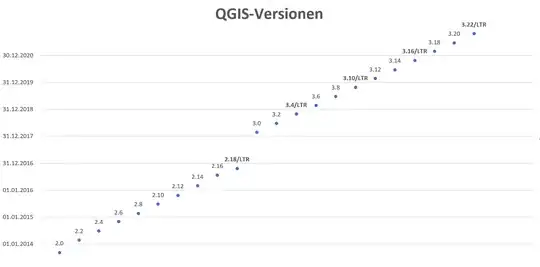
Every 3rd main version (3.4, 3.10, 3.16, 3.22 ...) starts as a regular release, but turns to a LTR after four months when the next regular version is released. So for the first four months of its lifecycle, future LTRs are just "normal" releases and only then they finally become a LTR.
Current situation (Nov. 2022)
Right now (Nov. 2021), QGIS 3.16 is LTR and 3.22 (released Oct 21) is current (newest) version. With release of 3.24 in Feb. 2022, 3.22 will replace 3.16 as LTR. 3.22 will be LTR for 12 months (Feb 2022 to Feb 2023). During this time, the regular versions will be QGIS 3.24 (to be released Feb 2022), QGIS 3.26 (to be released June 2022), and QGIS 3.28 (to be released Oct 2022). In Feb. 2023, QGIS 3.28 turns to be new LTR and 3.22 is depreciated as LTR and will no longer be supported.
Support period
So currently no QGIS version is supported for more then 4 months + one year (= 16 months) and this only in case of LTRs (first four months as regular release, then LTR). However, after this lifecycle, such a version should be stable enough to be used for some time and you could rely on that, even if it is not supported any more.
However, consider the comment by @IanTurton:
just installing the first LTR is not sufficient, you have to install
the updates too.
See e.g. the current message in the QGIS News feed in the start window:

Option to extend support
An alternative would be hiring one of the QGIS developpers to get longer support for a release. This, however, must be dealt directly with one of the developpers (not affiliated): see commercial support on the QGIS website.
QGIS versions and release pattern since version 2.0 (Sept. 2013). Apart from 2017, when the major jump from QGIS 2.x to QGIS 3.x was prepared, in the last years there were three new versions every year, each with substantial new features and functions: