17

I have lots of lines (in one feature class) which share the same location but I want to represent them as lines that are next to each other because they have different properties (different OWNERS).

So, my first try was transforming them in "Cartographic Line Symbol' -> 'Line Properties' set my offset different for each one. Which is fine except:

enter image description here

As you can see when I choose to represent the lines according to their owner (color= owner). The offset works great, but I need all the lines to be connected and sink in a junction. Something like this:
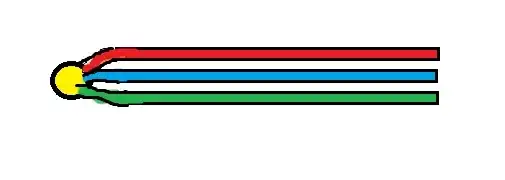
enter image description here

So I tought the solution is to create a representation, but not sure how to use a text field (OWNERS) in order to create those parallel lines (the equivalent of Symbology->Categories-> Unique Values-> Value field: OWNER). I know I should use the offset geometric effect. but I'm not sure if this is the solution and how should I do that.

I am using ArcGIS Desktop 10.1.

PolyGeo
  • 65,136
  • 29
  • 109
  • 338
Ligia
  • 1,476
  • 6
  • 28
  • 46
  • 5
  • That broken line is most likely due to it being digitized in the wrong direction. – blah238 Oct 29 '12 at 12:06
  • 1
    Further to Blah238's comment, shouldn't that broken line be a single line in the first place? At least if you're only using it for cartography I'd suggest joining the segments together. That might help obviate this problem. – GIS-Jonathan Oct 29 '12 at 17:12
  • Right, that too... :) – blah238 Oct 29 '12 at 17:33
  • I didn't digitized the lines, I've just received a large amount of data which I have to represent, and as you've noticed it has a lot of problems. – Ligia Oct 30 '12 at 06:36
  • @polygeo I don't really think this is a duplicate of the other question. Related, definitely, but this question seems to be much more specific on solving a problem (make sure the line goes through the node) while using one particular method (cartographic representations), whereas the linked question is more generally how to represent overlapping lines using any method. – Chris W Dec 11 '14 at 19:12

1 Answers1

3

Are we overcomplicating the problem? Is it simply that you want, cartographically, the lines to pass through each junction not around the junction?

With that interpretation in mind, perhaps simply make the juntion points larger?

If you want to actually join them in the database, buffer the junction points to sufficiently large circles and interset.

AnserGIS
  • 1,068
  • 7
  • 19