Assuming your polygons are quite simple, you could do it all in one step in Virtual Layer by combining @Gabriel De Luca's multipart-to-singlepart query here and this neat shortcut for rebuilding polygons from points here.
Replace pts_z with your points layer name and poly with your polygon layer name.
WITH RECURSIVE parts AS (
  SELECT t.id, t.total, 1 AS part
  FROM totals AS t
  UNION ALL
  SELECT t.id, t.total, part + 1 AS part
  FROM totals AS t
  INNER JOIN parts AS p ON t.id = p.id AND p.part < t.total
  ),

totals AS (
  SELECT id, num_points(geometry) AS total
  FROM multipoints
  ),

multipoints AS (
  SELECT id, nodes_to_points(geometry) AS geometry
  FROM poly
  ),

polypoints AS (
  SELECT p.id, p.part, geometry_n(m.geometry,p.part) AS geometry
  FROM parts AS p
  INNER JOIN multipoints AS m ON p.id = m.id
),

polypoints_z AS (
  SELECT pp.id, pp.part, st_translate(pp.geometry,0,0,st_z(pz.geometry)) AS geometry, st_z(pz.geometry) AS zval
  FROM polypoints AS pp
  INNER JOIN pts_z AS pz ON intersects(pp.geometry,pz.geometry)
  ORDER BY id, part
)

SELECT id, st_convexhull(st_collect(geometry)) AS geometry
FROM polypoints_z
GROUP BY id
Step 1 (multipoints): Extract the nodes from the polygon features along with the original polygon id
Step 2 (totals and recursive function parts): Figure out how many nodes each polygon has and generate a series of numbers accordingly per polygon (5 nodes = 1, 2, 3, 4, 5; 3 nodes = 1, 2, 3...)
Step 3 (polypoints): Convert multipoints to single points by iterating over each geometry part using step 2
Step 4 (polypoints_z): Then as @snaileater suggested you perform a spatial join on polypoints and your points layer, joining the points' z value and adding it to the polygon nodes using ST_Translate()
Step 5: Finally, use ST_Collect() to regroup all the points in polypoints_z by the original polygon id, resulting in a multipoint geometry, and use ST_ConvexHull() to create the polygon by 'shrink-wrapping' around that geometry.
Step 5 won't work properly if you have more complex polygons - where you have a point sticking inwards, for example.
I'm sure there is a way to rebuild the polygon using id and part, rather than Convex Hull, but I can't get Make_Line() to work on multipointZs in QGIS Virtual Layer...
Example:
Polygons with id 1 and 2 and point layer with z values shown.

Result from Virtual Layer query - does not recreate polygon accurately for id 2 due to more complex geometry.
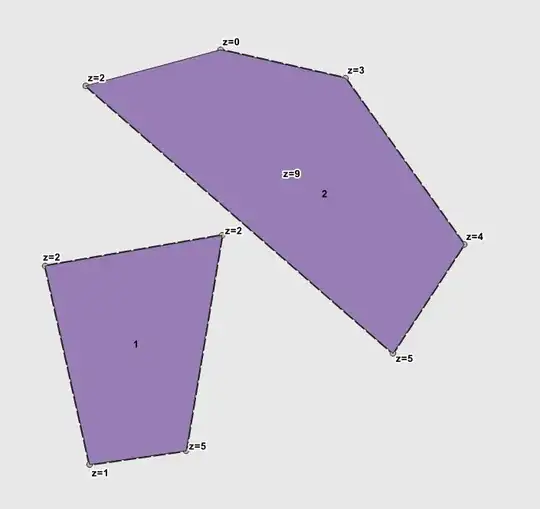
However Z-values have been transferred across to polygon vertices if you inspect the geometry (here in DB Manager).


