settings->project settings: here enable "on the fly CRS Transformation" and now you choose wgs84 (epsg 4326).
now import your shapefile.
in the left pane rightclick on your shapefile-layer and click save as in the context-menu: choose for format: kml and for CRS you select: Project CRS.
Now you should be able to load this kml-file into google maps and google earth.
good luck, hope this helps!
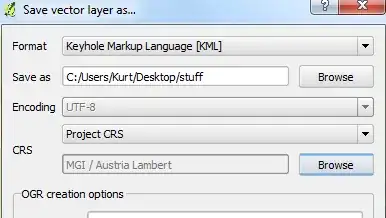
edit: oops your are using database-layer, nevertheless it should work the same way ..
edit2: if you are using windows you could use ogr2gui too (see my answer in this thread Converting projection?, you just have to select the correct database source)


